
Who ordered it, who approved it and where is it?
You see that on every site request. From the entry on the phone to the invoice checked against the order, without scrolling back through WhatsApp.
Bidmio runs purchasing for a site as one chain: the request from the site, purchasing taking it over, an issue from stock, a tool transfer or a purchase order, approval by amount, the delivery confirmed on site and the supplier invoice linked to the order. Every step leaves a record of who did it and when.
Material ordered over WhatsApp is hard to trace
A message to the group is quick to write. Three weeks later nobody knows who dealt with it, who approved the purchase or whether everything arrived. The same four situations, once in a chat and once in Bidmio.
Over WhatsApp
The material request gets buried between photos and voice messages from the site.
In Bidmio
The request is a record with a status and a history. Purchasing is notified about it.
Over WhatsApp
Nobody can tell whether someone is on it, or whether two people ordered it at once.
In Bidmio
You can see who in purchasing took the request over and what they decided for each line.
Over WhatsApp
Approval is a thumbs-up under a message.
In Bidmio
A named person approves the order by its amount, and never the person who created it.
Over WhatsApp
The delivery note stays in the van and the invoice is checked from memory.
In Bidmio
The delivery has a record from the site with photos and a signature, and the invoice is linked to the order.
Six steps from the request to the invoice
Each step says whether it happens on the phone at the site or in the office.
- 1
On the phone at the site
Request from the site
The site manager enters the request on the phone, right at the site: line by line, which material or tool is needed. Purchasing is notified and the request appears in the list with its status.
- Requests for material and for tools
- Entered on the phone, nothing retyped from a chat
- Purchasing is notified as soon as it is sent
- 2
In the office
Purchasing takes it over
A buyer takes the request over, so from that moment it is clear who is dealing with it. The site manager is notified and sees the new status on the phone, without ringing the office.
- The request shows who took it over
- Statuses and history for every request
- Notifications both ways: to the site and to the office
- 3
In the office
Stock, tool transfer or purchase
For each line purchasing decides: issue it from stock, transfer a tool, or buy it. For a purchase, the buyer sends a price enquiry to several suppliers. Each supplier fills in prices through a link, without an account; the offers are compared side by side and against the budget, and the winning one becomes a draft purchase order.
- Stock by location; tools assigned to a person, a site or a store
- Enquiry through a link, the supplier needs no account
- Offers compared side by side and against the budget
- 4
In the office
Approval by amount
The purchase order has an automatic number, the supplier, the site and the expected delivery date, and you can attach files to it. It goes for approval according to its amount: each amount band has a person or a role that approves it. Whoever created the order never approves it.
- An approver for each amount band
- A delegate while the approver is away
- Reminders for approvals that are waiting
- 5
On the phone at the site
Delivery confirmed on site
Whoever takes the goods in records the delivery on the phone: picks the order, corrects the quantities to what actually arrived, adds photos and a signature and marks the delivery complete, partial or damaged. The record marks the order lines as received. When the delivery date is close or has passed, a notification is sent.
- Quantities, photos and the recipient's signature
- Partial deliveries per order line
- Notification for an approaching or missed delivery date
- 6
In the office
Invoice checked against the order
The supplier e-mails the invoice to your company's inbox address in Bidmio. The invoice data is read and a person confirms it before approval. The invoice is linked to the site and to the order, where you see how much has been invoiced and how much remains.
- Supplier invoices by e-mail to the company inbox
- A person always confirms the data that was read
- Invoiced and remaining amount on the order
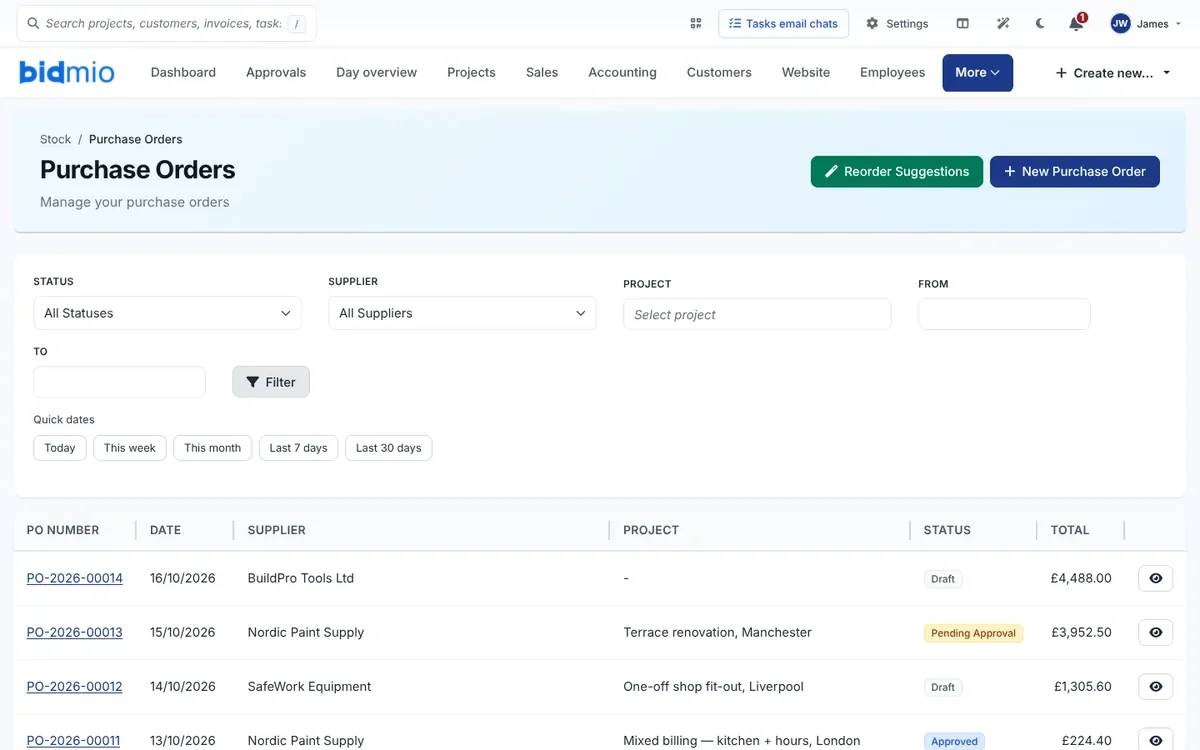
A screen from Bidmio with demo data.
Who does what
Five roles that meet around purchasing for a site, and what each of them does in Bidmio.
Managing director
Approves orders above the amount the company sets. On a request they see who entered it, who took it over and what its status is, and on an order who approved it. No phone calls needed to find out.
Head of pre-construction
Has the priced budget for the site, imported from Excel. When a supplier is chosen they see the offers side by side and against the budget and, depending on the setup, approve orders in the amount band you give them.
Purchasing
Takes over requests from the sites and decides for each line: stock, tool transfer or purchase. Sends enquiries, gets a draft order from the winning offer and is notified about delivery dates.
Site manager
Enters the request on the phone and sees its status. When the goods arrive, confirms the delivery with quantities, photos and a signature and marks it complete, partial or damaged.
Invoice control
Confirms the data read from the supplier invoice, links it to the site and to the order, and sees on the order how much has been invoiced and how much remains.
What you can trace at each step
Every step leaves a record. When someone asks a month later where a purchase got stuck, nobody has to search a chat for the answer.
- 1.Request
- Who entered it and when. The status history from entry to completion.
- 2.Takeover
- Who in purchasing took the request over and when.
- 3.Stock, transfer or purchase
- What was decided for each line. For a purchase: which suppliers got the enquiry, what they offered and which offer won.
- 4.Approval
- Who approved the order and when, also when a delegate approved.
- 5.Delivery
- What arrived and in what quantity, the photos, the recipient's signature, the state of the delivery, who recorded it and when.
- 6.Invoice
- Which order and site the invoice belongs to, how much of the order has been invoiced and who approved the invoice.
What this saves you
Work out how much time one purchase takes your firm today, from the site's request to the invoice.
The pre-filled numbers are only an example. Replace them with your own: how many times a month and how many minutes one task takes.
Ordering with the site and the supplier by phone or e-mail
Asking suppliers and comparing their offers
Checking a delivery against the order
Matching the supplier's invoice to the order
Result
- These tasks take you a month today
- 47.5 h
- At your rate that is a month
- €1 188
- Bidmio Professional for 45 people per month
- €965
Bidmio pays for itself once it saves 12 minutes per task on average.
We do not promise how many minutes Bidmio saves. The numbers are yours; we only set them against the price list.
First month 90% offQuestions about purchasing in Bidmio
Does Bidmio replace our estimating software?
No. You keep pricing the job in your estimating software. You import the priced budget into Bidmio from Excel and then compare supplier offers against it.
Do the workers need a smartphone?
Not for purchasing. The request is entered and the delivery confirmed by the site manager or whoever you give access to, and a phone with an internet connection is enough. Bidmio runs in the phone's browser and can be added to the home screen. Workers need a phone only if they log their own hours in Bidmio.
What about our accounting system?
Supplier invoices are checked, approved and assigned to sites in Bidmio. Your accountant can get their own access.
Does the supplier need a Bidmio account?
No. The supplier gets the enquiry by e-mail as a link, fills in prices there or declines. No account and nothing to install.
Can someone approve their own order?
No. Whoever created the order or sent it for approval does not approve it, not even as a delegate for an absent approver.
Does Bidmio order material by itself?
No. The winning offer becomes a draft purchase order that a person checks. Only an approved order goes to the supplier.
Does AI read the supplier invoices?
Yes, once your company allows it. What it reads is a suggestion that a person always confirms before approval. Without AI the invoice still arrives in the inbox and you fill in the data by hand.
Which plan is this in?
Stock and purchase orders are in Professional and above. The tool register, the budget with a bill of quantities and comparing offers against it are in Developer. Every paid plan starts with a discounted first month.
We will walk one request with you, from the site to the invoice
On a short call we show the whole chain on a demo site and tell you which plan covers which part.
Book a call