Software for general contractors from the BoQ to the monthly valuation
Bill of quantities, programme, subbies, site diary, variations and monthly valuations on the same job. The QS in the office and the site manager in the cabin look at one set of numbers. Below we follow one apartment block shell in Manchester, step by step.
How software for general contractors works: 10 steps of one job
Gareth is site manager at a Manchester building firm of about twenty people. A developer has let them the shell of a canal-side apartment block, priced from a bill of quantities, with a programme of roughly seven weeks. Their own gang does the groundworks and frame; electrics, roofing and coatings go to subcontractors. This is how he runs the job in Bidmio.
1
Tender · Bill of quantities
The bill of quantities becomes the job budget
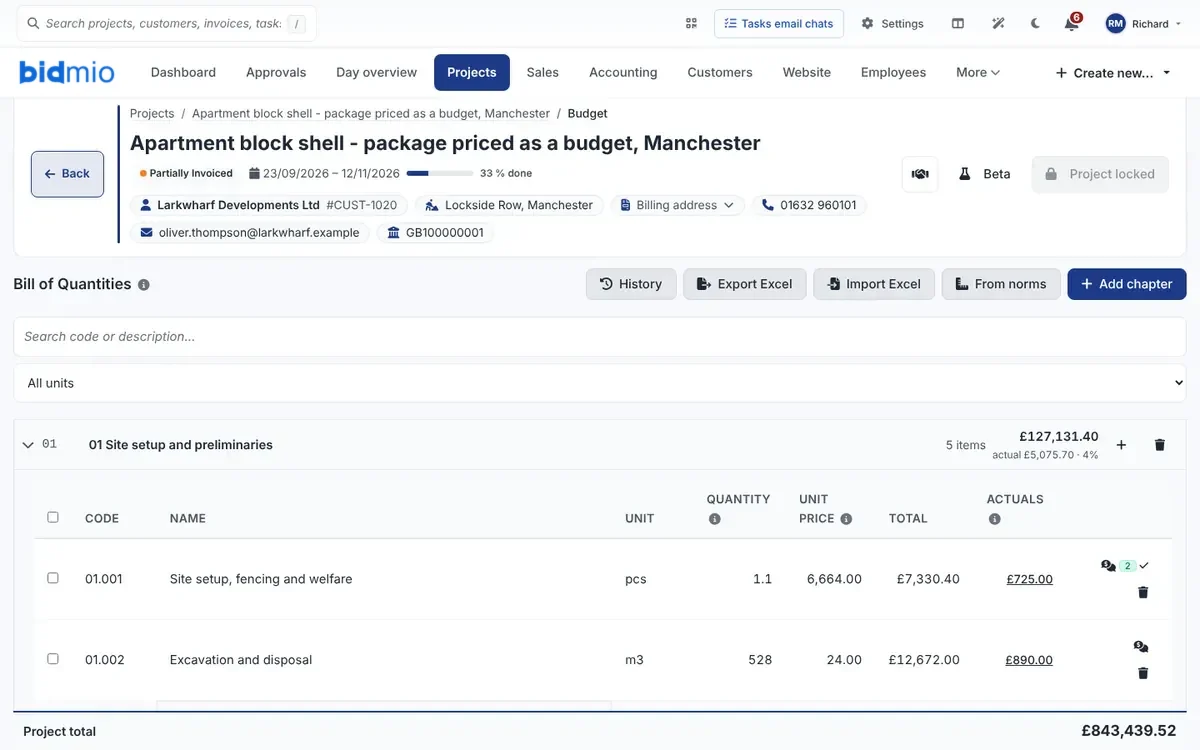
The QS imports the priced BoQ from Excel, or builds it from standard rates. Sections, quantities and rates sit in one list with a running total. As the job goes on, every line picks up its actual cost, so you can see how much of the brickwork allowance is already spent.
Import and export the BoQ in Excel
Section totals with the share already spent
A change history on every line
Developer
app.bidmio.com
A real Bidmio screen with demo data.
2
Contract signed · Milestones
Milestones that carry dates and payment status
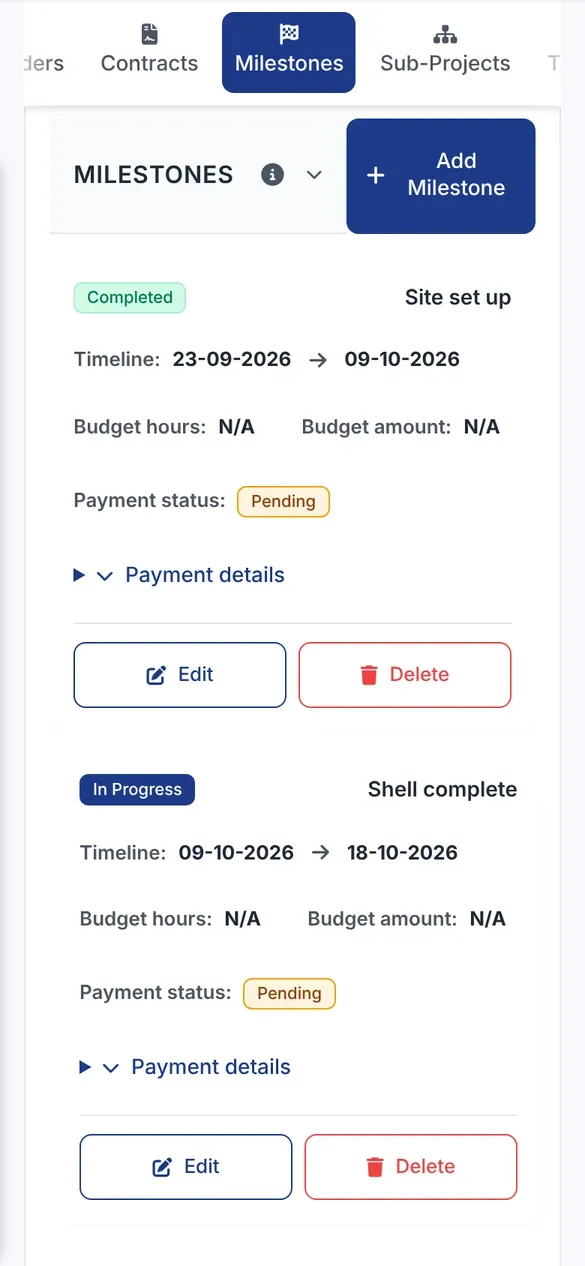
Gareth splits the contract into milestones: site set-up, shell complete, roof closed, fit-out complete. Each one has a start and finish date, and each one shows whether the money for it has come in.
Start and finish date for every milestone
Payment status next to each milestone
Contracts and documents kept with the job
SoloProfessionalDeveloper
A real Bidmio screen with demo data.
3
Week 1 · Programme
A programme with the critical path worked out
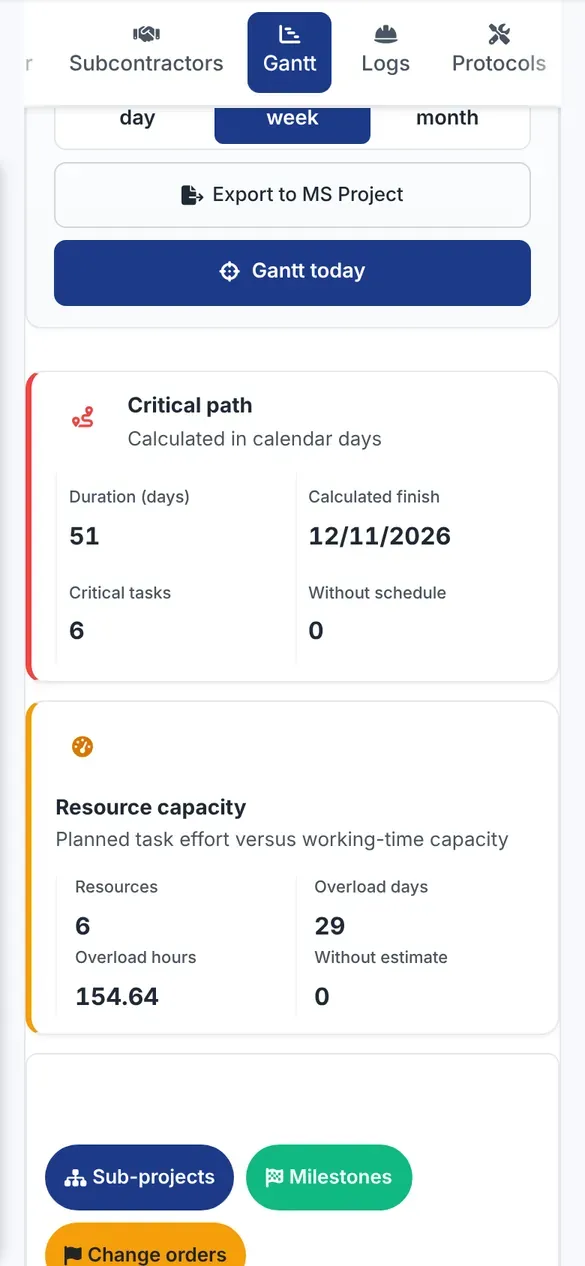
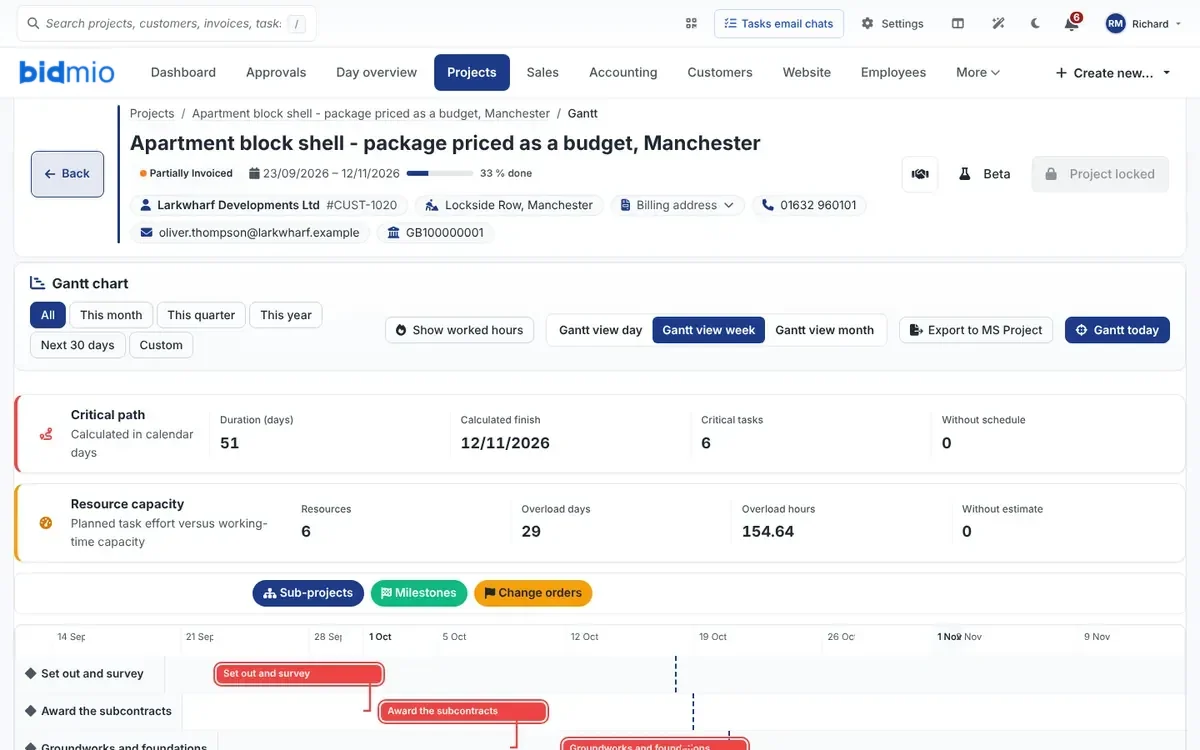
Tasks and milestones line up in a Gantt chart. Bidmio works out the critical path and the finish date, and flags the days when a gang is booked for more hours than it has. If the client's PM wants it in their own tool, the programme exports to MS Project.
Critical path and calculated finish date
Gang capacity and overloaded days
Export to MS Project
SoloProfessionalDeveloper
A real Bidmio screen with demo data.
4
Week 2 · Subcontractors
Subbies work on the same job, not on a WhatsApp thread
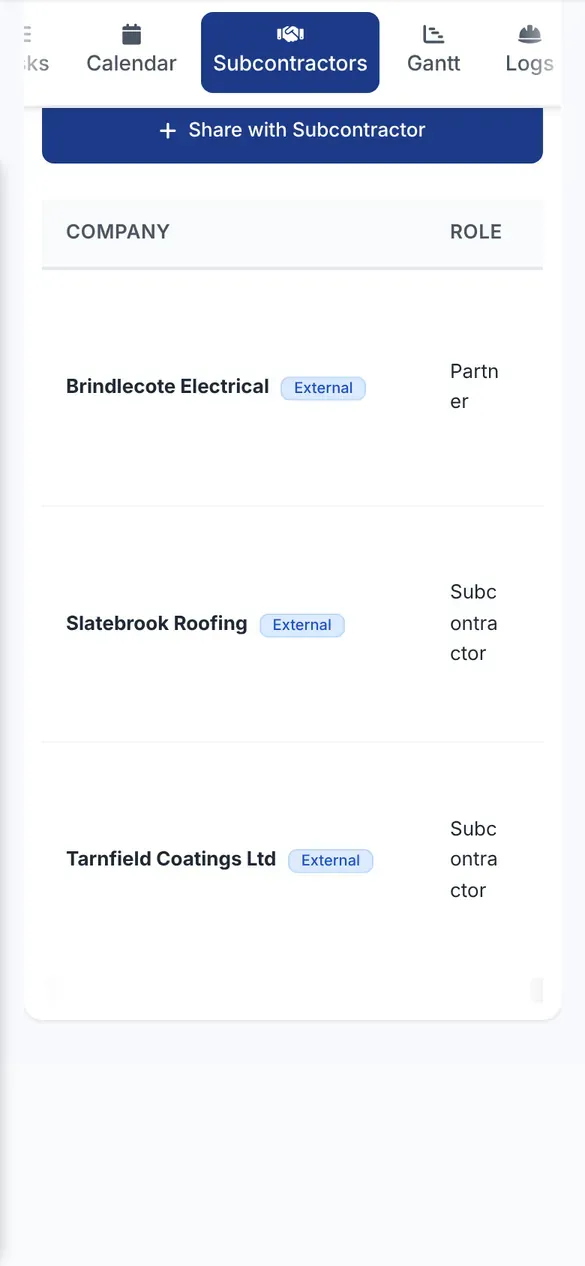
The electrician, the roofer and the coatings firm get an e-mail invitation to the job. They see what they need for their package, and Gareth can see who is active on site and who has not accepted yet.
Invite a subcontractor by e-mail
Role and status of every firm on the job
Subcontractor quotes against BoQ lines on Developer
SoloProfessionalDeveloper
A real Bidmio screen with demo data.
5
Every day · Site diary
The site diary, written before he leaves site
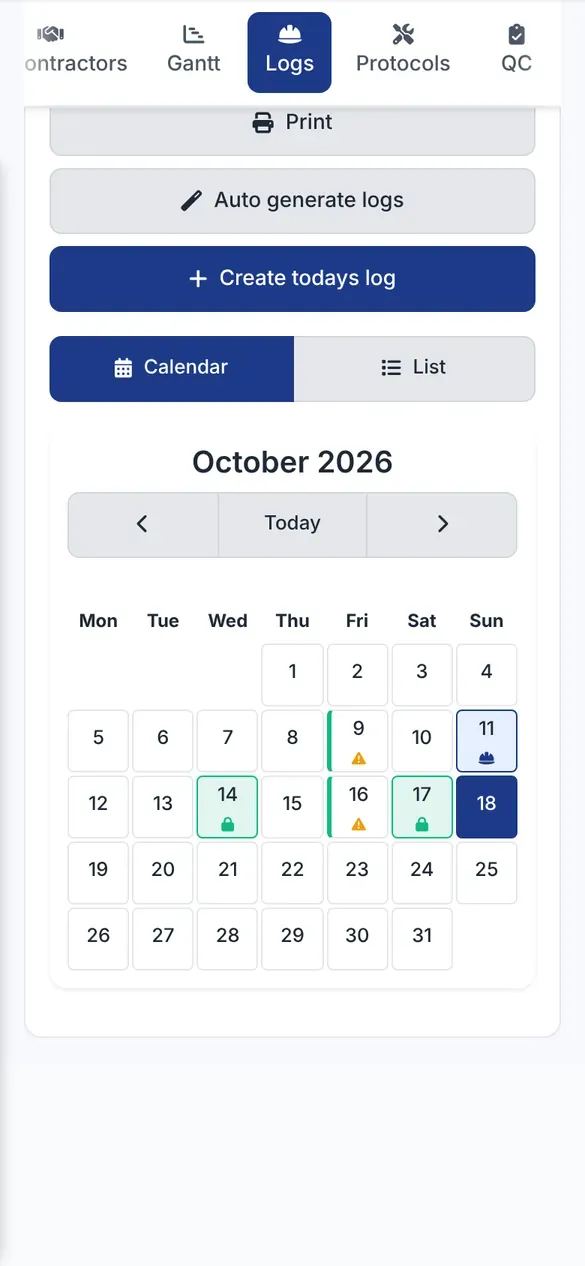
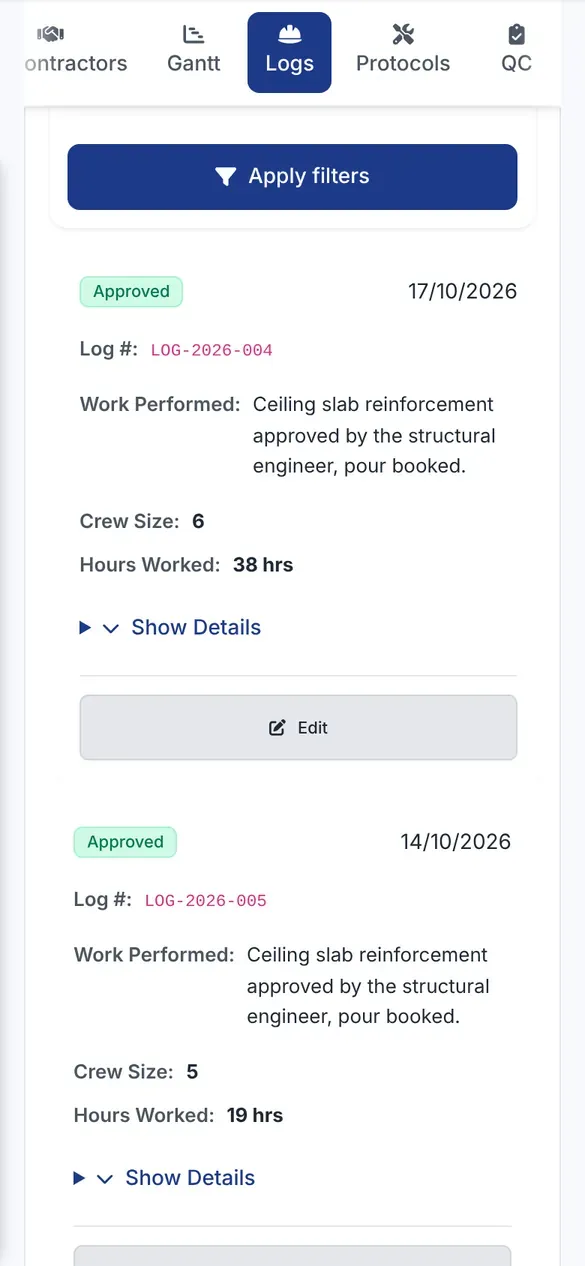
Gareth records the work done, how many were on site and the hours, standing on the job. He can dictate the entry and the weather is added for him. Once an entry is approved it stays as written; a correction goes in as an amendment underneath.
Work done, labour on site and hours
Weather and photos with each entry
Calendar of filled and missing days, printable diary
SoloProfessionalDeveloper
A real Bidmio screen with demo data.
6
Before the pour · Quality checks
Quality checks from templates, safety on one board
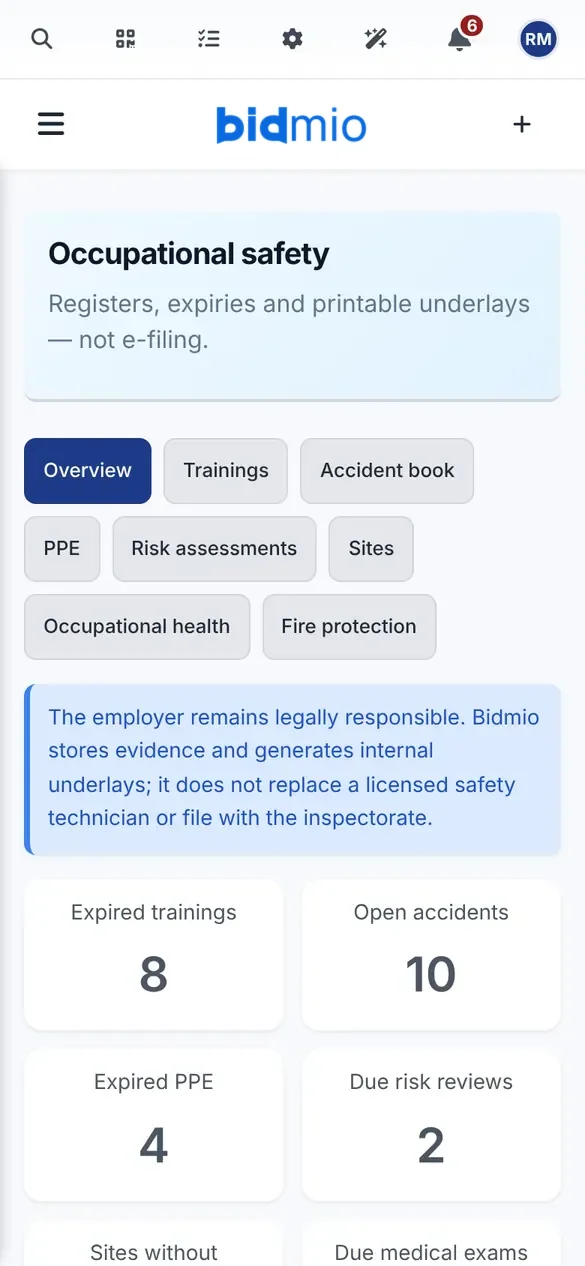
Before the foundations are poured, the mandatory foundation inspection is done from a template, and Bidmio shows which checks are still missing. Anything found becomes a defect with a severity, an owner and a fix-by date. The safety board shows expired training, open accidents and risk assessments due for review.
Mandatory check templates on the job
Defects and snags with a close-out date
Training, accident book, PPE and risk reviews on one board
Snags handed to subcontractor firms, with a report for each firm
ProfessionalDeveloper
A real Bidmio screen with demo data.
7
Week 6 · Variations
A variation in writing, not a nod on the scaffold
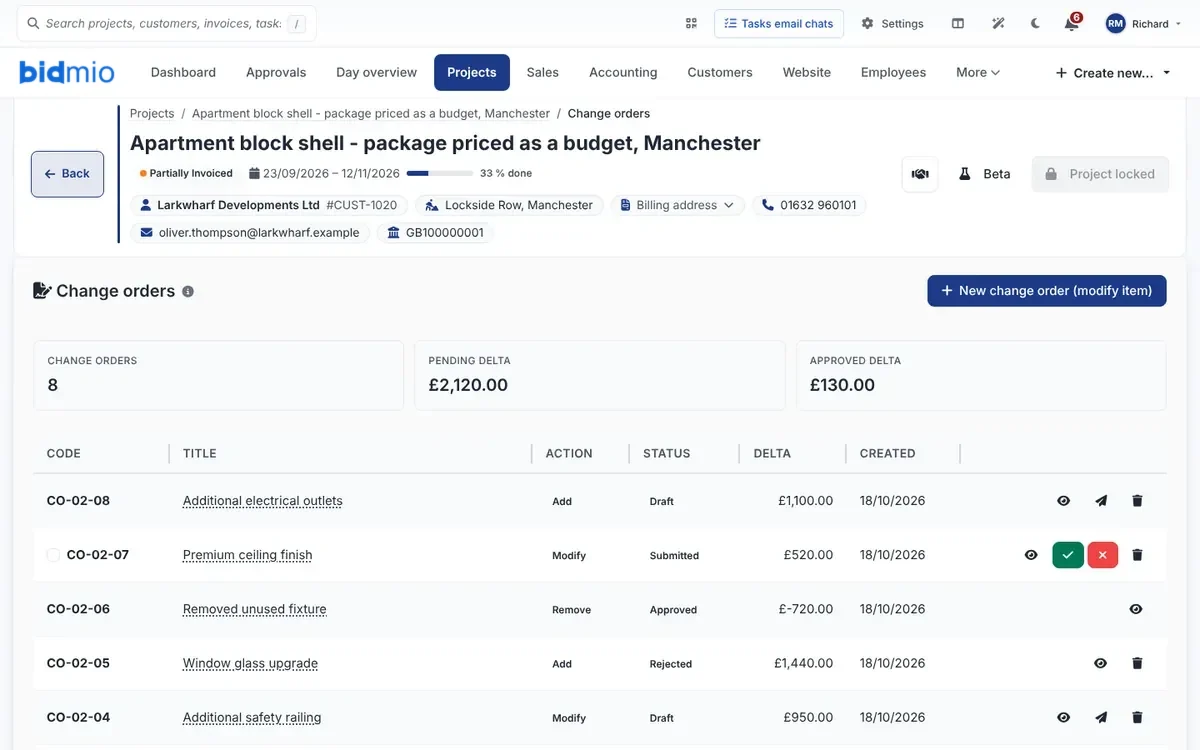
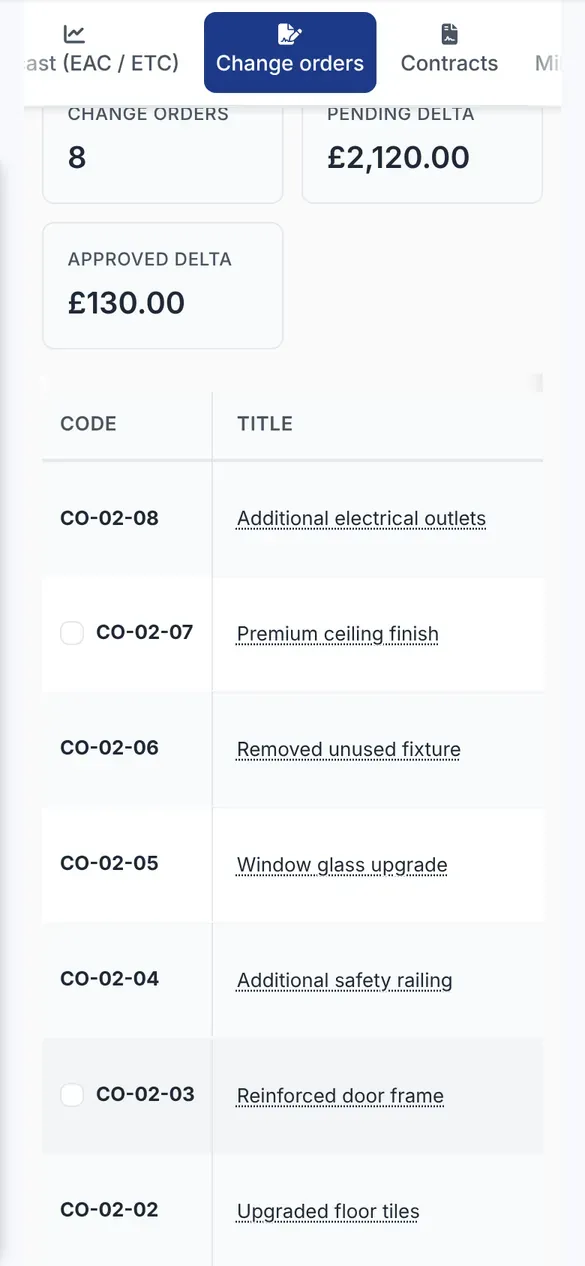
The developer wants different balustrades and a few extra sockets on each floor. Gareth raises a variation (the app calls it a change order) against the BoQ, with the price difference, and sends it to the client to approve. Once approved, the new value flows into the budget.
Add, change or omit a BoQ line
Pending and approved value in one place
Client approval through a link
Developer
A real Bidmio screen with demo data.
8
Halfway · Cost forecast
A cost forecast that shows the outcome before the final account
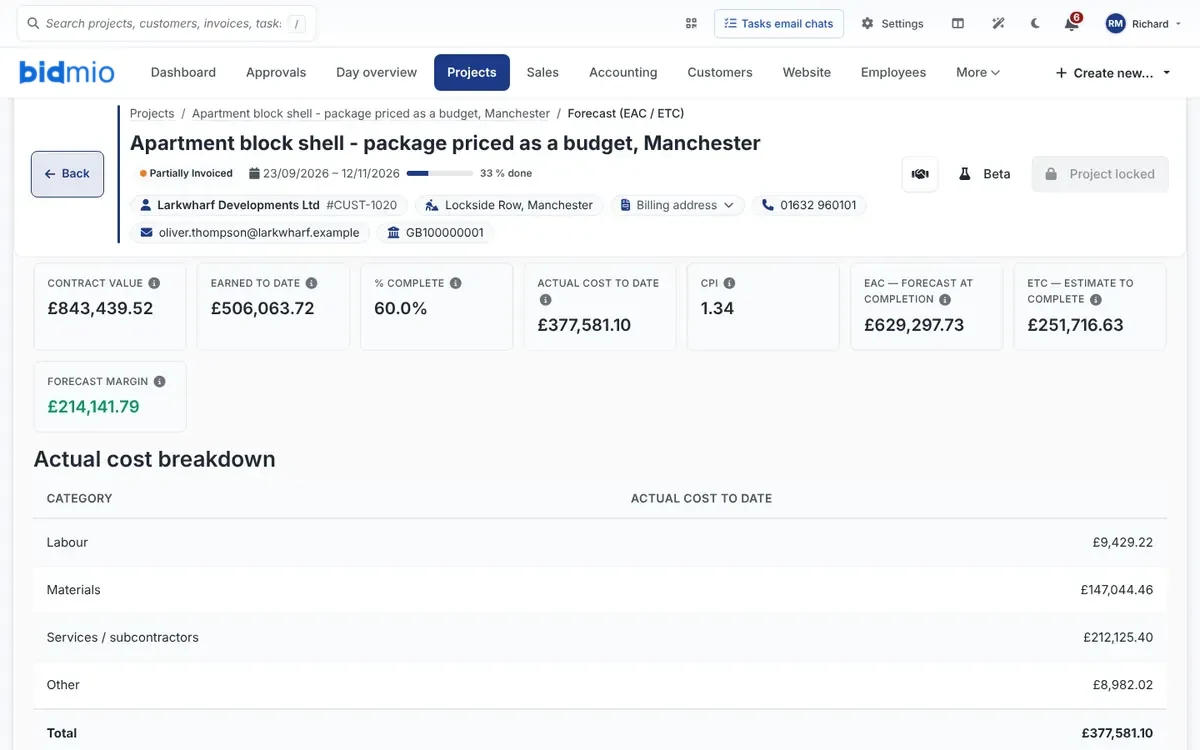
From the budget, the work done and the real costs, Bidmio calculates the estimate at completion (EAC), the cost still to come (ETC) and the cost performance index. If the margin is slipping, the contracts manager sees it halfway through the frame, not when the last invoice goes out.
EAC, ETC and CPI on every job
Costs split into labour, materials and subcontract
Saved snapshots to compare month with month
Developer
app.bidmio.com
A real Bidmio screen with demo data.
9
Month end · Interim valuation
An interim valuation the client approves from a link
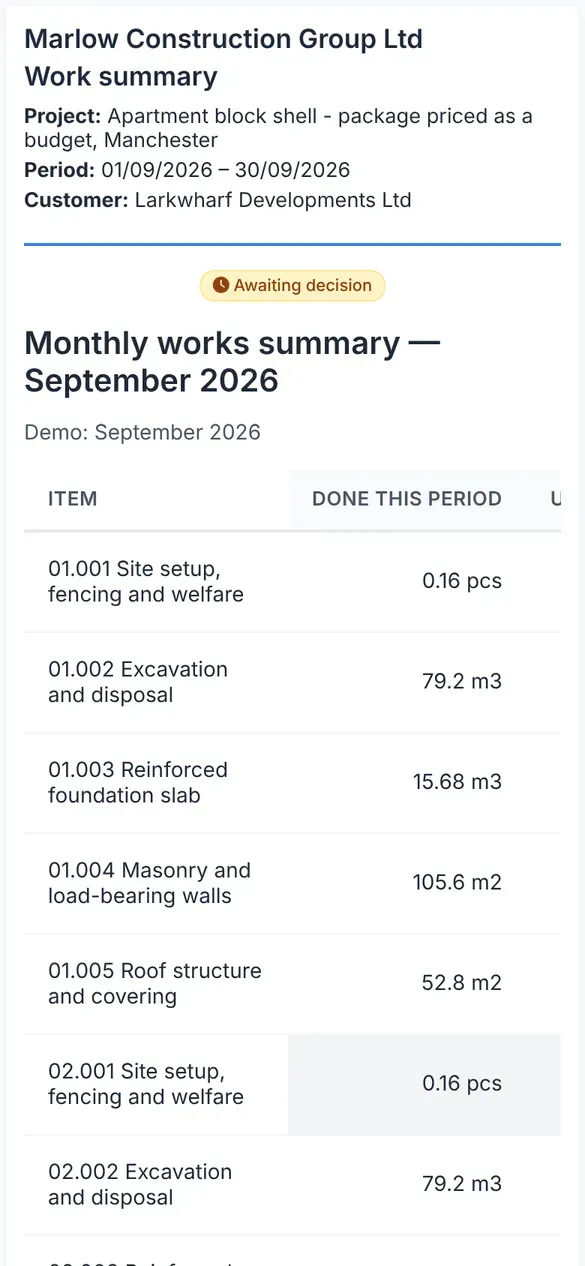
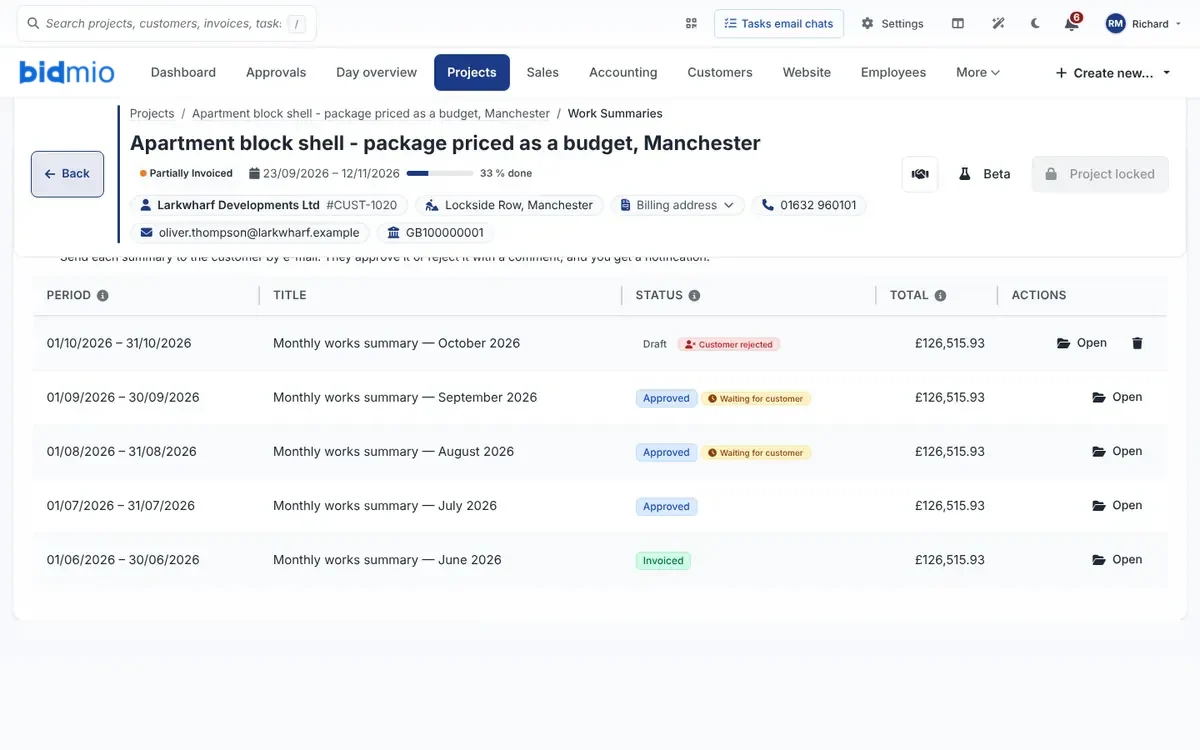
The monthly valuation fills in from the BoQ: line, quantity done this period, value. The client gets it by e-mail, opens it on a phone without logging in and approves it or sends it back with a comment. Gareth gets a notification either way.
Valuation by BoQ line for the period
Approve or reject in the client portal
Status of every valuation: draft, approved, invoiced
Developer
A real Bidmio screen with demo data.
10
Invoicing · Invoice
The invoice and the job's numbers on one screen
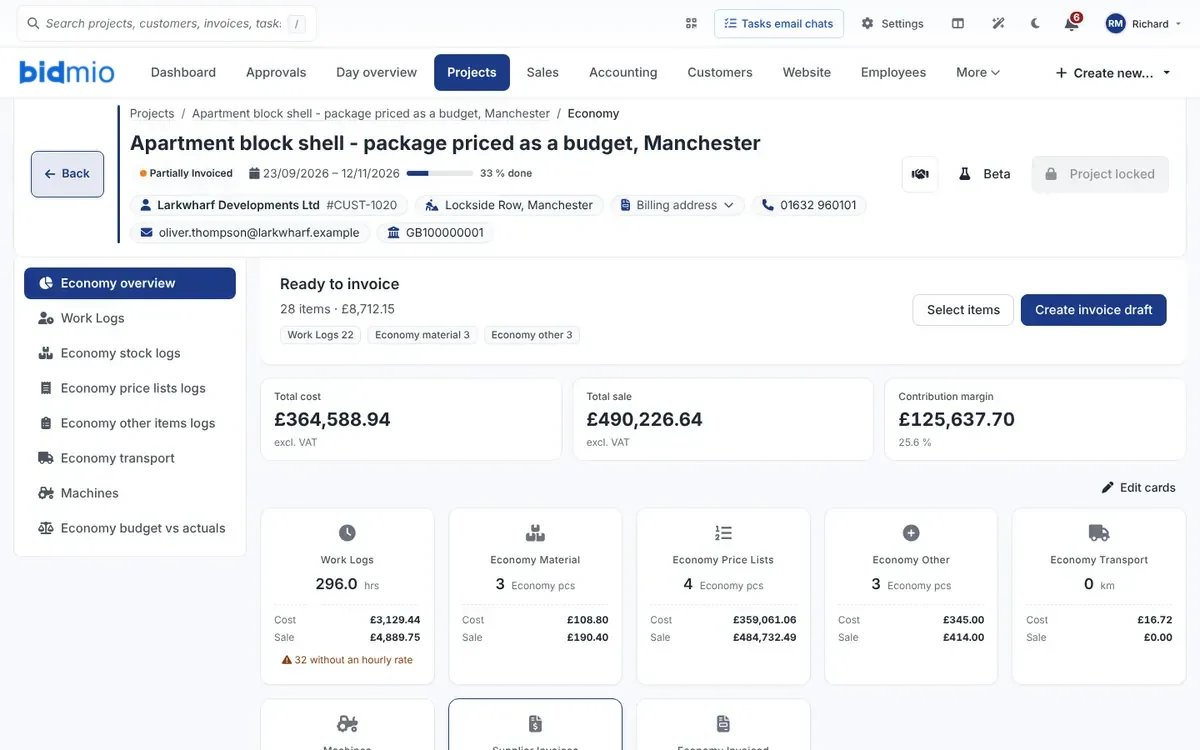
The job economics screen shows total cost, total sale and contribution margin. Gareth's office picks the items that are ready to invoice and turns them into a draft invoice in pounds, with VAT, which goes to the client as a PDF by e-mail.
Cost, sale and margin of the whole job
Draft invoice from the items ready to bill
Hours, materials and other costs behind every figure
SoloProfessionalDeveloper
app.bidmio.com
A real Bidmio screen with demo data.
Why bother
Jobs rarely lose money in the concrete. They lose it in the spreadsheets.
A main contractor carries the client, the QS, a dozen trades and a fixed price at the same time. Margin leaks out through three copies of the BoQ, a variation agreed on the slab and a valuation nobody checked against the budget.
Today
Three versions of the BoQ, each one a little different
Extra work agreed on site and never written down
Site diary in a notebook in the welfare cabin
Valuation pieced together on the last Friday of the month
The overspend turns up with the final account
With Bidmio
One BoQ with the actual cost against every line
A variation the client approves from an e-mail link
Diary entries from the phone, weather filled in
The valuation built from the BoQ and approved in the portal
A cost forecast while there is still time to act
Live demo
Look around Bidmio with a building firm's data
A main contractor's demo account with jobs, a bill of quantities, a site diary, variations and monthly valuations, all in pounds. No sign-up, and the data resets every day.
The list of valuations on the job with their status: draft, approved by the client or invoiced. You see at a glance which month the client has agreed and still has no invoice against it.
app.bidmio.com
In depth
Running a main contractor's job in Bidmio, in more detail
The steps above follow one job from tender to invoice. This part explains how each piece works on a UK job, what to watch out for, which rules it touches and how to start with Bidmio on a live site.
The bill of quantities as the spine of the job
For a main contractor almost everything hangs off the bill of quantities. The tender price came from it, the monthly valuation is measured against it and the final account is argued over it. When the estimator has one spreadsheet, the QS another and the site manager a printout from April, nobody is quite sure which number is real. In Bidmio the BoQ lives once, on the job, and everyone reads the same version.
The bill is split into sections the way you would expect: preliminaries, substructure, frame, upper floors, roof, external works. Each line has a reference, a description, a unit, a quantity and a rate, and the section and job totals add themselves up, so nobody is fixing broken formulas at midnight before a tender return. A bill from the client's QS or your estimating package comes in from Excel, and the priced bill goes back out to Excel when the client asks for it in their own format.
The real difference from a spreadsheet is the actual cost column. Hours booked by your own gang, materials from receipts and supplier invoices, and subcontractor invoices are linked to the lines they belong to. At section level you can see what has been spent and what share of the allowance has gone. If the blockwork has used eighty per cent of its money with half the walls up, you know that afternoon, not at the final account.
Every change to a line is kept in its history. When someone asks in six months why the concrete quantity went up, you open the line and see who changed it and when.
Sections and lines with reference, unit, quantity and rate
Excel import and export
Actual cost against every line
Line-by-line change history
Interim valuations without the month-end scramble
On most UK jobs you are paid monthly against an interim valuation or application for payment. The client and their QS want to see what was done in the period, how much of it and at what rate. Building that by hand means reading back through the diary, matching it to the bill and recalculating totals. In Bidmio the valuation is built straight from the BoQ lines, so the rates cannot drift away from the contract.
At the end of the period you open a new valuation and enter the quantity done against each line. Values come from the rates in the bill. You send it to the client by e-mail; they open it from the link, on a laptop or a phone, without an account, and approve it or reject it with a comment. A rejected valuation comes back with the comment on it and a notification to you, you correct it and send it again.
Every valuation has a status: draft, sent, approved, rejected or invoiced. The list shows straight away which month the client has agreed and still has no invoice against it. If the client signs a paper copy at the site meeting, you can mark the valuation approved yourself and the record of who approved it and when stays on the job.
A note on the Construction Act. Under the Housing Grants, Construction and Regeneration Act most commercial building contracts need payment notices and, where the payer wants to pay less, a pay less notice by set deadlines. Bidmio gives you a dated record of what was valued, sent and approved, but it does not draft or serve those statutory notices for you. Keep your contract administrator or QS on that.
Variations and extra work without the final-account fight
Every job changes. The developer picks a different cladding, the engineer adds steel, the excavator finds an old drain nobody drew. Main contractors seldom lose money on the change itself; they lose it when the change was agreed out loud and the argument starts at the final account.
In Bidmio a variation is always tied to the bill. You can add a line, change one or omit one, and Bidmio works out the difference in value. The variation goes to the client for approval. Until it is approved the difference sits as pending; once approved it moves into the job budget and the next valuation already includes the new line.
The job shows how many variations there are, the pending total and the approved total. At the monthly progress meeting you know exactly how much money is still to be agreed with the client. A rejected variation stays in the list, so nobody can later claim it was never raised. Under JCT or NEC the instruction and its valuation follow the contract's own rules; Bidmio is where you keep the paper trail, not a replacement for the contract.
Add, change or omit a line
Pending and approved value
Client approval through a link
Rejected variations stay on record
A site diary that is written on site
Most diaries get filled in on a Friday evening from memory, and that is when the head count, the weather and the name of whoever took the delivery go missing. They are exactly the details you need when a delay claim or a defect dispute turns up a year later. In Bidmio the site manager or the foreman writes the entry on a phone while the day is still in front of them.
An entry holds the work done, the labour on site and the hours worked. Weather is filled in automatically and photos go with the entry, for example the rebar before the pour. The text can be dictated. The diary calendar shows which days have an entry and which are empty, and the whole diary prints for a site meeting or for the client's clerk of works.
An approved entry is not overwritten. If something needs correcting, an amendment is added underneath and the original text stays. That is the kind of record that holds up when the client's QS and your contracts manager disagree about what happened in week six.
Subcontractors, own gangs and packages
A main contractor rarely does everything with direct labour. Electrics, mechanical, roofing and decorating usually go out as packages, while groundworks or the frame may stay with your own gang. Each is tracked differently and Bidmio keeps them apart.
A subcontractor gets an e-mail invitation to the job. On the job you see their role, whether they have accepted and whether they are active. On Developer you can attach subcontractor quotes to BoQ lines, compare them and carry the winning price into the budget. A subbie you invite works on your shared job without paying for their own subscription, so cost is not an excuse for staying on paper.
An own-gang package can be priced as a lump sum and still have its hours booked, so you can see productivity. A labour-only or supply-and-fix subcontract paid by package needs no hours; its invoice goes into the actual cost. Both can sit on the same job.
Bidmio also lets you record a retention you hold back on a subcontractor's invoice, with the percentage and the date it is due for release. What it does not do is CIS: it does not verify subcontractors with HMRC, calculate the 20 or 30 per cent deduction or file the monthly CIS return. Keep that with your accountant or payroll provider.
Cost forecasting, explained plainly
The forecast answers the question every contracts manager asks halfway through a job: if we carry on at this rate, what will this job cost us when it is finished? Bidmio uses earned value, the method larger contractors know, but shows the result in a handful of figures rather than a forty-tab workbook.
Contract value is the price of the job. Earned to date is the value of the work actually done. Actual cost is what you really paid for it. The cost performance index, CPI, is the ratio of the two: 1.0 means the job is spending exactly to plan, below 1.0 means every pound of work is costing you more than a pound. EAC is the estimated total cost at completion and ETC is what is still left to spend. The projected margin follows from those.
You can save the forecast as a snapshot and compare one month with the next. When the margin is getting worse you can see whether labour, materials or subcontract is behind it, and you still have time to raise a variation, re-sequence the work or have a straight conversation with the client.
Contract value, earned value and actual cost
CPI, EAC, ETC and projected margin
Monthly snapshots to compare
Quality, health and safety, snagging and handover
Quality control in Bidmio is built on templates. You assign check templates to the job, such as a foundation inspection or a daily site safety walk. Mandatory templates have to be completed in the site records and Bidmio shows how many are done and which one is still outstanding. A defect found on a check is logged with a description, severity, the person responsible and a close-out date, so before practical completion your snagging list is in one place and you know what is closed and what is not.
Snags can go straight onto the drawing. Under Defects in the job's uploads there is an On drawing view: register a page of a PDF from the job's files as a drawing with its number, name, floor, discipline and revisions, and every defect is a numbered pin whose shape shows its status. On site you tap the spot to raise a new defect or move an existing one there, and zoom with the buttons, the mouse wheel or two fingers. A new version of the file becomes a new revision of the drawing and the pins stay where they are.
Nobody signs off their own fix. Whoever fixed the defect marks it fixed, and the site manager accepts the fix or returns it with a reason. A permission called Verify fixes decides who may accept, return and close, so a subcontractor's group can report fixes without closing them, and the To check filter lists the fixes waiting. Every defect has a number on the job, photos of the problem and the fix, comments and its full history, and you can change the status, the person responsible or the deadline of up to 200 defects at once. Any defect the change does not fit is named, never skipped silently.
Snagging rounds are walks. On the Defects list you start a walk, internal, before handover, at handover or a warranty walk, with its date and who came along, and every defect raised while it is open joins it. On site you start and end a walk in the Work zone on your phone and record its snags without signal; they are sent in order once the signal is back. Two flags matter at handover: Blocks use, for anything the client cannot live with, and Client sees it. From a handover walk Bidmio fills in the handover protocol with the date, the people present and the walk's defects, those that block use first, and adds an appendix with each defect's photo beside the bit of drawing around its pin. The protocol keeps a copy of the defects as they were on the day, so a later repair does not rewrite what was handed over.
A snag can go straight to the subcontractor who has to put it right. A firm working on the job with you through Bidmio, with an account of its own, gets the defect there: the description, the problem photos and the bit of drawing around the pin, but not your internal comments or your prices. The firm starts on it, gives it to one of its operatives on the job, reports it fixed with a photo, writes to you or objects with a reason, and your site manager still decides; a firm never accepts or closes its own fix. Its admins get one notice for a batch of snags and, each morning, one summary per job of what was handed over the day before, what is overdue and what came back. The Defects report on the job shows, firm by firm and for your own gang, what is open, waiting for a check and overdue, the average days to fix and how many fixes were returned, and exports a PDF with photos and drawings or an Excel file, for one firm or all of them.
The client sees only what you choose. In the customer portal, defects marked Client sees it appear on the job with their status, place and deadline, the photos of the problem and the fix and each status change, without your staff's comments or names. The client can comment on them and, once a handover protocol has been issued, report a warranty defect from the portal. It arrives waiting for approval and only becomes a defect when someone who approves defects accepts it. Defects can be switched off in the portal settings. As the warranty end of the latest handover protocol comes near, the Defects list offers Plan the warranty walk, and the warranty reminder takes you to the job's defects.
Defects never hold money back on their own, but you see them before you pay. When you release the retention on a subcontractor's invoice, Bidmio lists that firm's open defects, matched by its VAT or company number, and releasing with snags still open asks for a reason, which is kept with the release. A draft final invoice on the job lists the defects that block use, so you know what the client may raise against it. Neither blocks anything.
On Professional and Developer the occupational safety module keeps training records with expiry dates, the accident book, PPE issued, risk assessments and fire safety for the whole site on one board, with a reminder before something expires. Under CDM 2015 the principal contractor still owns the construction phase plan, any F10 notification to the HSE and RIDDOR reporting. Bidmio helps you keep the records behind them together, it does not produce those documents or file anything for you.
When a claim comes in after handover, the diary, photos, checks and valuations are still on the job, and you can see who built that part and when.
How to start with Bidmio on a live job
There is no need to move every job across at once. Pick one job that is just starting or halfway through and run one full month on it, from the first diary entry to the valuation.
Create the job and import its bill of quantities from Excel
Add the contract milestones and the main tasks to the programme
Invite the site manager and the key subcontractors
Write the site diary on the phone every day
At month end send the client the first valuation and look at the cost forecast
What else Bidmio does for a main contractor
With ten trades on site, who was actually there is always disputed. A cheap tablet in the cabin shows a rotating QR code and each operative scans in and out with their own phone, optionally with a photo as proof of presence. There is no face recognition and no paper signing-in book. If a phone is near the site, Bidmio can also suggest a time entry for the operative to confirm, and the Workzone app records hours without signal and sends them once it is back.
Messages in the job chat can be read in English, Slovak, Czech, German or Danish, with the original kept. Vans and cars sit in the fleet module with a trip log and a monthly close for the bookkeeper. Tools and plant get QR labels, so you know who has the breaker and when the mixer is due its service. On Developer you can measure areas and lengths on a PDF drawing and send the result into the bill, and open the architect's IFC model in the browser.
As the firm grows, Bidmio grows with it: several companies under one login, permissions by module, approval rules with deputies and company sign-in with Microsoft or Google. A numbered photo report with your logo goes out as a PDF for a handover or a defect claim.
A spoken work report records the whole day in one go. In the Work zone, or from the job's options menu, you record up to three minutes: which job, who worked how long, what was done and what material went in. If you would rather not talk, type it. Bidmio turns it into hours, material from the van, from the price list or as a one-off item, and a site diary note. You check every line, and nothing reaches the job until you tap Save to project. Whoever may create invoices then taps Create invoice draft on the saved report and gets a draft partial invoice with exactly those hours and that material; nothing is issued or sent. Reports still without a draft wait for the office on the invoice list under Spoken reports. It needs AI switched on and uses AI credits.
QR clock-in on site, with an optional photo
Job chat read in five languages
Occupational safety board for the whole site (Professional)
Fleet and trip log (Professional), tools and plant with QR labels (Developer)
Measurements from PDF drawings and an IFC model viewer (Developer)
Invited subcontractors log hours and materials without a subscription
Several companies, permissions, approvals and company sign-in (Professional, Developer)
Spoken work report: hours, material and a diary note from one recording, then an invoice draft
What Bidmio does not do for main contractors
Bidmio is not a CAD or design package and you do not draw in it. It does not handle the Construction Industry Scheme: no subcontractor verification, no CIS deductions and no monthly CIS return. It does not apply the VAT domestic reverse charge for construction for you, it does not file VAT or income tax under Making Tax Digital, it does not run UK payroll and it does not send e-invoices into UK networks. It is not a replacement for Xero, QuickBooks or Sage, so keep your accountant and their software for the books and HMRC.
It does not issue Construction Act payment or pay less notices, write your construction phase plan or RAMS, notify the HSE or check CSCS cards, and it holds no retention on your own valuations to the client. The diary, valuations, variations and forecast are tools for running your firm. Your contractual and legal duties to the client, HMRC and building control stay with you; Bidmio keeps the records you need for them in one place.
Typical jobs
Job management for the work a main contractor takes on
From a one-off house built to the key to a block of flats with a dozen trades.
New house, turnkey
A fixed price from groundworks to handover. The trades go out as packages and you keep an eye on whether they fit the budget.
Apartment block shell
Priced from the BoQ with monthly valuations to the developer. The cost forecast shows where the margin is heading.
Refurbishment
An old building always hides something. Each surprise becomes a priced variation, not a row over the invoice.
Office fit-out
A tenant's floor done in a one-week shutdown. A programme by the day and quality checks before handover.
Extension with extras
A fixed price for the extension and the client's late wishes on daywork. Both on one job and one invoice.
Defects after handover
The diary, photos and valuations stay on the job. When a defect is reported you know who did what, and when.
Switching
What you can stop juggling
One place instead of spreadsheets, notebooks and group chats. The BoQ comes in from Excel and we help you set up the first job on a call.
Plans in euros, your invoices in poundsBidmio plans are priced and billed in euros, so your card or bank converts the monthly amount to pounds. Everything your building firm sends to customers, quotes and invoices included, is in pounds with UK VAT.
Your accountant keeps the booksInvite your accountant as an external user for the companies you choose and remove the access in one click. They see the invoices, receipts and bank matches, or you send a CSV export. Bidmio does not file with HMRC and does not replace Xero, QuickBooks or Sage.
Yes. You import the BoQ from Excel and can export it back to Excel. Lines can also be added by hand or from standard rates. The bill of quantities is on the Developer plan.
How do interim valuations work?+
A valuation for the period fills in from the BoQ lines with the quantity done and its value. You send it to the client by e-mail and they approve it or reject it with a comment in the client portal. Every valuation shows whether it is approved and whether it has been invoiced.
Can the site manager keep the site diary on a phone?+
Yes, from the Solo plan. They record the work done, labour on site, hours and photos, can dictate the entry, and the weather is filled in automatically. An approved entry is not changed; corrections go in as an amendment.
Does Bidmio handle CIS deductions and returns?+
No. Bidmio does not verify subcontractors with HMRC, calculate CIS deductions or file the CIS return. It can record a retention you hold back on a subcontractor's invoice. Keep CIS, VAT returns and payroll with your accountant and their software.
How does the client approve a variation?+
You send the variation with its price difference to the client to approve. The job shows the pending and the approved value, and an approved variation flows into the budget. Variations (change orders in the app) are on the Developer plan.
What does the cost forecast show?+
The estimated total cost at completion (EAC), the cost still to come (ETC), the cost performance index (CPI) and the projected margin, calculated from the budget, the work done and the actual cost. The forecast is on the Developer plan.
Do my subcontractors get access?+
Yes. You invite a subcontractor to the job by e-mail and see their role and status on the job. An invited subcontractor works on your shared job without a subscription of their own and does not see your buying prices or margin.
Can I look at Bidmio before signing up?+
Yes. The building firm demo opens without registration and shows prices in pounds. When you want to try it on your own job, you get First month 90% off.
Can I pin snags on the drawings?+
Yes. Under Defects in the job's uploads you register a page of a PDF as a drawing, and every defect becomes a numbered pin shaped by its status. A fix is accepted or returned with a reason only by someone with the Verify fixes permission, and never by the person who made the fix.
Can a subcontractor answer snags in its own account?+
Yes, when the firm works on the job with you through Bidmio and has an account of its own. It sees only the defects handed to it, with the photos and the bit of drawing around the pin, and can start on them, give them to an operative, report them fixed with a photo or object with a reason. Accepting and closing the fix stays with your site manager.
Do open defects stop me releasing a subcontractor's retention?+
No. When you release the retention Bidmio lists that firm's open defects and, if any are still open, asks you for a reason. The reason is kept with the release and nothing is blocked.