Field service software from the breakdown call to a signed service report
Call-out, engineer, equipment history, parts from the van, the customer's signature on your phone and an invoice from the report. Below we follow one real heat pump breakdown in Birmingham, screen by screen.
How the field service software works: 10 steps from phone call to invoice
Emma Halton runs a heating and cooling service business in Birmingham with two other engineers. At two o'clock on a Sunday afternoon Hannah Okafor rings. She is a property manager at Fernhill Property Management, and the heat pump that heats Larchmont House, a three-storey office building in Kings Heath, keeps stopping with a low-flow alarm. The offices are going cold and the tenants are back on Monday morning. This is how Emma handles that call in Bidmio.
1
Sunday 14:00 · Breakdown call
The call becomes a service request while he is still talking
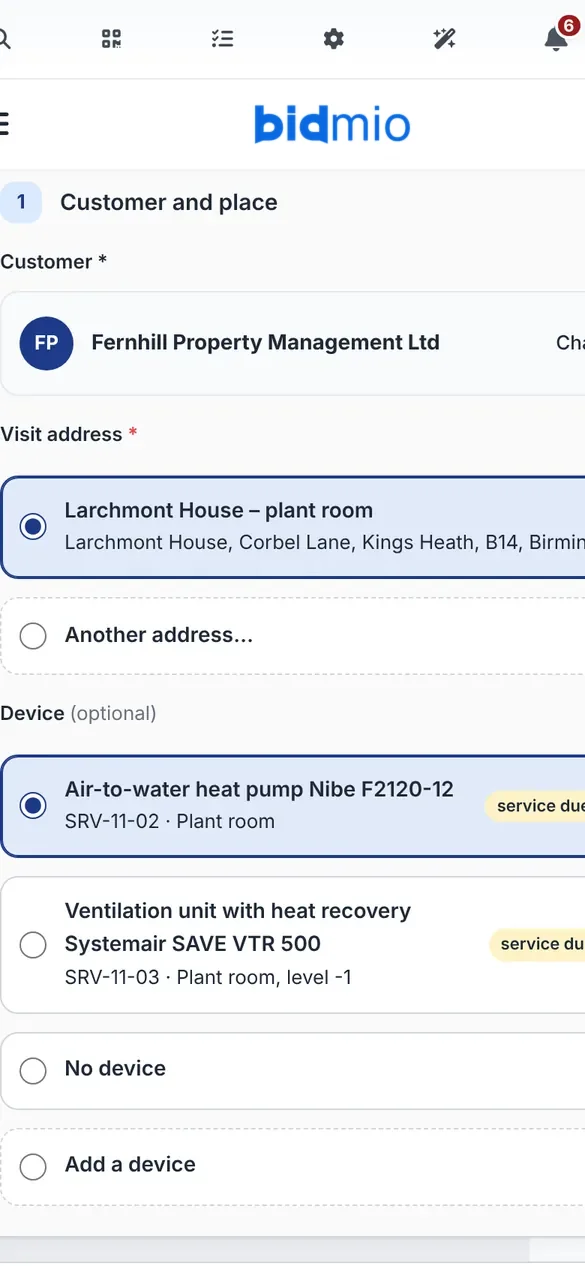
Emma picks Fernhill from the customer list. The plant room at Larchmont House and the air-to-water heat pump, with its serial number, come up on their own, so she just taps them. She types what Hannah tells her: a low-flow alarm after every reset, three floors of offices without heating, and the plant room key in the key safe by the bins.
Customer, site and device filled in from earlier visits
Breakdown, scheduled service or inspection
Dictate the notes instead of typing them
SoloProfessional
A real Bidmio screen with demo data.
2
14:05 · Who goes
A time slot and an engineer, based on who is free
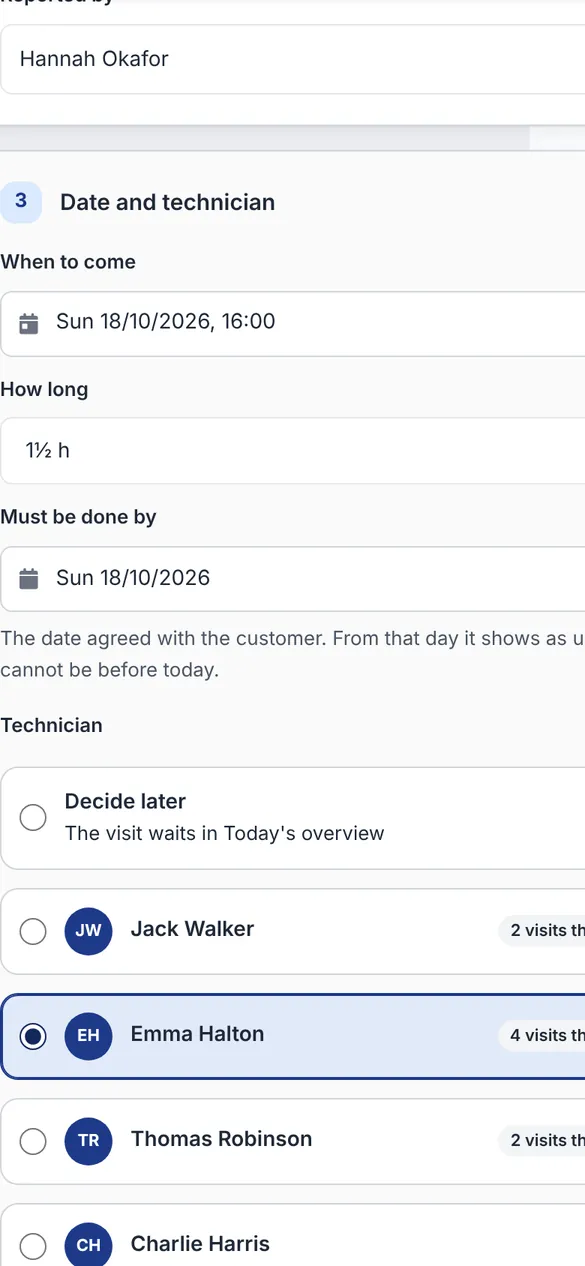
Next to every engineer the app shows how many visits they already have that day. Tom has two, Jack has two, Emma has four but lives closest. She books 16:00 for an hour and a half, sets the must-be-done-by date to today and takes it herself. The visit lands straight on her list for the day.
Visits per engineer for the chosen day
Must-be-done-by date that flags urgent work
"Decide later" keeps it on the office overview
Professional
A real Bidmio screen with demo data.
3
16:00, plant room · Unit history
Every earlier visit to this heat pump, before a panel comes off
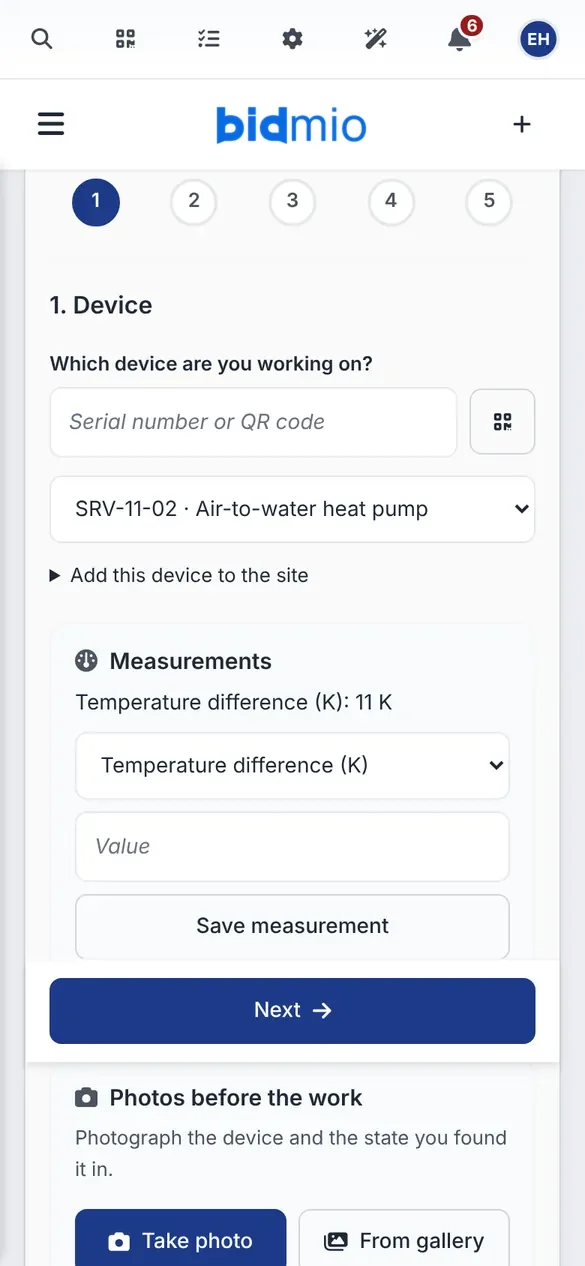
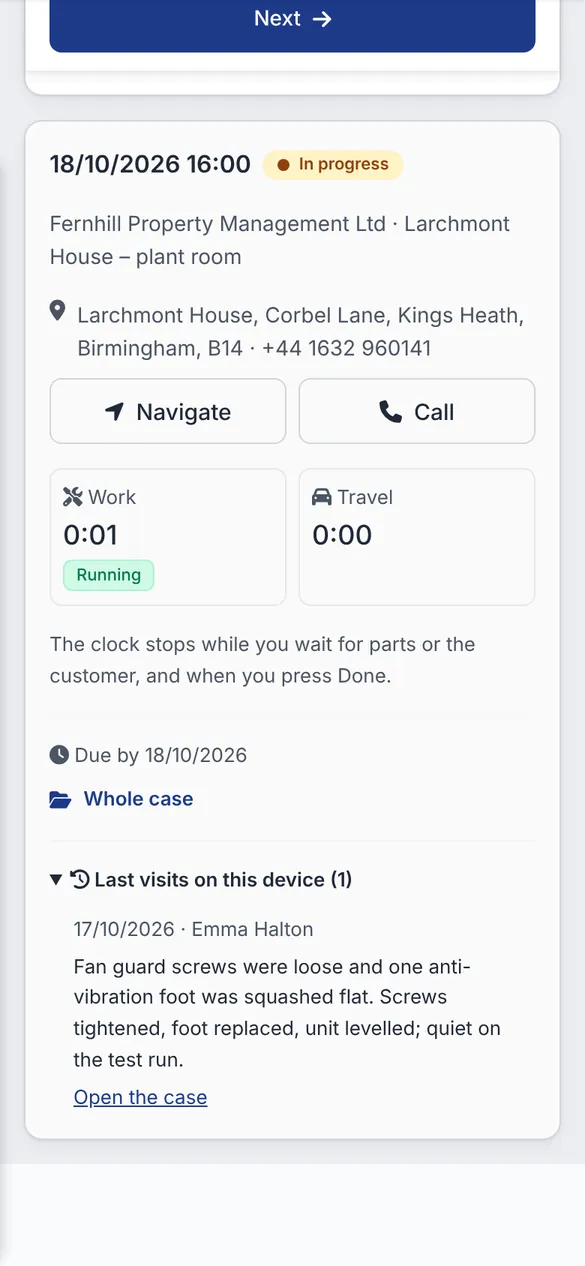
Emma presses On my way, then Start work, and the clock starts. She saves the temperature difference across the heat pump, 11 K, more than twice what it should be, and opens the last visits on this unit. She was here only yesterday because the outdoor fan rattled: she tightened the fan guard and replaced an anti-vibration foot. That has nothing to do with water flow, so this is a new fault, not yesterday's repair coming undone.
Find the device by serial number or its QR label
Readings such as temperature difference saved on the visit
Work and travel time measured on the visit
SoloProfessional
A real Bidmio screen with demo data.
4
16:20 · Work done
What was done goes straight onto the service report
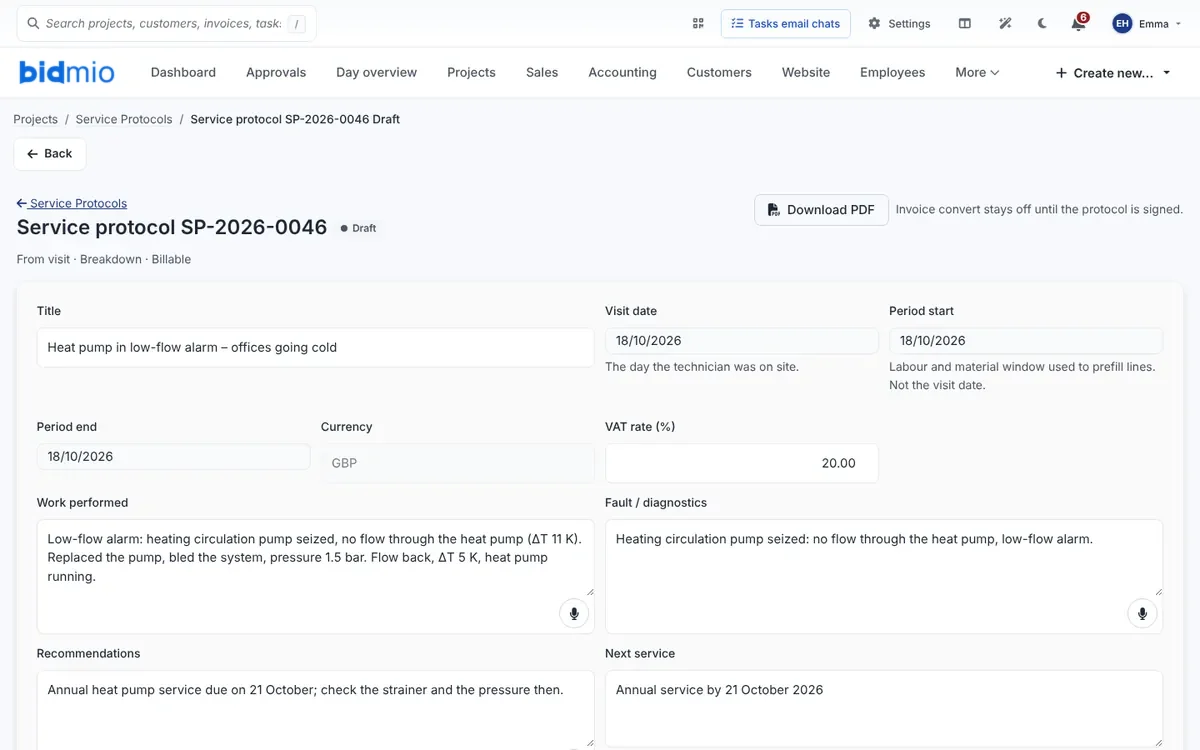
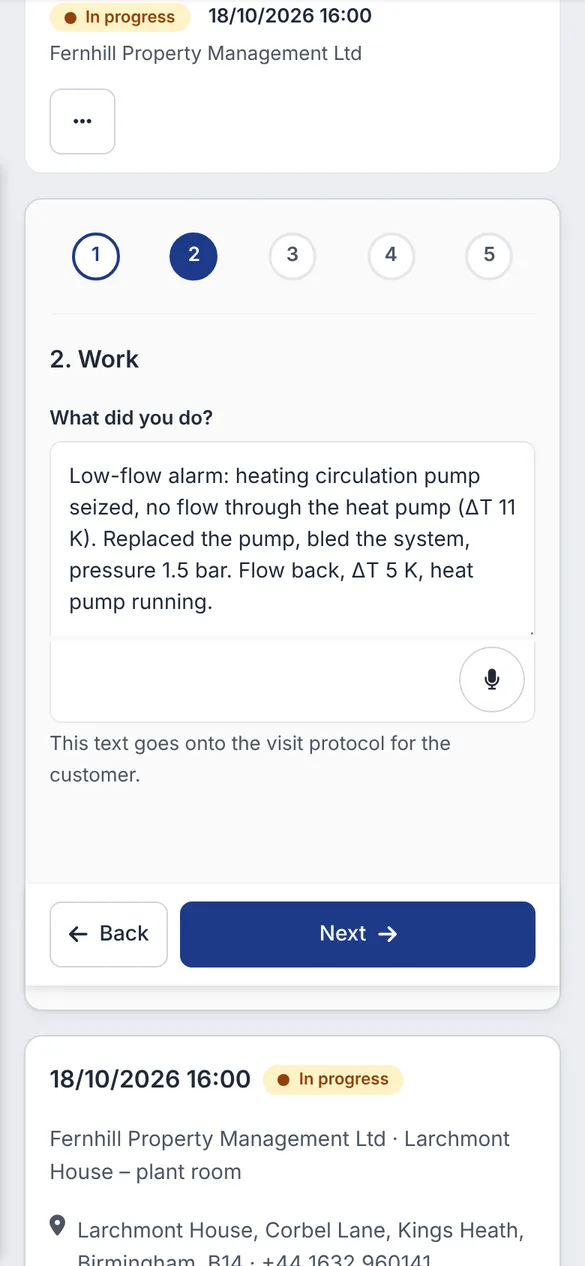
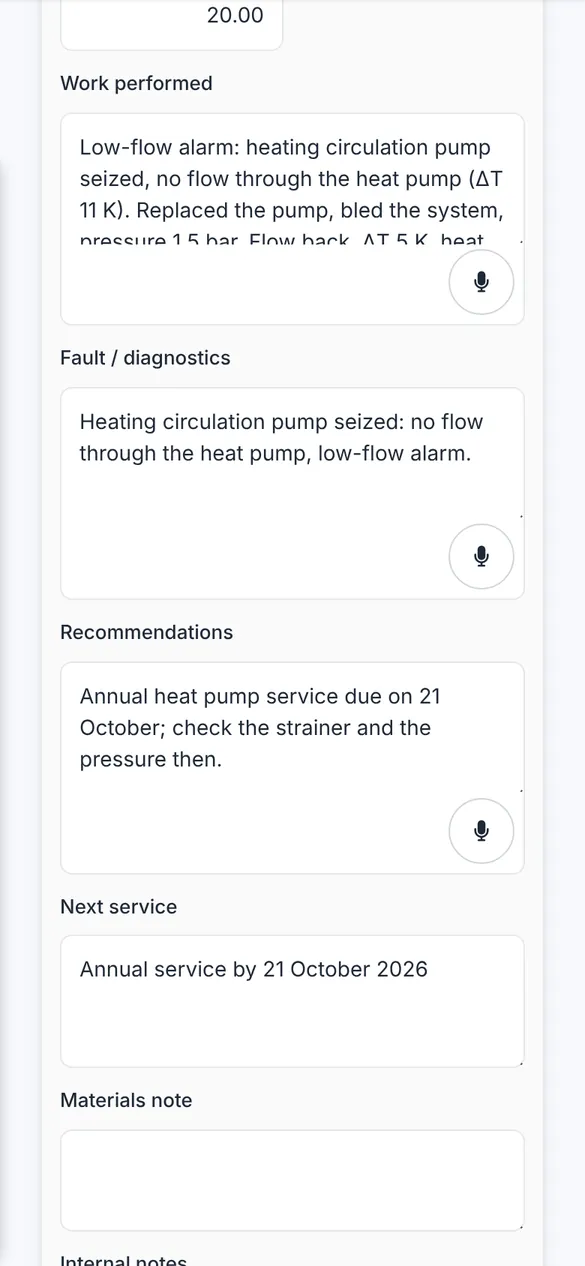
Emma writes it in a few lines: the heating circulation pump has seized, so no water flows through the heat pump. Pump replaced, system bled, pressure 1.5 bar, flow back, temperature difference down to 5 K, heat pump running. She could just as well dictate it. The same text appears on the customer's report later, so nothing is copied up in the evening.
Typed or dictated, saved as you go
The text goes onto the customer's report
Before and after photos stay with the visit
SoloProfessional
A real Bidmio screen with demo data.
5
16:40 · Parts
The part comes off stock and onto the report
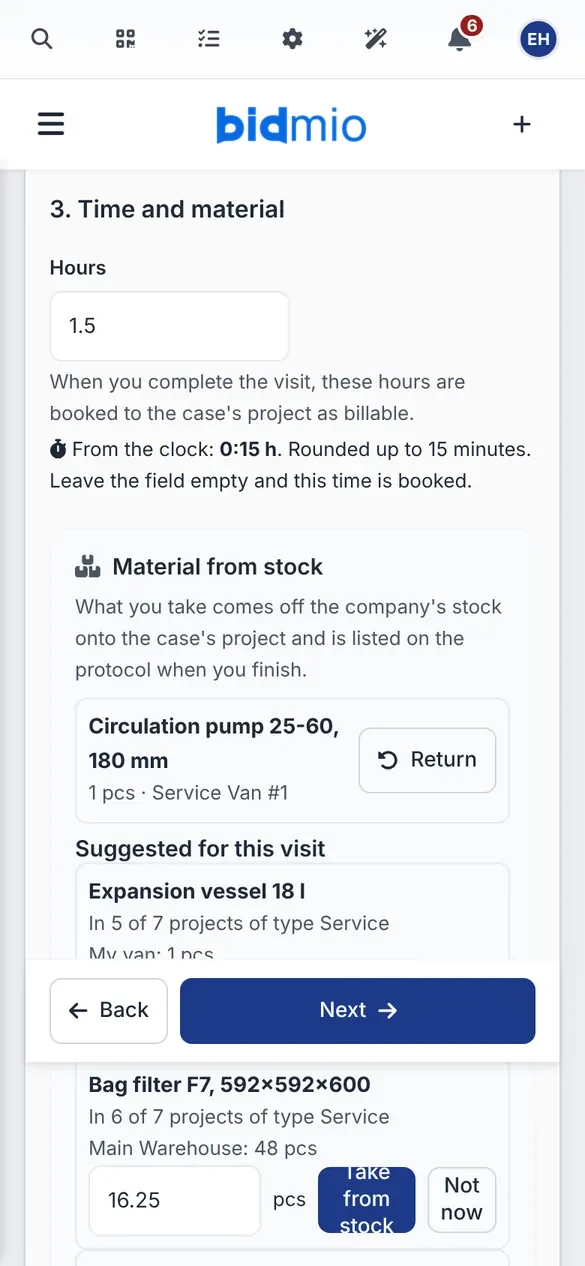
Emma searches for the circulation pump, and the one in her own van comes up first. She takes it and enters an hour and a half. The pump is booked out of the van's stock and will be on the report at its selling price. The app also suggests parts that are usually used on this kind of job. When a van runs low, the office can see what needs topping up.
Stock for every van with minimum levels
Hours from the visit clock, rounded up to 15 minutes
Suggested parts from similar jobs
Professional
A real Bidmio screen with demo data.
6
17:00 · Checks
A checklist for the visit, then a word with the customer
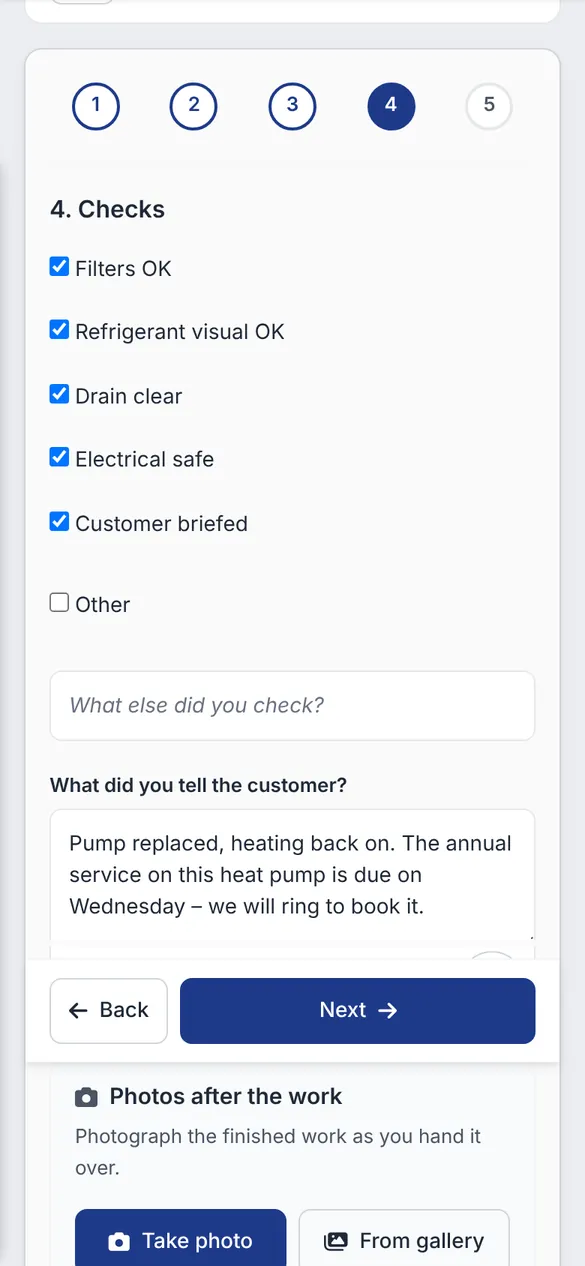
The visit offers a checklist. For this heat pump it is the standard heating and cooling list: filters, a look at the refrigerant circuit, the condensate drain, electrical safety, customer briefed. In the settings you can write your own list for each type of device. Emma ticks what she checked and notes what she told Hannah: the pump is new, and the annual service on this heat pump is due on Wednesday, so the office will ring to book it.
Your own checklist for each device type
Measurements such as pressure or temperature
A note of what the customer was told
SoloProfessional
A real Bidmio screen with demo data.
7
17:10 · Signature
The customer signs with a finger on the engineer's phone
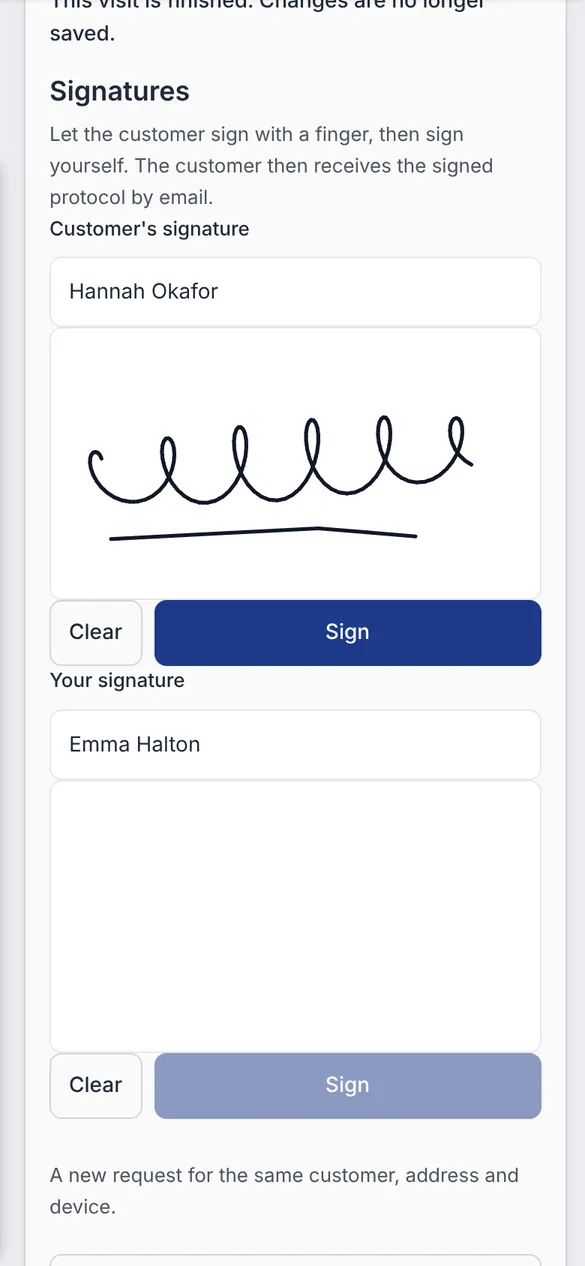
Emma presses Done and the visit turns into a service report. Hannah, who came over to see the heating come back on, signs on Emma's phone, then Emma signs as the engineer. Once both signatures are in, the report locks and Fernhill gets the PDF by email. If nobody had been there, Emma would send a link and Hannah could sign from her office.
Customer first, then the engineer
Signing link by email when nobody is on site
Signed PDF sent to the customer
SoloProfessional
A real Bidmio screen with demo data.
8
17:15 · Service report
A service report with the fault, the advice and the price
The report holds the work done, the fault, the recommendation and the next service date, plus 1.5 hours at £72 and the pump at £140.25. That is £248.25 plus 20% VAT, £297.90 in total. This is the signed copy Hannah gets by email, and it is now locked: had the office wanted to change the rate or add a line, that had to happen before she signed.
Labour and parts with VAT on one page
Signed and locked, so the price cannot drift
Kept against the heat pump for the next visit
SoloProfessional
A real Bidmio screen with demo data.
9
Monday 08:30 · Invoice
An invoice from a signed report in one click
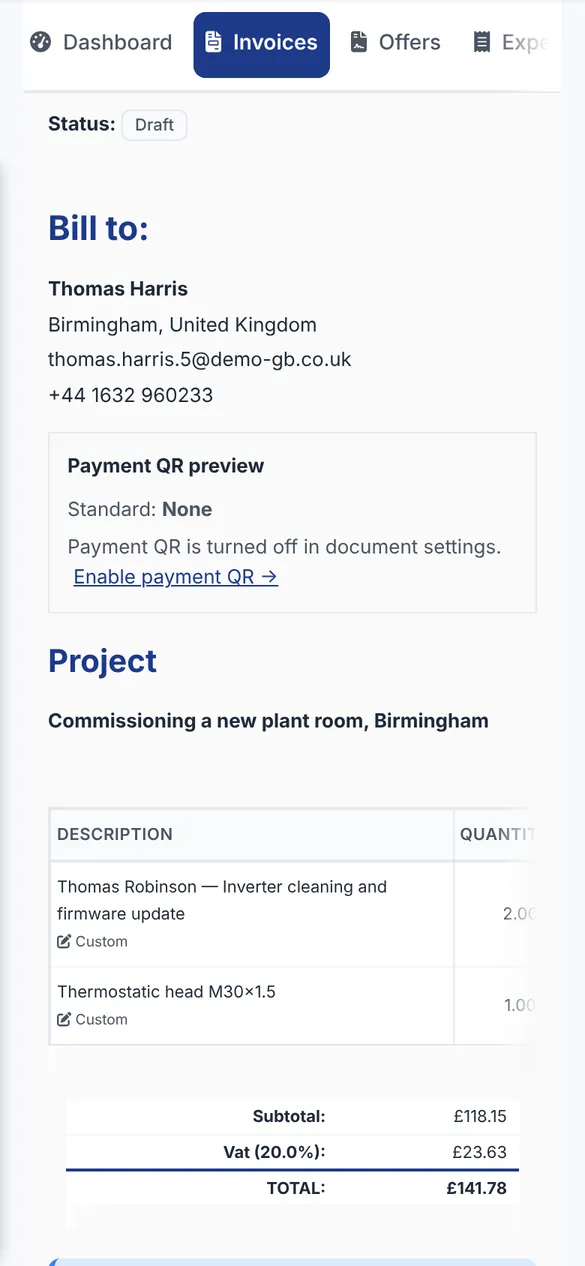
On Monday morning Emma goes through the reports signed over the weekend and clicks Create invoice on each. Hours and parts move across as invoice lines, VAT is worked out, and your bank details and payment terms are printed at the bottom. Fernhill pays for exactly what Hannah signed for, so there is nothing to argue about. The screen shows the same step for an inverter service signed earlier in the week.
Lines taken from the report, nothing typed twice
Your bank details and payment terms on the PDF
Automatic payment reminders if it goes overdue
SoloProfessional
A real Bidmio screen with demo data.
10
Due on Wednesday · Service plan
The annual service on the contract comes round by itself
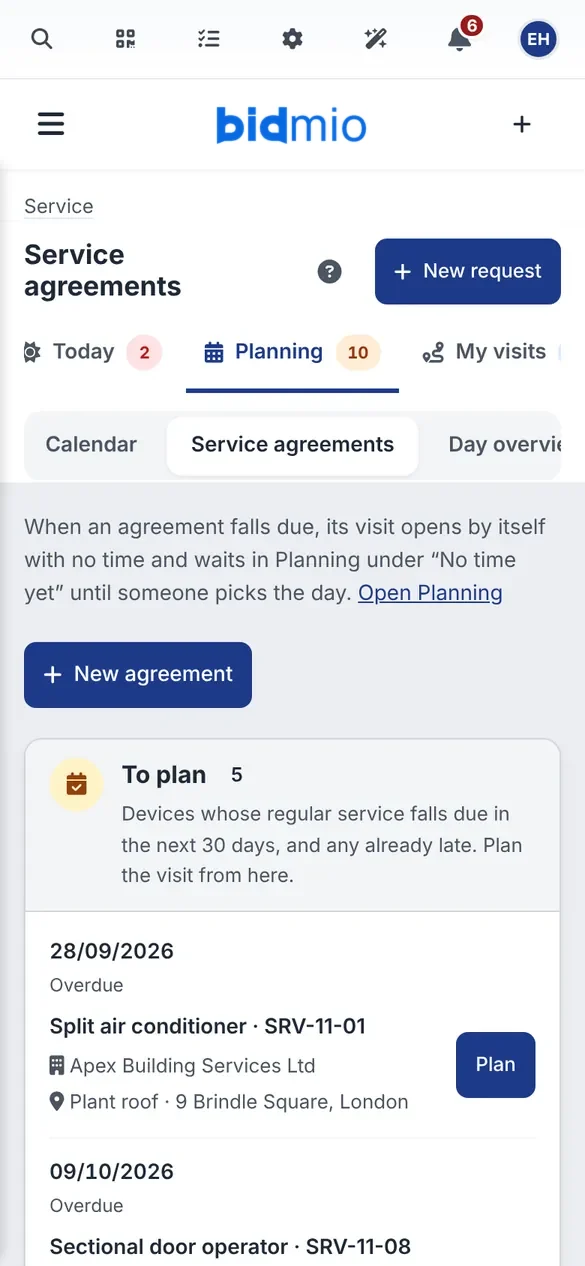
The Larchmont House heat pump is on a yearly service agreement, and its annual service falls due on 21 October. It already sits on the list of devices to plan, and the visit opens with no time set until someone picks a day. Hannah does not have to remember, and neither does Emma.
Service interval in days for each device
Devices due in the next 30 days, and any overdue
Contract visits kept out of the invoicing list
SoloProfessional
A real Bidmio screen with demo data.
Why it matters
The engineer fixed it. The office has no idea.
In service work the money goes missing between the van and the office: the job sheet stays on the dashboard, nobody books out the part that went in, and the annual service on a contract only comes up when the customer rings to ask where you are.
Today
Breakdowns rung through to an engineer's mobile, invisible to the office
Carbon-copy job sheets with a signature nobody can read
Only the engineer who went last time knows what was done to the heat pump
Parts leave the van with no record
Service dates from contracts in a spreadsheet nobody opens
With Bidmio
Every breakdown is a request with a deadline and an engineer
The customer signs the report with a finger and gets it by email
Every past visit is listed against the boiler or unit
A part taken on a visit comes off stock and goes on the report
Contract visits open by themselves when they fall due
Live demo
See Bidmio with a service firm's data
A demo heating and air-conditioning service account with breakdowns, visits, service reports, service agreements and van stock. No sign-up needed, and the data is reset every day.
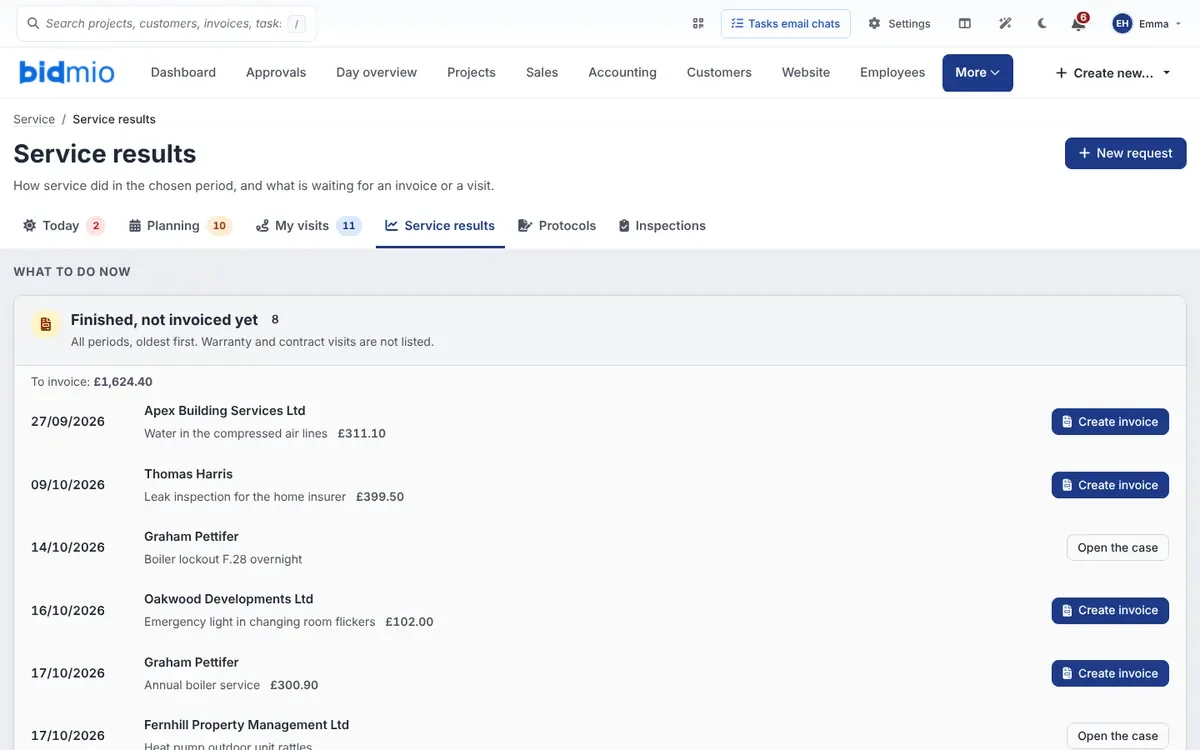
Service results list finished visits without an invoice and the amount waiting to be billed. You create the invoice straight from the list. Warranty and contract visits are kept out of it.
app.bidmio.com
In detail
How field service software holds a service business together, from dispatch to contracts
The ten steps above followed one Sunday breakdown. Here is the rest: what an ordinary week looks like in a heating and air-con firm that runs on Bidmio, where service businesses usually lose money, and where to find each part in the app.
Dispatch: every call has somewhere to go
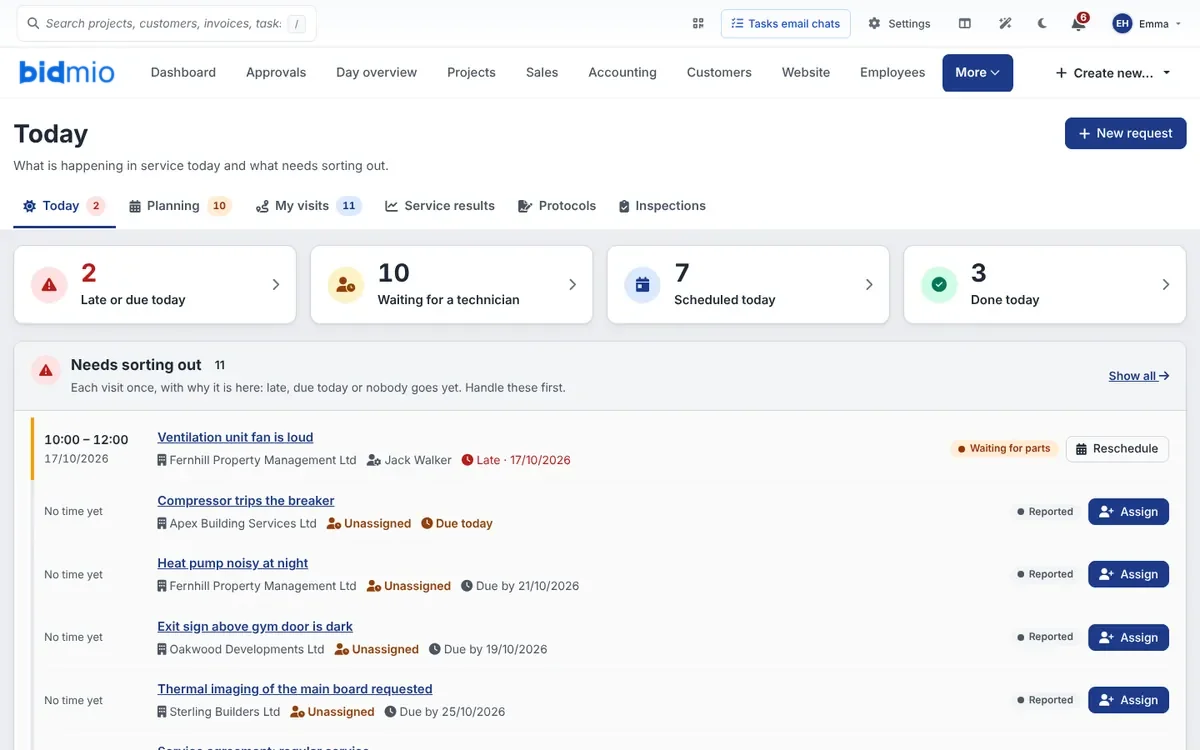
In a small service firm, dispatch is often the owner, between two jobs, with the phone on the passenger seat. A managing agent sends a text, a tenant emails, a landlord rings the engineer directly because he still has the number from last winter. By the evening nobody is sure what came in and what has actually been dealt with.
In Bidmio every one of those calls becomes a service request. It carries the customer, the site, the boiler or unit, the type of visit and whether it will be invoiced, covered by warranty or included in a contract. A request without an engineer does not vanish into somebody's head. It waits in planning until it is assigned, so in the morning the office sees what is late, what has nobody yet and what is finished.
You can plan from the office computer or from your phone in the van. When you choose an engineer you see how many visits they already have that day, so the emergency goes to whoever can genuinely get there, not to whoever happened to answer the phone first.
Breakdowns, scheduled services and inspections in one list
Engineers on the road: the phone instead of the job sheet pad
Your engineers do not need another complicated program to learn. On the phone they open today's route, tap the next visit and go through five short steps: device, work, time and parts, checks, finish. Each step shows only what has to be filled in at that moment, and everything saves as they type.
The work description can be typed or dictated. What the engineer writes in the plant room arrives on the customer's report without anybody retyping it. Photos taken before and after the work are kept with the visit, so when a customer complains three months later nobody has to scroll through a personal camera roll.
A clock runs while the engineer is on the job. If they are waiting for a part or for the customer to come home, they press that button and the clock stops. The office sees why the visit is on hold and does not need to ring round to find out.
Five visit steps on the phone
Dictation instead of typing on a small screen
Navigate and call the site straight from the visit
Equipment and its history: a service record that remembers
A service business does not only sell hours. It sells knowing what was done to the boiler, the split system or the air handling unit last time. While that knowledge lives in one engineer's head, the business loses it the day that engineer leaves or goes off sick.
In Bidmio every device has its own record with type, make and model, serial number, location on site and warranty date. You can print a QR label for it, and on site the engineer scans it to open the right record. The last visits are listed with the text from their reports, together with the readings taken, such as pressure or the temperature difference across a heat pump.
Different types of equipment can have different checklists. A gas boiler has other checks than an air-conditioning unit or a roller shutter door. That way nobody forgets the flue or the condensate trap, even on their first visit to the site. If you already keep your equipment in a spreadsheet, you can import it from a file.
Make, model, serial number and location
QR labels and a full visit history
Checklists per type of device
F-gas register: leak checks and a refrigerant log for every unit
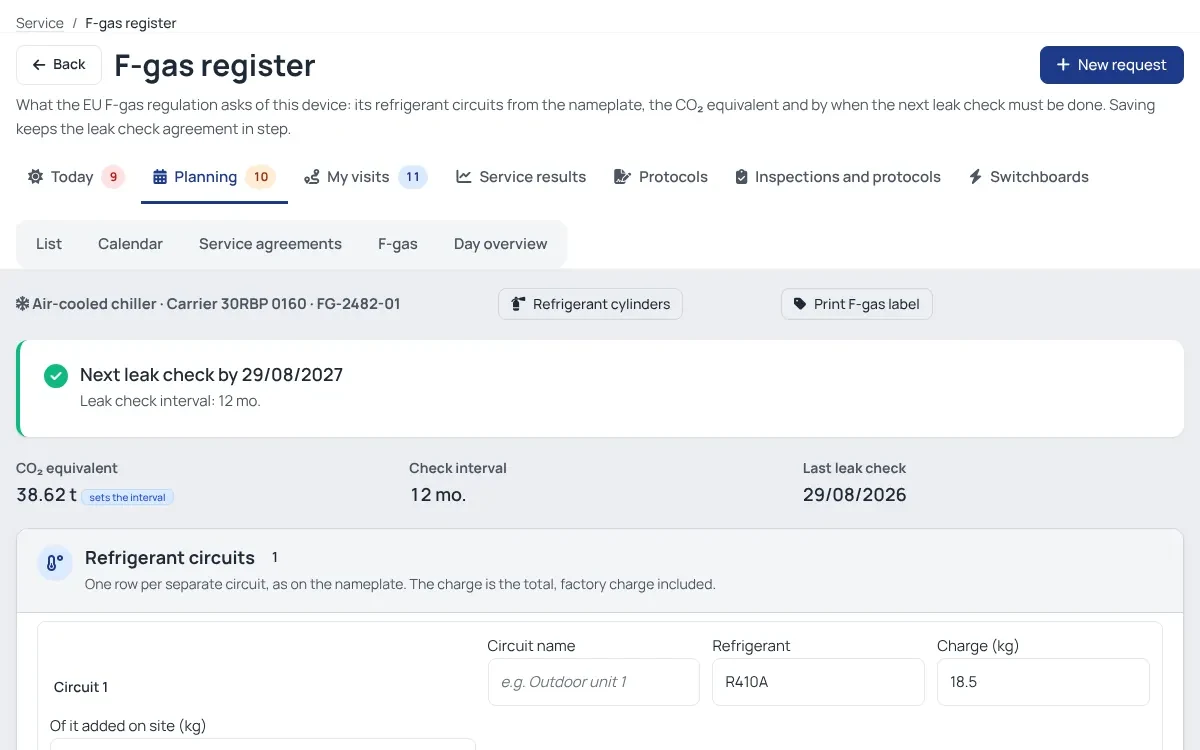
Air conditioning, heat pumps and refrigeration with fluorinated refrigerant must be leak checked at fixed intervals, and every charge, top-up, recovery, check and repair has to be recorded. In many firms the due dates live in a spreadsheet and the log is a sheet of paper in the plant room, so a missed check only comes to light when the customer is asked for their records.
In Bidmio you enter each circuit of a unit with its refrigerant and charge. Bidmio works out the tonnes of CO₂ equivalent and the leak check interval from the 5, 50 and 500 tonne thresholds, twice as long with a leak detection system, and opens a service agreement so the check appears in your planning a month before it is due. It also prints the unit's F-gas label with a QR code.
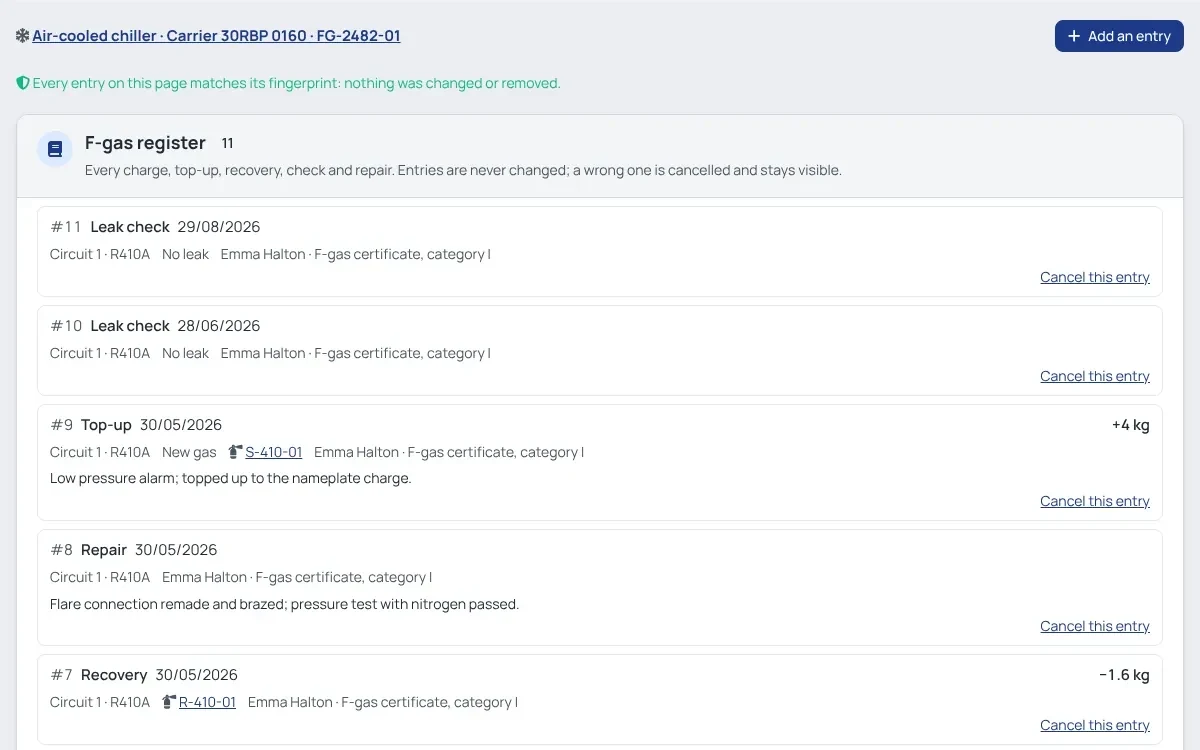
The engineer writes each job into the unit's register on the visit: the check, a top-up from a numbered cylinder, the gas recovered into a recovery cylinder. Every entry carries the engineer's F-gas certificate and the firm's, is numbered and cannot be changed afterwards. A mistake is corrected with a new entry, and both stay visible. A leak found on a check opens a repair request and a follow-up check within a month. The register is kept for ten years, longer than the rules ask for.
Leak check interval worked out from the charge in t CO₂e
A numbered register per unit that cannot be rewritten, with the engineer's and the firm's certificate
Supply and recovery cylinders, and a found leak becomes a repair request with a follow-up check
app.bidmio.com
app.bidmio.com
The service report: proof for the customer and for you
A signed service report, the job sheet of old, is the most important piece of paper in service work. It confirms what was done, how long it took and which parts went in. When a customer later queries the bill, a report with their own signature on it usually settles the matter.
When the engineer finishes a visit, Bidmio builds the report from what they recorded. Until it is signed, the office can complete it, for example adjust the labour rate or add a recommendation for the next service. The customer signs with a finger on the engineer's phone, or later through a link in an email if they were not at home.
Once signed, the report is locked and the customer receives it as a PDF. The next time the unit breaks down, the engineer finds it straight away against the device, so the whole history stays together.
The report is built from the visit
Editable before signing, locked afterwards
PDF emailed to the customer
Invoicing: no call-out given away by mistake
The most expensive mistake in service is a visit that was done and never invoiced. The job sheet stayed in the van, the engineer forgot to mention the part, or nobody was sure whether it was a warranty call. With dozens of call-outs a month, that soon adds up to hundreds of pounds.
That is why the request already says whether a visit is billable, under warranty, included in a contract or free of charge. The service results page then lists finished visits that have no invoice yet, with the amount waiting to be billed. Warranty and contract visits do not get mixed in with them.
The invoice is created from the signed report. Hours and parts become invoice lines, VAT is added at your rate if you are VAT-registered (your accountant can confirm which rate applies), and the invoice shows your bank details and payment terms so customers can pay by bank transfer. If a customer reference or purchase order number matters to a managing agent, it goes on the invoice too. Overdue invoices can get automatic payment reminders.
Billable, warranty, contract or free, chosen on the request
A list of finished visits with no invoice
Invoice from the report with bank details and terms
Van stock: parts you actually know about
Every service van is a small stores. Electrodes, seals, filters, valves and pumps go out of it every day, but without a record the office only finds out when an engineer discovers on site that the last one has already gone.
On the Professional plan each van can have its own stock. The engineer takes a part with one tap, it comes off that van's stock and appears on the report at its selling price. When a van drops below its minimum, the office knows what to load before the next day, and the engineer can ask for a refill from the phone. A van count shows what is really on board and the office approves the differences.
Separate stock for each service van
Parts booked out straight from the visit
Low-stock warnings and refill requests
Service agreements: steady income that plans itself
Service agreements are the most reliable income a service business has. A managing agent or a company with forty air-conditioning units needs to know the services will not be forgotten. You need the dates not to depend on somebody checking a spreadsheet.
In Bidmio you set which devices an agreement covers and how often they should be serviced. Devices that are coming due appear in one list and their visits open by themselves. The cycle follows the date in the agreement, not the day the work happened, so a late visit does not push next year's date back. Contract visits do not appear on the list waiting for an invoice, so nobody is billed for something they have already paid for.
Service interval in days
Devices due soon, and any overdue
Agreement visits open by themselves
What else Bidmio gives a service business
A service van is the engineer's office. On the Professional plan you keep your vehicles and a trip log: each journey between customers is recorded or confirmed, business and private miles are kept apart, and the month closes with a summary for whoever does your books. When an engineer arrives at an address, the phone can suggest a time entry, and hours recorded in a cellar with no signal are saved offline and sent later.
Spare parts carried in the vans have minimum levels. When stock falls below them, Bidmio can suggest an order to your supplier and a stock count shows what is missing (Professional plan). A customer who has not replied to a quote for a repair can get an automatic reminder from your own template, and a thank-you email goes out when an invoice is paid.
New enquiries can arrive through a form on your website, with a photo of the fault, into one inbox. Engineers can collect points for chosen activities, and if the business grows into several companies or branches, you stay in one login with your own permissions and approval rules.
A spoken work report records the whole day in one go. In the Work zone, or from the job's options menu, you record up to three minutes: which job, who worked how long, what was done and what material went in. If you would rather not talk, type it. Bidmio turns it into hours, material from the van, from the price list or as a one-off item, and a site diary note. You check every line, and nothing reaches the job until you tap Save to project. Whoever may create invoices then taps Create invoice draft on the saved report and gets a draft partial invoice with exactly those hours and that material; nothing is issued or sent. Reports still without a draft wait for the office on the invoice list under Spoken reports. It needs AI switched on and uses AI credits.
Vehicles, trip log and mileage claims (Professional)
Time entries suggested by location, and hours logged with no signal
Supplier orders and van stock counts (Professional)
Automatic quote reminders and thank-you emails
Website enquiry forms with a photo of the fault
Points and rewards for engineers
Several companies in one login
Spoken work report: hours, material and a diary note from one recording, then an invoice draft
What Bidmio does not do for service firms
Bidmio is not a Gas Safe body and does not check anyone's registration. It has no ready-made Landlord Gas Safety Record (CP12) or Benchmark commissioning checklist. It keeps the F-gas register for air conditioning and heat pumps (see above), but it does not issue F-gas certificates or report to a regulator. You can write your own checklists for each type of equipment, but the certificates your scheme requires still come from your usual forms.
Bidmio does not file anything with HMRC. There is no Making Tax Digital submission for VAT or Income Tax, no Construction Industry Scheme returns and no UK e-invoicing. It does not connect to Xero, QuickBooks or Sage and does not replace them or your accountant. Most UK firms keep their bookkeeping where it is and use Bidmio for the jobs, the reports and the invoices.
Invoices show your bank name, IBAN and SWIFT code with the payment terms. There is no separate sort code field yet, no card payment or payment link for customers, and no automatic calculation of statutory late-payment interest under UK law. Payment reminders are there, but the interest you claim is your call.
No Gas Safe, CP12 or Benchmark paperwork, no F-gas certificates
No MTD, CIS or HMRC filing, no link to Xero, QuickBooks or Sage
No card payments, payment links or sort code field on invoices
How to start without a big project
You do not have to switch everything over in one go. Most firms start by bringing in the customers and equipment they keep in a spreadsheet today and, for the first week, only log new breakdowns in Bidmio. The engineers get used to the five steps on the phone and gradually stop carrying the job sheet pad.
If you would rather look around before putting in your own data, open the service demo. It has a firm with engineers, equipment, visits, reports and agreements already in it, so you can try every step on this page yourself.
Typical jobs
Service software for everything your engineers do
From a midnight breakdown to hundreds of units on contract.
Emergency call-outs
No heat, a leak, a tripped unit. A request with a deadline and the engineer who is actually free.
Annual boiler services
Checklist, readings and a report with recommendations. The next date can be planned from the visit itself.
Air conditioning and heat pumps
Unit cleans, filters, parts from stock and leak checks in the F-gas register. Every indoor and outdoor unit keeps its own history.
Managing agents and landlords
Dozens of devices across several addresses. Plant room, roof and flats each have their own equipment.
Warranty and call-backs
A warranty visit is recorded and signed like any other but does not go on an invoice.
New installations
A new plant room as a project with its own budget. After handover its equipment moves into your service list.
Switching
What you can stop using
Customers, equipment with serial numbers and your parts price list can come with you. We help you on a call when you switch.
Plans in euros, your invoices in poundsBidmio plans are priced and billed in euros, so your card or bank converts the monthly amount to pounds. Everything your service firm sends to customers, quotes and invoices included, is in pounds with UK VAT.
Your accountant keeps the booksInvite your accountant as an external user for the companies you choose and remove the access in one click. They see the invoices, receipts and bank matches, or you send a CSV export. Bidmio does not file with HMRC and does not replace Xero, QuickBooks or Sage.
With a finger on the engineer's phone as soon as the visit is finished, and then the engineer signs. If the customer is not there, you email them a link and they sign from home. The signed report is locked and the customer receives the PDF.
Can the engineer see what was done to a heat pump or boiler last time?+
Yes. Every device lists its recent visits with the date, the engineer and the text from the report. The engineer finds the device by serial number or by scanning its QR label.
How do service agreements for annual services work?+
For each device you set how many days apart the service should be. When the date comes round, the visit opens by itself and waits in planning until somebody picks a day. The list also shows devices due within the next 30 days.
Does Bidmio keep an F-gas register for air conditioning and heat pumps?+
Yes. You enter each circuit with its refrigerant and charge, and Bidmio works out the t CO₂e and the leak check interval, plans the checks as service agreement visits and keeps a numbered register per unit with the engineer's and the firm's F-gas certificate. An entry can only be corrected by a new one, never rewritten, and the register is kept for ten years. Your certificates still come from your certification body, and Bidmio does not report anything to a regulator.
Can each van have its own parts stock?+
Yes, on the Professional plan. Every service van is a stock location with minimum levels. A part taken on a visit is booked out and added to the report, and when the van drops below its minimum the office tops it up from the main store.
Is the service module part of the Solo plan?+
Yes. Requests, visits, signed service reports, equipment history and service agreements are in Solo too. Solo is for one or two people, though, so a team of engineers needs Professional, and stock in the vans and the vehicle log also come with Professional.
How do I invoice from a service report?+
On the signed report you click Create invoice. Hours and parts move across as lines with VAT, and the invoice carries your bank details and payment terms. Customers pay by bank transfer; card payments and payment links are not part of Bidmio.
Does Bidmio produce Gas Safe or CP12 certificates?+
No. Bidmio is not linked to the Gas Safe Register and has no CP12 or Benchmark forms. You can build your own checklist for each type of equipment and keep your certificates on the forms your scheme requires.
Does it do Making Tax Digital or replace Xero?+
No. Bidmio does not submit anything to HMRC, does not handle CIS and does not connect to Xero, QuickBooks or Sage. It runs the jobs, reports and invoices; your bookkeeping and VAT returns stay with your accountant or your current software.
What happens when the engineer is waiting for a part or for the customer?+
They press Waiting for parts or Waiting for customer and the work clock stops. The visit stays open and the office can see why it is on hold.
Can I try the field service software before I sign up?+
Yes. You can open the service firm demo without registering. When you want to try it with your own equipment and customers, you get First month 90% off.
Does the customer get a reminder before the visit?+
Yes, once you switch it on under Settings → Service. Bidmio sends an SMS, an e-mail or both one or two days ahead or on the morning of the visit. The customer confirms, cancels or asks for another time from the link, and both the office and the technician see the answer. The SMS comes from your company's name.