AI in Bidmio · it drafts, you sign off

    Let AI do the typing, you keep the say

    Price a bathroom off a photo. Book hours by talking into the phone. Snap the till receipt at the trade counter. Below we follow one London building firm through a single day, on the actual screens.

    • Hours and notes spoken, not typed
    • A quote started from a photo or a couple of lines
    • Nothing counts until someone confirms it
    • Every draft waits for a person
    • Each AI feature has its own off switch
    • Hosted on servers in Germany
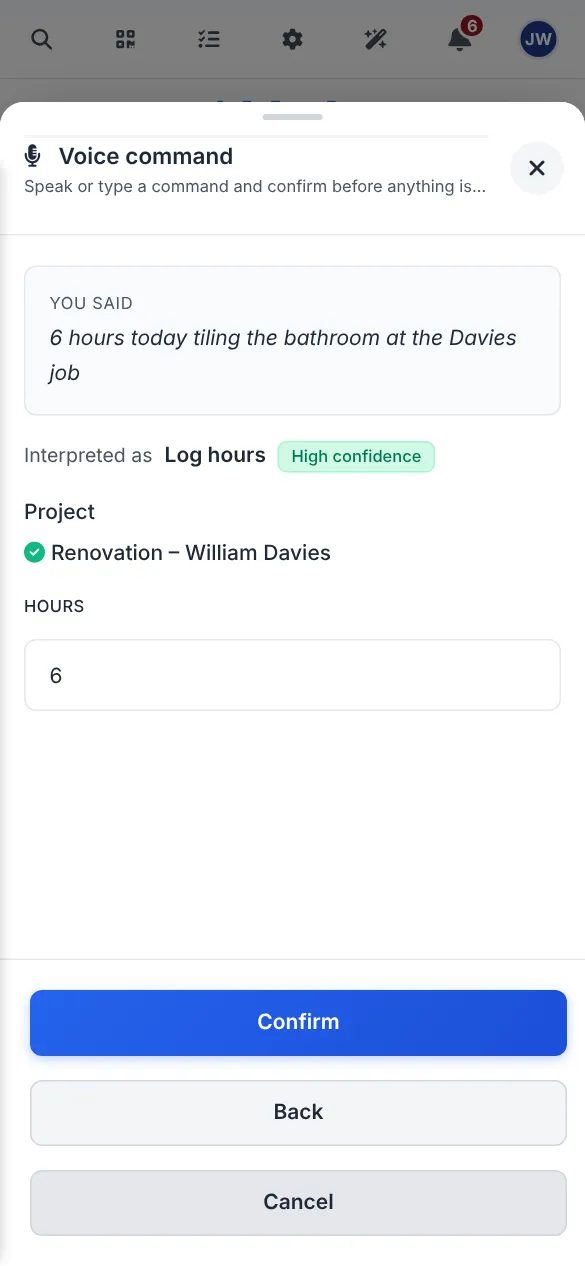
    Phone screen where a tiler has said his hours and Bidmio has a time entry waiting for him to confirm
    Screenshot from Bidmio, filled with demo data.
    A day with AI

    Thirteen moments where AI helps, from 7am to the weekend

    Greenfield & Pellowe Construction Ltd refurbishes kitchens, bathrooms and the odd loft in and around London. James owns it, there's someone in the office, and two small crews are out on jobs. Today one of those jobs is William Davies's bathroom.

    1. 1

      7:00, the office · Morning summary

      Before the first brew, the morning summary

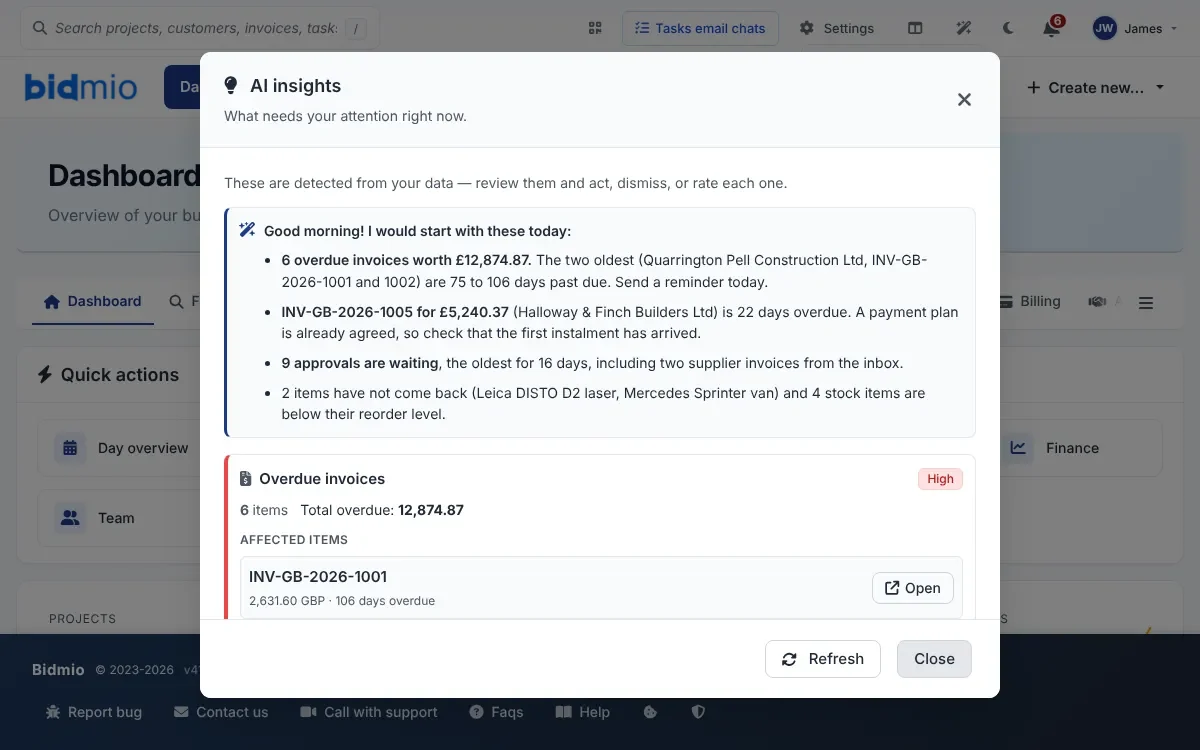
      Bidmio's own checks run overnight and flag overdue invoices, approvals that have sat too long, and tools nobody has brought back. AI then writes those up as a few lines in plain English, with the worst first. It only words the findings. It doesn't go looking for them.

      • Overdue invoices and stuck approvals on one screen
      • A suggested next step that you choose to start
      • An Explain with AI button on each job

      SoloProfessional

      AI insights in Bidmio with a morning summary of six overdue invoices worth £12,874.87

      Screenshot from Bidmio, filled with demo data.

    2. 2

      7:30, kettle on · Quote from a photo

      Start a quote from a photo, a few lines, or your voice

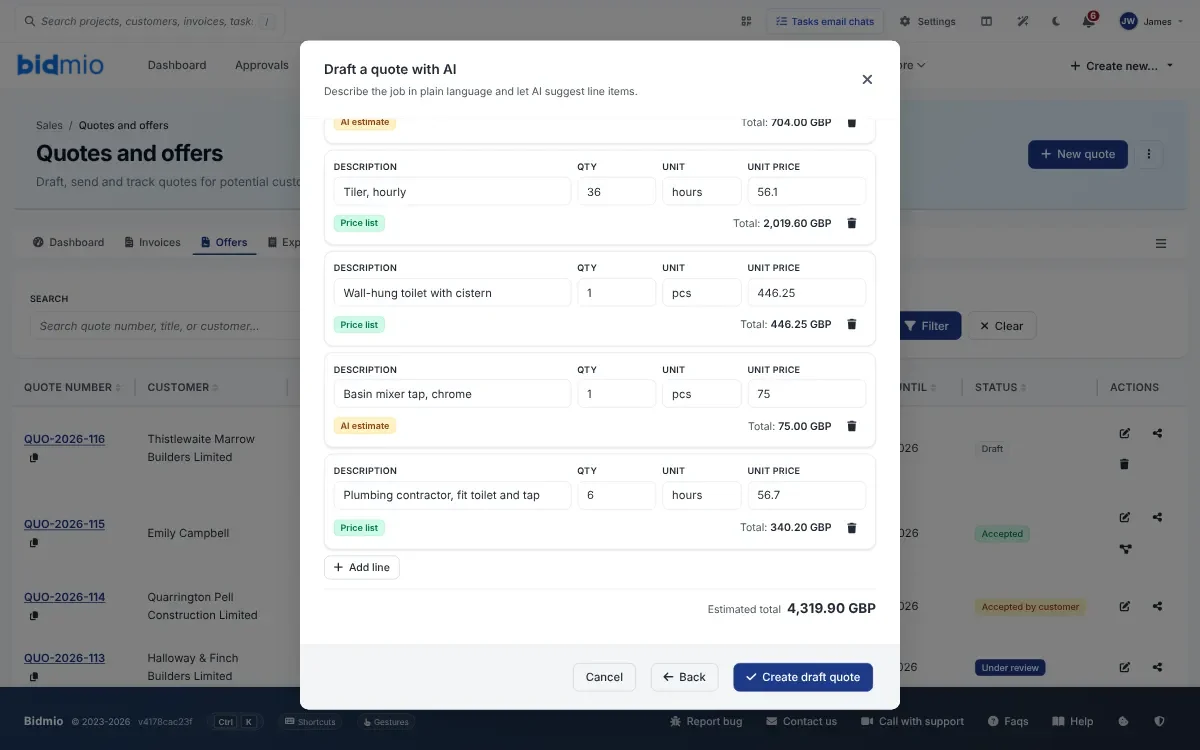
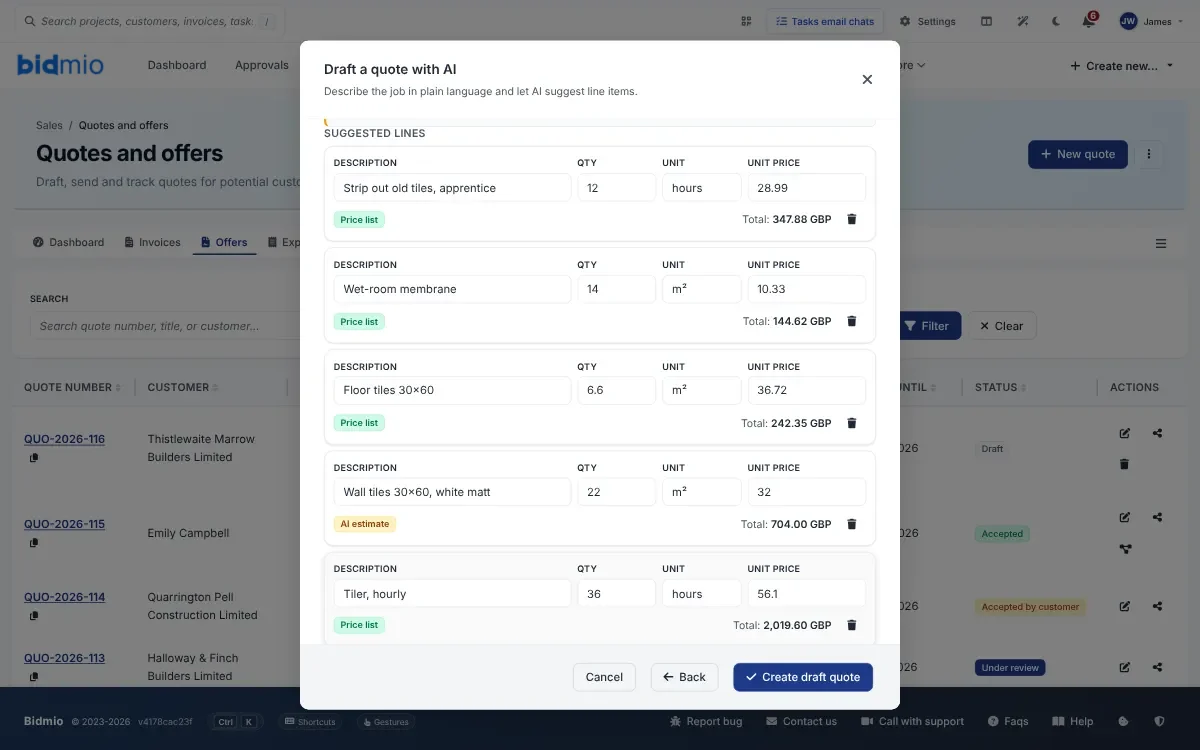
      James types "bathroom refit, 6 m², tiles, new tap and wall-hung toilet" and picks William Davies as the customer. AI fills the quote with lines from his own price list, plus the odd item from a catalogue of over 10,000 when the list has no match. Those are labelled AI estimate so he knows to check the price. He changes what he wants. Nothing goes to the customer until he sends it.

      • Prices pulled from your list, never invented
      • A floor plan with measurements turns into quantities
      • Drop a draft into a quote you've already begun

      SoloProfessional

      Draft a quote with AI window showing suggested lines in pounds, each marked Price list or AI estimate

      Screenshot from Bidmio, filled with demo data.

    3. 3

      8:15, on site · Hours by voice

      Tomasz says his hours out loud, and the timesheet is done

      There's a Say what you did button on the worker's home screen. He says "6 hours today tiling the bathroom at the Davies job" and Bidmio finds the right job and lays the entry out for him to check. It only lands on his timesheet once he taps Confirm.

      • Hours, a job note, a task or a diary line
      • Several things in one breath, each shown before saving
      • When the sentence is unclear, it asks rather than guesses

      SoloProfessional

      Voice command on a worker's phone with six hours on Renovation – William Davies ready to confirm
      Screenshot from Bidmio, filled with demo data.
    4. 4

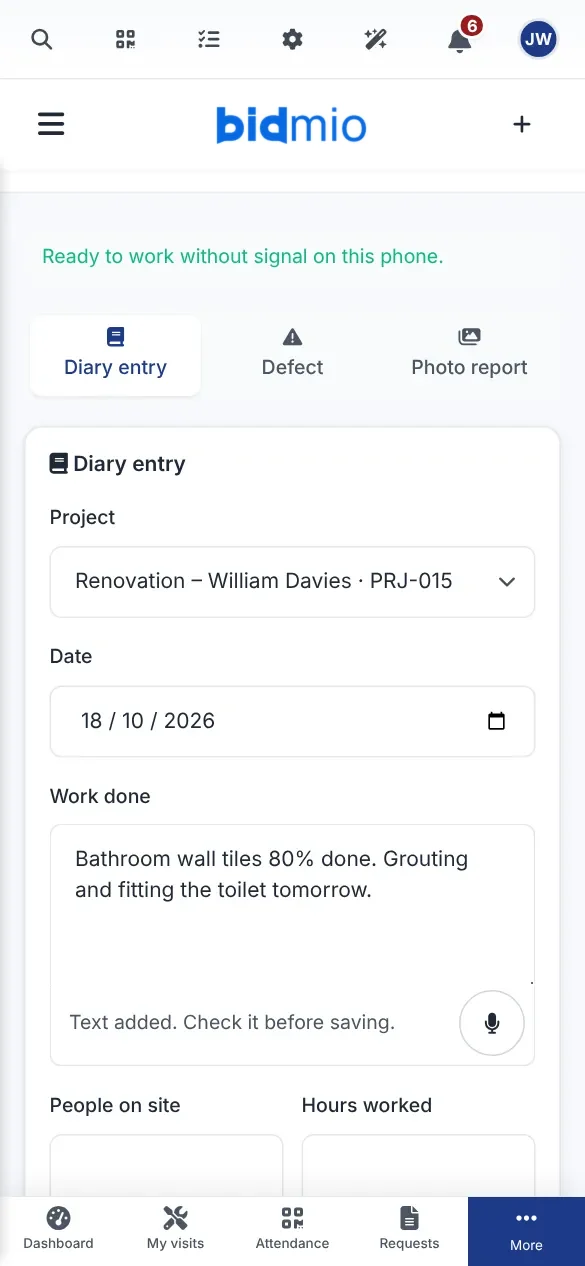
      9:30, in the bathroom · Dictation

      Talk into the field when your hands are covered in adhesive

      Most text boxes have a small Dictate button beside them. Press it, speak for up to a minute and the words appear in the box. The form still isn't saved until you save it.

      • Diary, defects, service reports, tasks and chat
      • Over 140 fields across the app
      • The audio is thrown away once it's turned into text

      SoloProfessional

      On-site diary on a phone with a note typed out by the Dictate button
      Screenshot from Bidmio, filled with demo data.
    5. 5

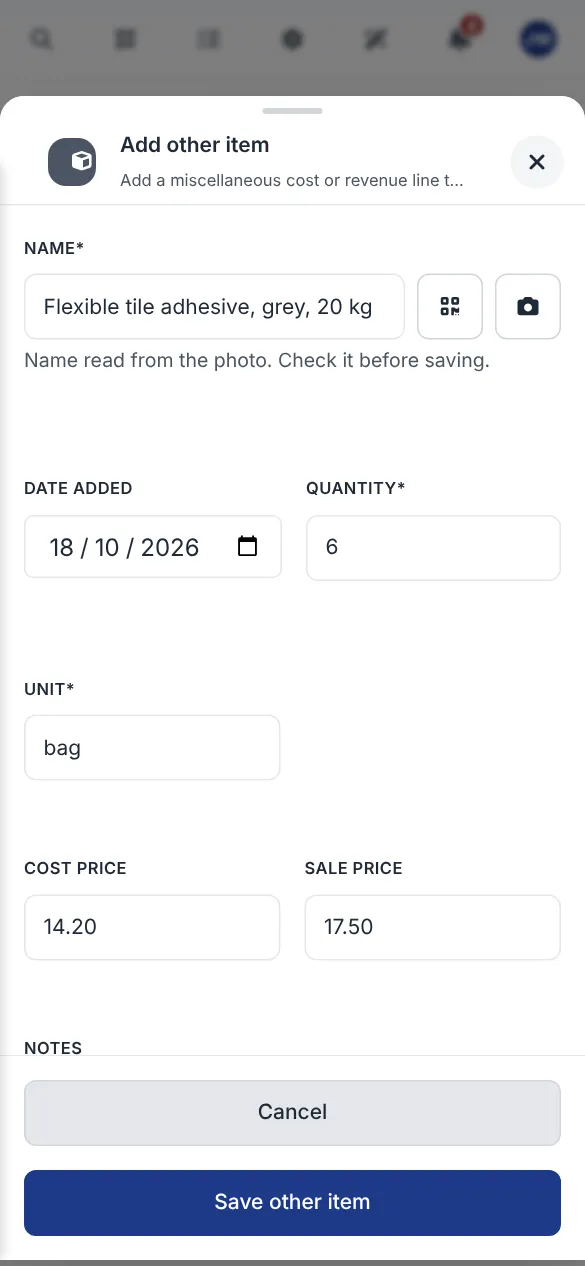
      10:20, unloading · Label photo

      Point the camera at the bag instead of copying the label

      Adding materials to a job usually means squinting at small print on a sack of adhesive. Take a photo of the label and Bidmio reads the product name and unit. You put in how many.

      • Materials logged against the job, not in a notebook
      • Works on a phone or at the desk

      Professional

      Adding a bag of tile adhesive to a job with the name read from a photo of its label
      Screenshot from Bidmio, filled with demo data.
    6. 6

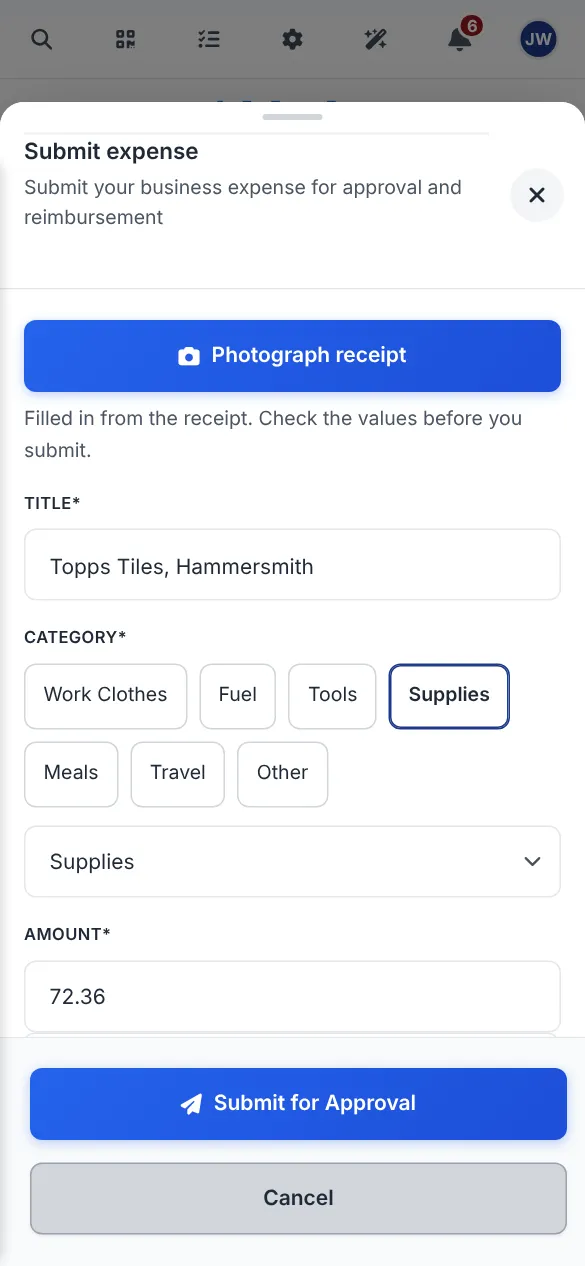
      11:40, trade counter · Receipt photo

      A crumpled receipt becomes an expense in two taps

      Tomasz photographs the receipt before it goes in his pocket. Supplier, date, total and category are filled in from the picture. He has a look and sends it to the office for approval. When James scans one of his own, the VAT and a suggested account are added as well.

      • The cost sits on the right job with the right amount
      • The office approves it in one click
      • The photo stays attached to the expense

      SoloProfessional

      Expense on a phone with Topps Tiles, Supplies and £72.36 filled in from a receipt photo
      Screenshot from Bidmio, filled with demo data.
    7. 7

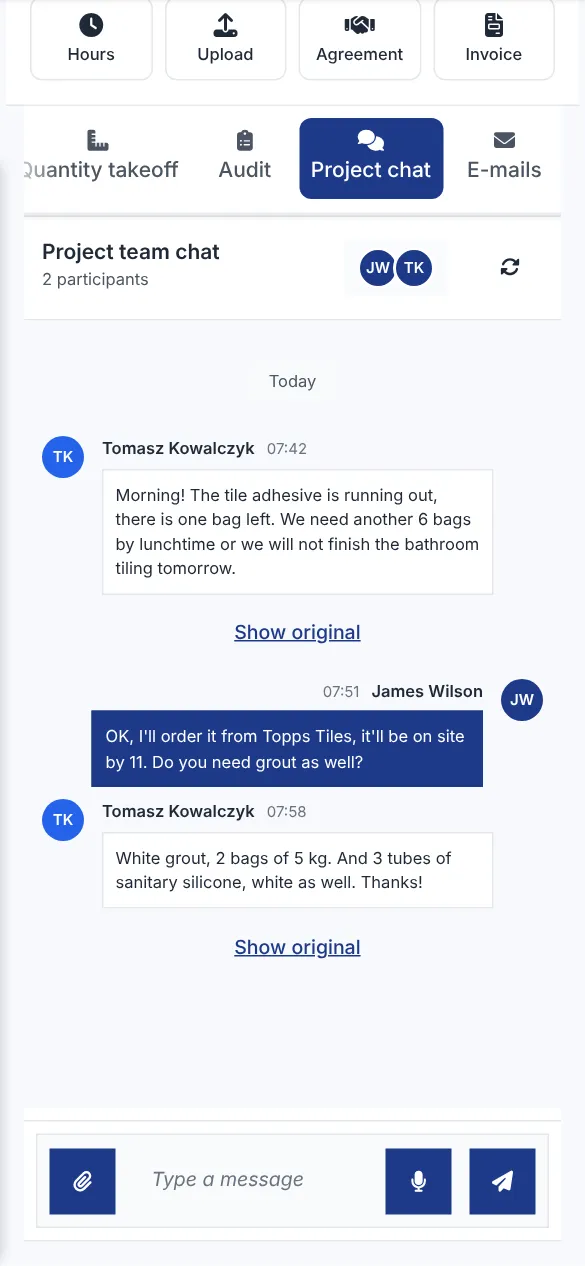
      12:30, sandwiches · Translated chat

      Tomasz writes in Polish. James reads English.

      Messages in the job chat show up in whatever language the reader uses. Show original is one tap away if something reads oddly. The job description gets the same treatment, so the brief is clear to everyone.

      • Everybody reads their own language
      • The original text is always kept
      • Photos and tasks live in the same thread

      SoloProfessional

      Job chat on a phone with Tomasz's message translated from Polish into English
      Screenshot from Bidmio, filled with demo data.
    8. 8

      14:00, walk-round · Defect from a photo

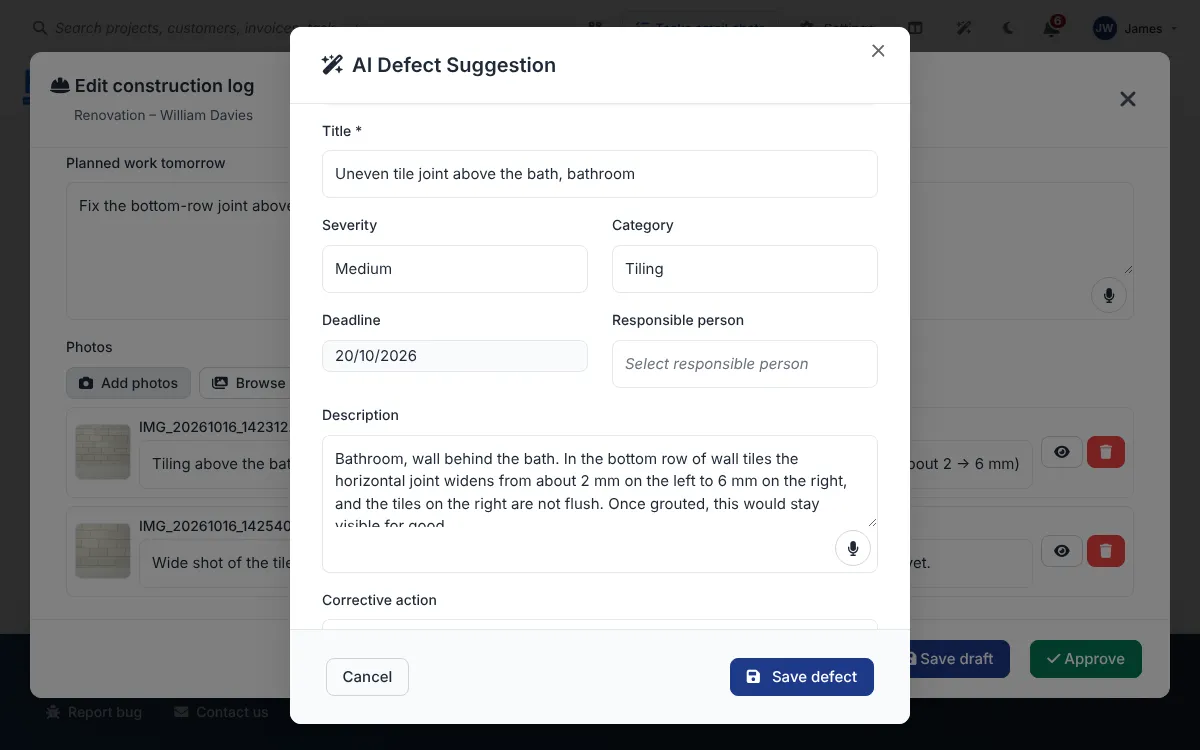
      Spot a problem in a photo, get the defect written for you

      Run AI over the photos in a diary entry or quality check and it proposes a defect with a title, its location, how serious it is and what should be done about it. Upload your own standards and it will quote the clause too. James edits the wording and saves. Until then, no defect exists.

      • Wording a client can follow
      • The photo stays with the defect
      • Can be turned off in the diary settings

      Professional

      AI defect suggestion from a photo of uneven tile joints, with a description and a fix

      Screenshot from Bidmio, filled with demo data.

    9. 9

      15:30, back at the desk · Supplier invoice

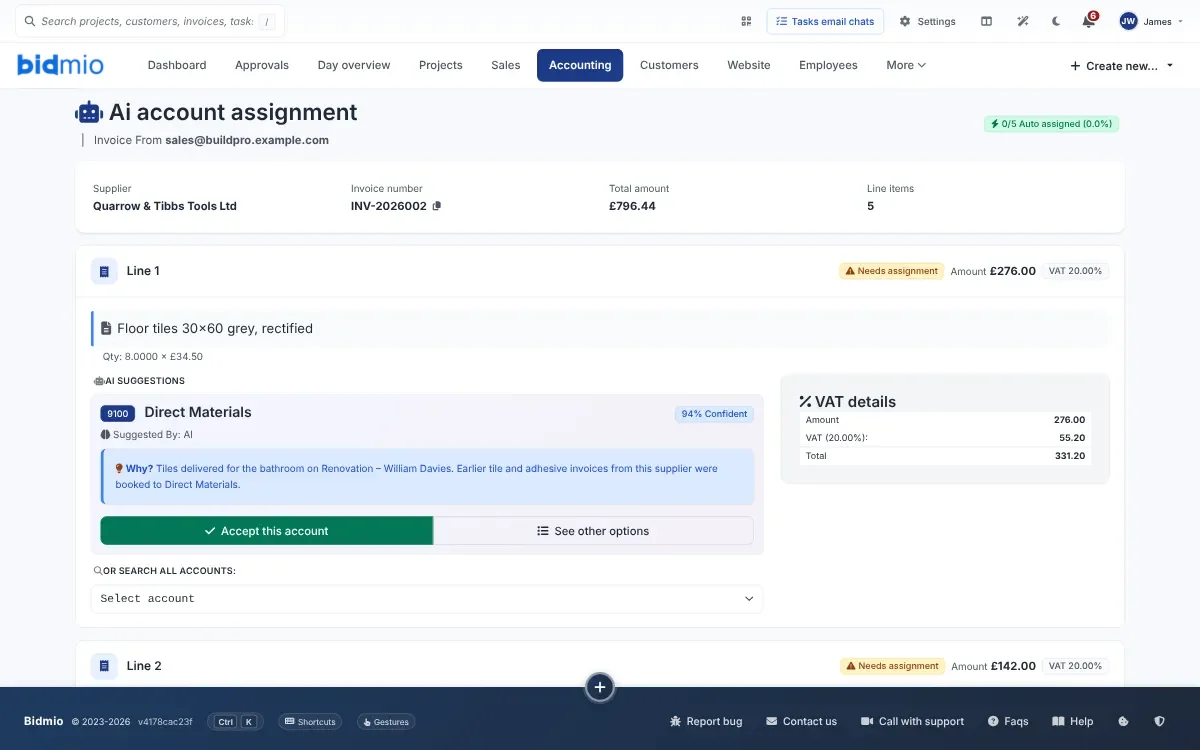
      The supplier's PDF reads itself and suggests where it goes

      Suppliers e-mail invoices straight to your Bidmio documents inbox. The supplier, amounts, VAT and each line are lifted out of the PDF. For every line Bidmio suggests an account, based on how similar invoices were booked before. Where it is over 95% sure, it fills the account in. Anything less waits for you. After that the invoice goes for approval like any other.

      • No retyping from the PDF
      • Suggestions learnt from your own past bookings
      • A person still approves and posts it

      SoloProfessional

      Supplier invoice from Quarrow & Tibbs Tools Ltd with lines read out and an account suggested

      Screenshot from Bidmio, filled with demo data.

    10. 10

      16:30, in the van · AI assistant

      Ask the assistant the way you'd ask the office

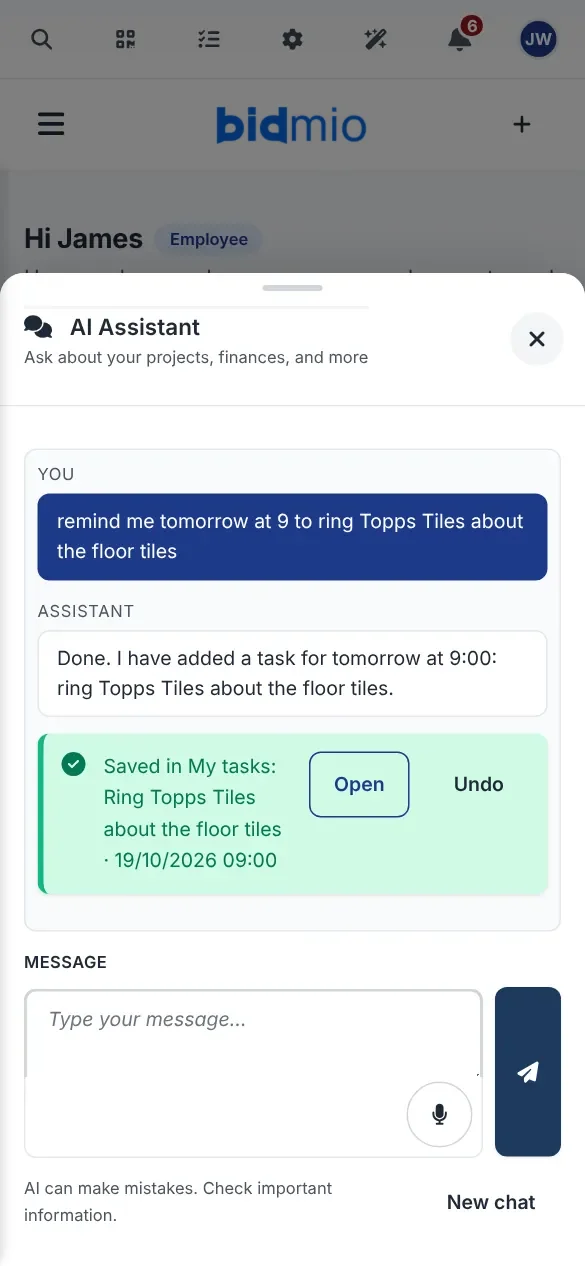
      "Where are we with the Davies bathroom?" gets an answer from your own jobs and invoices. "Remind me tomorrow at 9 to ring Topps Tiles about the floor tiles" becomes a task straight away, shown on screen with an Undo button in case it got it wrong. Notes and calendar entries work the same way.

      • Answers come from your own jobs, invoices and diary
      • Tasks, events and notes can be undone
      • It sees only what the signed-in person is allowed to see

      SoloProfessional

      AI assistant on a phone confirming a task for 9:00 tomorrow, with Open and Undo buttons
      Screenshot from Bidmio, filled with demo data.
    11. 11

      18:00, nobody lifts a finger · Site diary

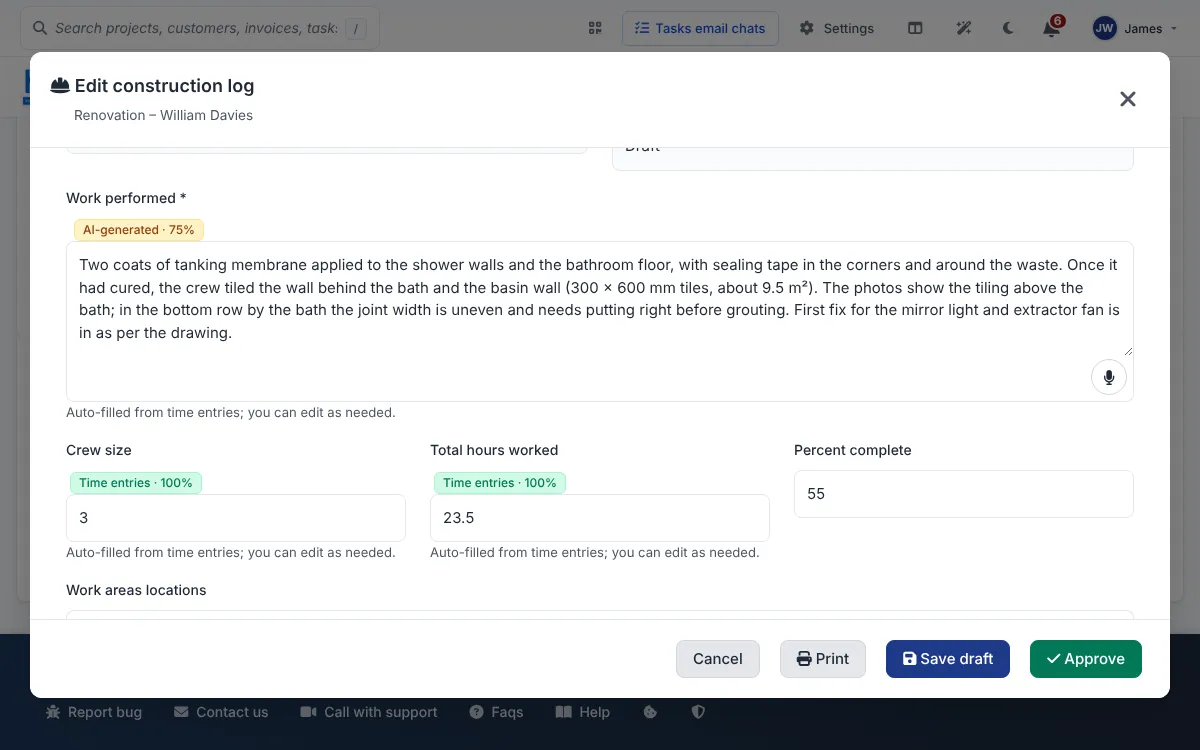
      At six o'clock the diary entry writes its first draft

      Each evening Bidmio pulls the day's hours, photos and local weather into a diary entry. It covers who was on site, what got done and what the photos show. The site manager reads it over, corrects anything that's off and signs it.

      • Built from hours booked and photos taken
      • Sits as a draft until someone approves it
      • Gaps from last week can be filled in after the fact

      SoloProfessional

      Site diary entry for the Davies bathroom drafted from the day's hours and photos

      Screenshot from Bidmio, filled with demo data.

    12. 12

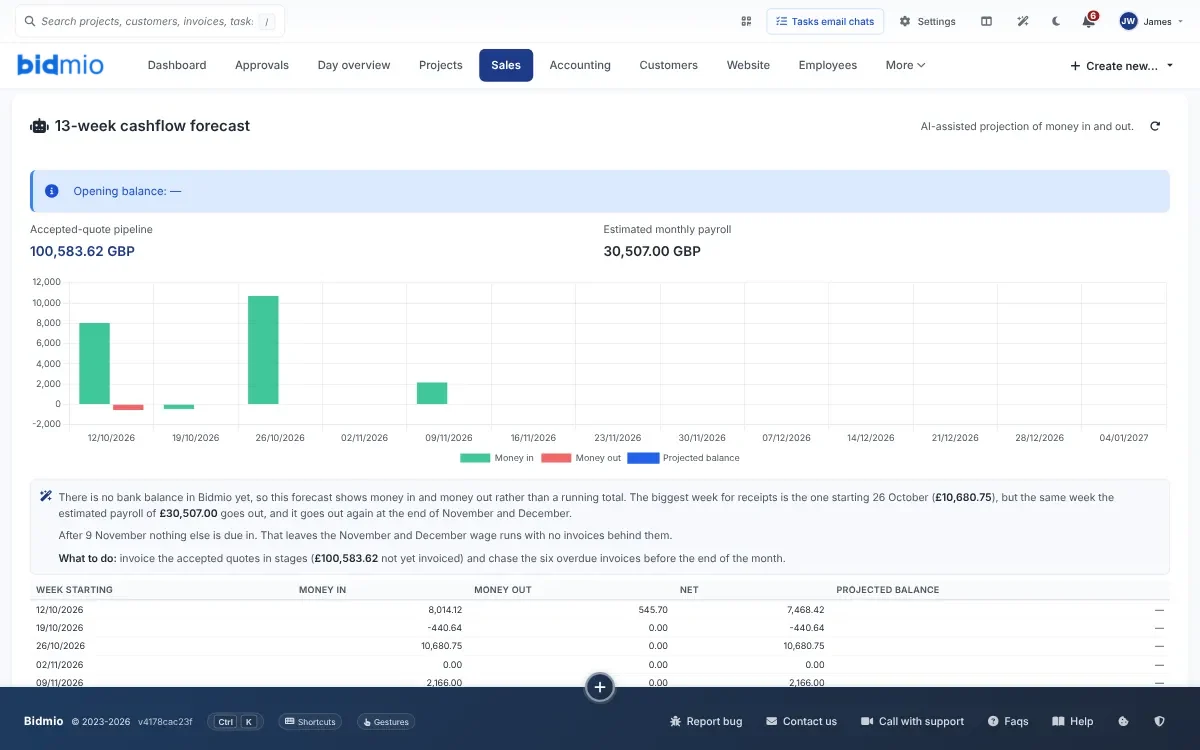
      Friday, money · Cash forecast

      Thirteen weeks of cash, and a note on what to watch

      The numbers come from your invoices, due dates and regular payments. AI plays no part in the sums. Its job is the paragraph underneath, which says in ordinary English when the bank will be at its thinnest and what is causing it.

      • Calculated from real invoices, not guessed
      • Readable if you're not an accountant

      Professional

      13-week cash forecast in pounds with a short explanation written by AI

      Screenshot from Bidmio, filled with demo data.

    13. 13

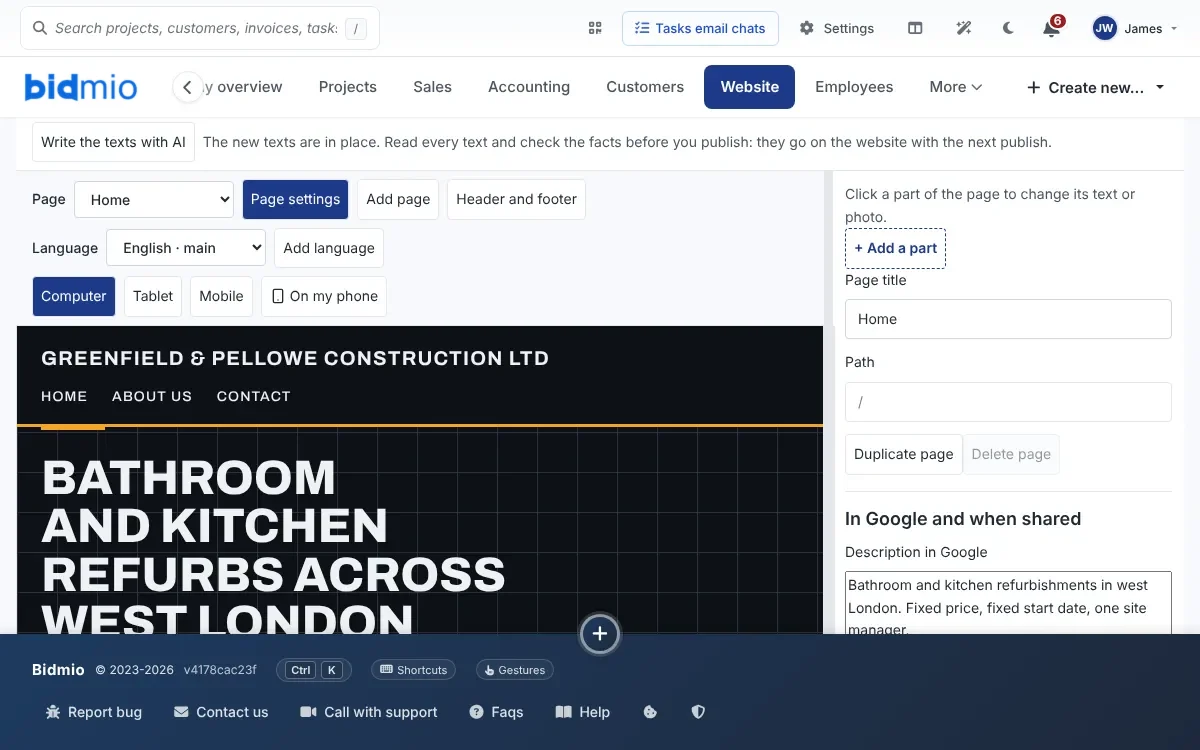
      Saturday morning · Website copy

      Website copy you don't have to write yourself

      The website builder can write the page copy from what Bidmio already knows about your firm, and translate the whole site if you work with customers in another language. Nothing goes live until you publish it. If a run fails, your old text stays put.

      • Services, recent jobs and contact details from your company profile
      • Translate the site in one go

      SoloProfessional

      Bidmio website builder after Write the texts with AI, with new copy for a London refurbishment firm

      Screenshot from Bidmio, filled with demo data.

    Why bother

    On a good day the job is the easy bit

    Hours you never wrote down can't go on an invoice. The AI in Bidmio goes after the evening admin, meaning the typing, the chasing and the copying out.

    How it usually goes

    • Monday's quote typed up from the back of an envelope on Sunday night
    • Ringing round the lads on Friday to find out who worked where
    • Receipts fading in the van door until the VAT quarter
    • A site diary written up from memory when the client asks for it
    • A Polish tiler, a Google Translate window and a lot of thumbs-up emojis

    Once Bidmio's AI is switched on

    • Describe the job, add a photo, and a draft quote comes back priced from your list
    • The tiler says what he did and confirms the hours before he leaves
    • One photo of the receipt and the shop, date and total are filled in
    • At six each evening a diary entry is waiting, built from hours and photos
    • Each person reads the job chat in their own language

    Have a go

    Poke around the AI in a demo firm

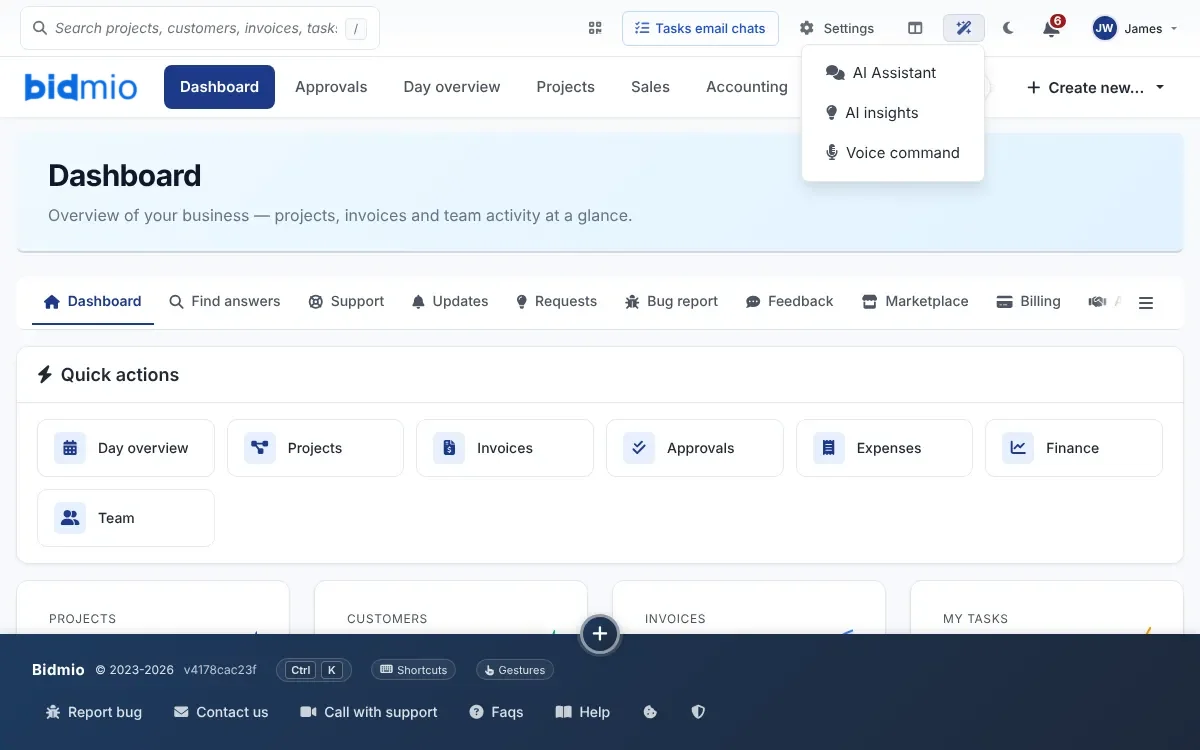
    The demo is a London building firm with jobs, quotes, receipts and a crew chat already in it. Look for the sparkle icon in the top bar, and the microphone beside text boxes. You don't need an account.

    AI menu in the Bidmio header with AI Assistant, AI insights and Voice command
    Open the demo

    Your call

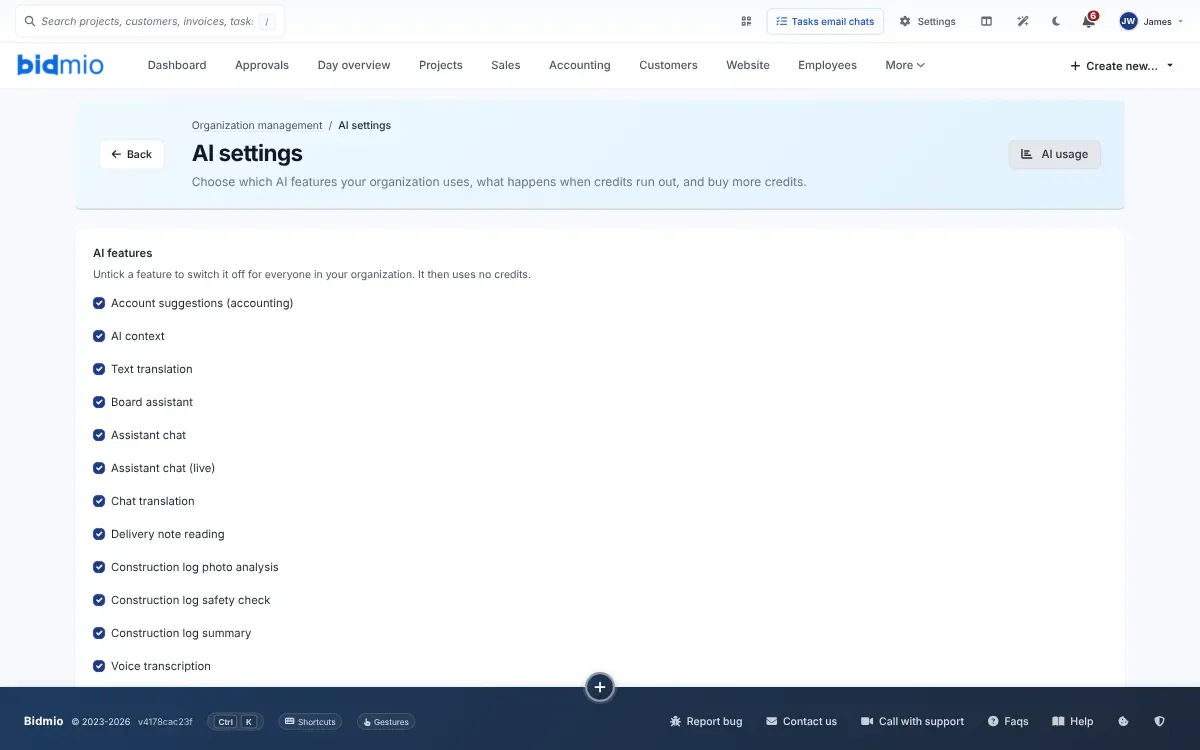
    Switch off any AI feature you don't want

    The company admin has a page of switches, one per feature, that apply to the whole firm. The same page shows how many AI credits each person has used, and lets you cap anyone's monthly spend.

    AI Settings in Bidmio with a switch for every AI feature
    The small print

    Ground rules, dictation, and where your data ends up

    The ground rule

    AI prepares. People decide. A quote stays a draft, hours wait for the worker to confirm them, and bookkeeping needs a human to approve it.

    There are two places where Bidmio acts first, and we'd rather you heard it from us. A task or calendar event created by the assistant is saved straight away, with an Undo button next to it. And on a supplier invoice, a line Bidmio is more than 95% sure about gets its account filled in. You see that account, and can change it, before you approve the invoice.

    Where the Dictate button turns up

    It records for up to a minute, puts the words in the box and stops there. Saving is still your job. You'll find it in:

    • The site diary, defects, service reports and machine breakdowns
    • Quotes, invoices, expenses and approvals
    • Tasks, the job chat, customer notes and the calendar
    • Timesheets, job descriptions and accident reports

    Where your data goes

    Bidmio itself, and everything you keep in it, runs on servers in Germany. When you use an AI feature, the text, audio or photo involved is sent to OpenAI in the USA to be processed. That only starts once the company admin has accepted it, under Organization management › Legal documents.

    OpenAI's API terms say it does not train its models on this data. Audio is deleted once it has been turned into text.

    Where it stops

    Things the AI won't do

    Worth knowing before you start.

    • Send your quotes

      A drafted quote sits in your list until you choose to send it.

    • Replace your accountant

      It suggests accounts. You or your bookkeeper approve them. Nothing is filed with HMRC, and your VAT return stays with your accountant.

    • Act on half a sentence

      Voice commands cover hours, notes, tasks and diary lines. You see the result before it's saved. If it can't make sense of what you said, it asks again.

    • Rank your enquiries

      There's no lead scoring in the CRM and no automated marketing campaigns.

    • Answer website visitors

      The enquiry form on your site is just a form. The message lands in Bidmio, and you decide if it's worth quoting.

    • Work behind your back

      No defect, time entry or quote appears unless someone saves it. Assistant tasks show up on screen with Undo. The evening diary waits as a draft.

    Plans

    Every plan comes with AI credits

    Start with the first month at 90% off and cancel anytime. Asking the Help Centre a question is free and never touches your credits.

    • Solo

      Sole trader or a two-person outfit, up to 2 people

      €19/mo.

      • 300 AI credits each month
      • AI for quotes, hours and receipts
      • Dictation and the AI assistant
      • Site diary, and receipts with a suggested account
      Try Solo
    • Best for firms with crews

      Professional

      Firms running crews, call-outs and stock

      €49/mo.

      • 400 AI credits per user
      • Everything in Solo
      • Defects suggested from photos
      • Material names read off labels
      • Cash forecast with a written explanation
      Try Professional
    • Developer

      Larger builds priced from a bill of quantities

      €99/mo.

      • 700 AI credits per user
      • Everything in Professional
      • Bills of quantities and variations
      Try Developer

    See the full plan comparison →

    AI in Bidmio, questions we get asked

    Can I just not use the AI?

    Yes. Each feature can be switched off. The fields don't go anywhere, and the microphone on your phone's keyboard still works in them.

    What happens to the voice recordings?

    They're deleted once they've been turned into text. All that's left is the text in the box, and that's only kept if you save it.

    Where do I switch features off?

    Organization management › AI settings. The admin can untick features one at a time for the whole firm and set a monthly credit cap for each user.

    Where is my data processed?

    Bidmio runs on servers in Germany. Anything you pass to an AI feature, whether text, audio or a photo, is processed by OpenAI in the USA, and only after the company admin has agreed to it.

    Can the assistant see the firm's finances?

    Only if the person asking can. Someone without access to invoices or the bank won't get round that by asking the assistant.

    Does it all work on a phone?

    Yes. Voice commands, dictation, receipts, label photos, the chat and the assistant are all built for the phone. Add Bidmio to the home screen and it opens like any other app.

    Is the AI in Bidmio an AI agent?

    Partly, yes. When you ask, the assistant saves a task, a calendar event or a job note on its own and shows you straight away what it saved, with an Undo button. Hours, quotes and receipts it prepares as a draft that you confirm. It never sends a quote or an invoice by itself.

    What does Bidmio do automatically, without a click?

    Every evening at 6 pm it prepares a draft site diary entry. Every day it checks jobs, invoices and deadlines and sums up what needs attention. Supplier invoices that arrive by email in the document inbox are read and get a suggested account.

    Put it to work on your next job

    Book a day's hours by voice, scan one receipt and let it have a go at a quote. By teatime you'll know if it's worth keeping.

    • Every draft waits for a person
    • Each AI feature has its own off switch
    • Hosted on servers in Germany