For electricians, sole traders and small electrical firms
Software for electricians from the first call to the paid invoice
Quotes, hours, photos of the board, signed job sheets and invoices sit on one job, on your phone and on the office PC. Below we follow one real board change in Leeds, step by step.
How electrician software works: 10 steps from the call to the payment
Michael runs a small electrical firm in Leeds with one apprentice. On Monday morning Sarah Holloway rings from Headingley: her 1930s semi still has an old fuse board with rewireable fuses, the lights tripped twice last week, and while he is there she would like two more sockets in the kitchen. This is how that job runs through Bidmio.
1
Monday 7:40 · The call
A new customer card in under a minute
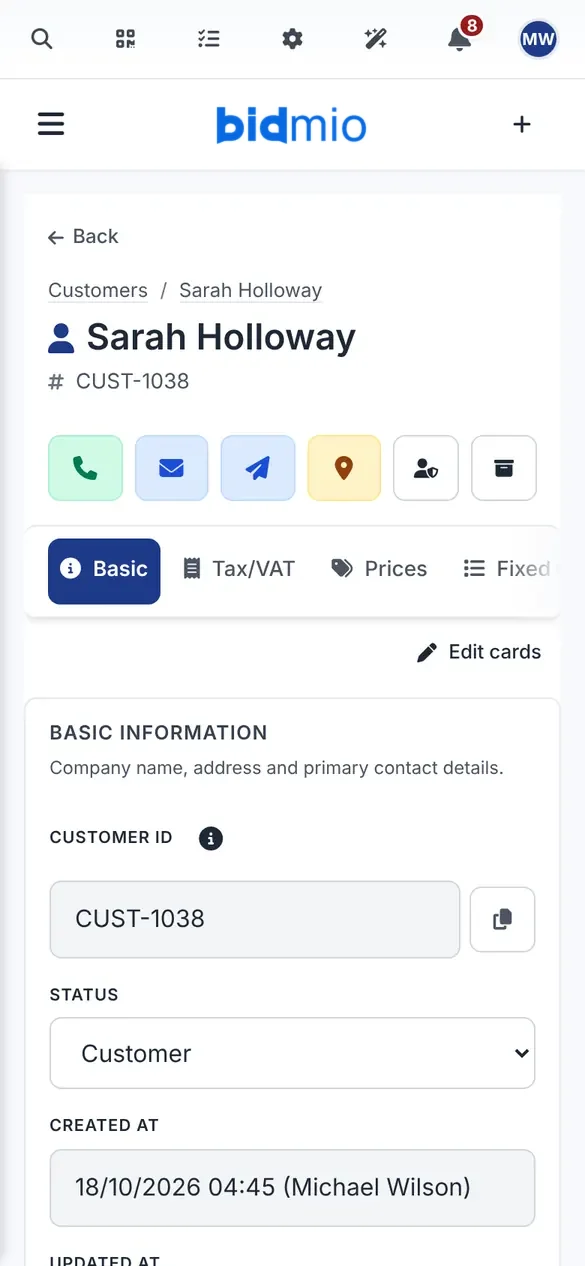
While Sarah is still on the phone, Michael adds her name, number, email and address and notes what she wants: board change, two kitchen sockets. Every quote, job, invoice and photo for this house will land on the same card, so next year nobody has to scroll through WhatsApp to find out what was fitted.
Quotes, jobs and invoices under one name
A landlord with several lets gets one card and a job per property
Who pays late is visible before you promise more work
Notes can be dictated instead of typed
SoloProfessional
A real Bidmio screen with demo data.
2
Monday 17:30, after the survey · The quote
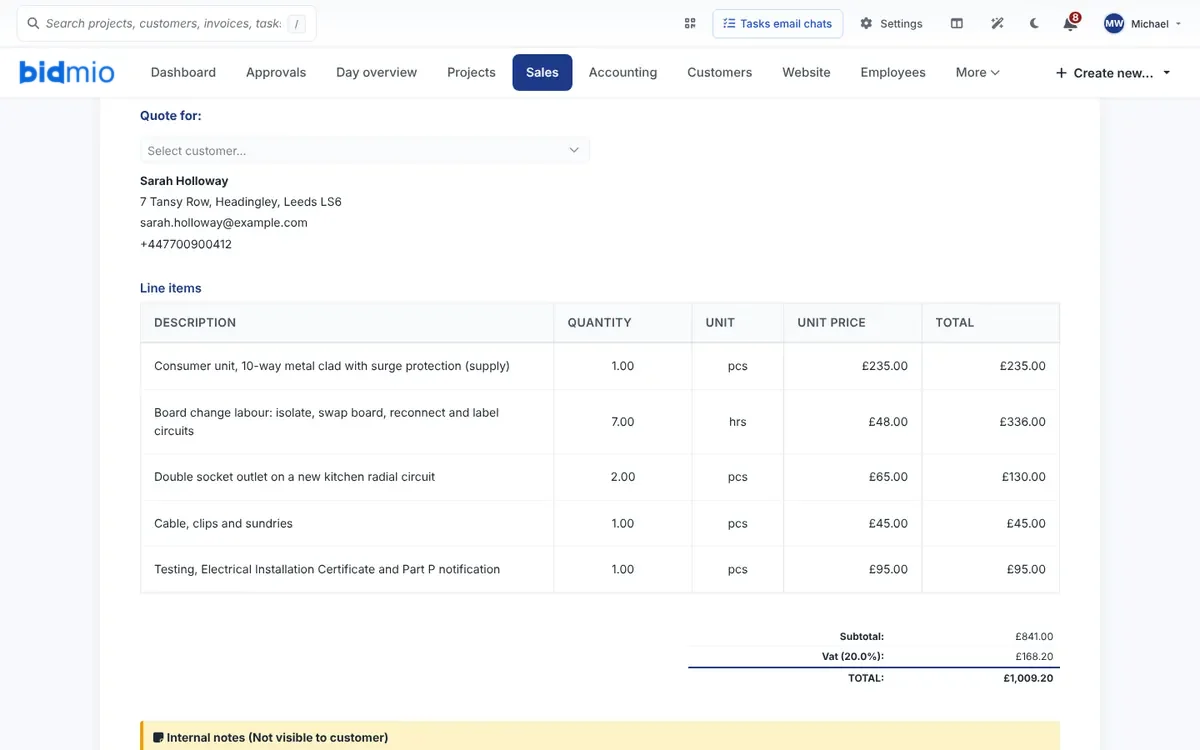
An itemised electrical quote in pounds, with VAT on every line
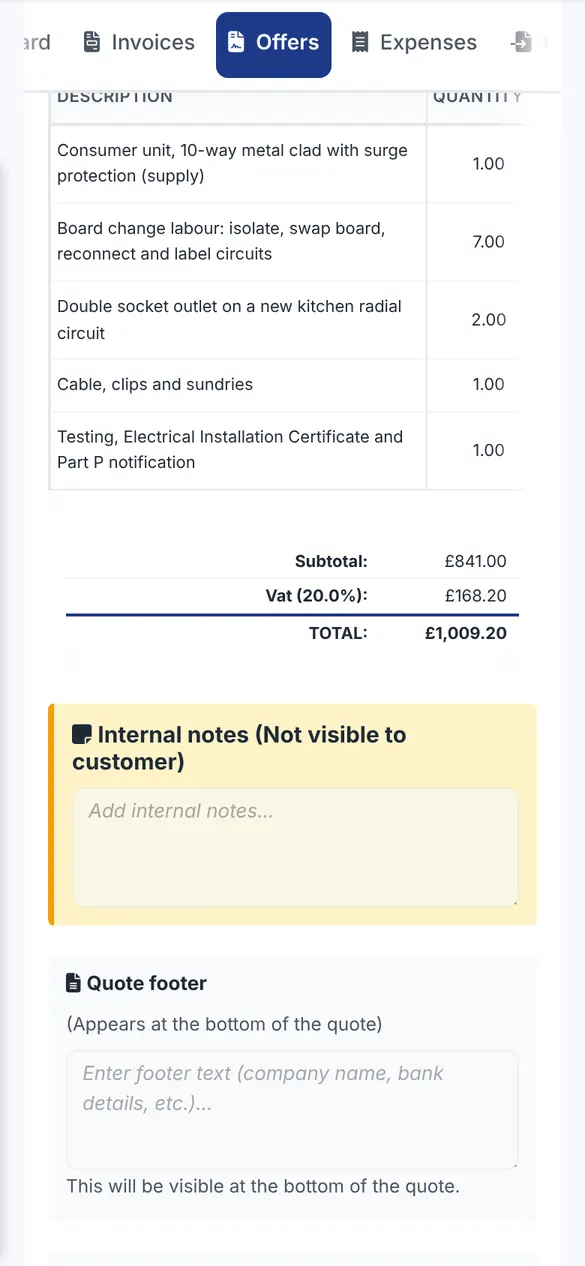
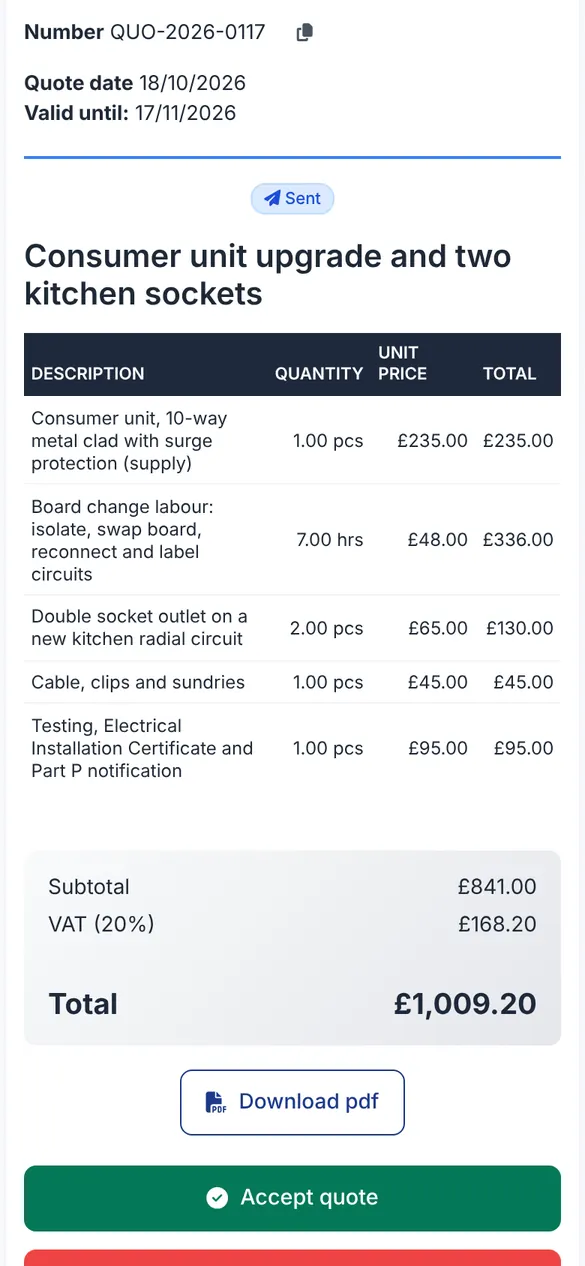
After a look at the board Michael prices the job in the van: the consumer unit with surge protection, seven hours of labour, two double sockets on a new kitchen radial, cable and sundries, and testing with the certificate and Part P notification. VAT at 20 % sits on each line, so the total is £1,009.20 and there are no surprises later.
Your own price list: call-out, hourly rate, board change, socket, EICR
Quote text by voice, or an AI draft from a photo of the board
PDF with your logo, sent only when you press send
SoloProfessional
A real Bidmio screen with demo data.
3
Monday 20:15 · Customer says yes
The customer accepts the quote on her phone and signs it
Sarah gets a link by email. She sees every line and the total, downloads the PDF for her records and taps Accept, signing with her finger. She could also decline, ask for a change or send a question. Once Michael confirms the acceptance, the quote becomes the job and nothing is copied by hand.
The customer never sees your trade prices or margin
A follow-up email after the number of days you set, if you switch that rule on
Questions about the quote stay with the quote
SoloProfessional
A real Bidmio screen with demo data.
4
Next Monday 7:45 · The day's route
Everyone knows where they are going before the van leaves
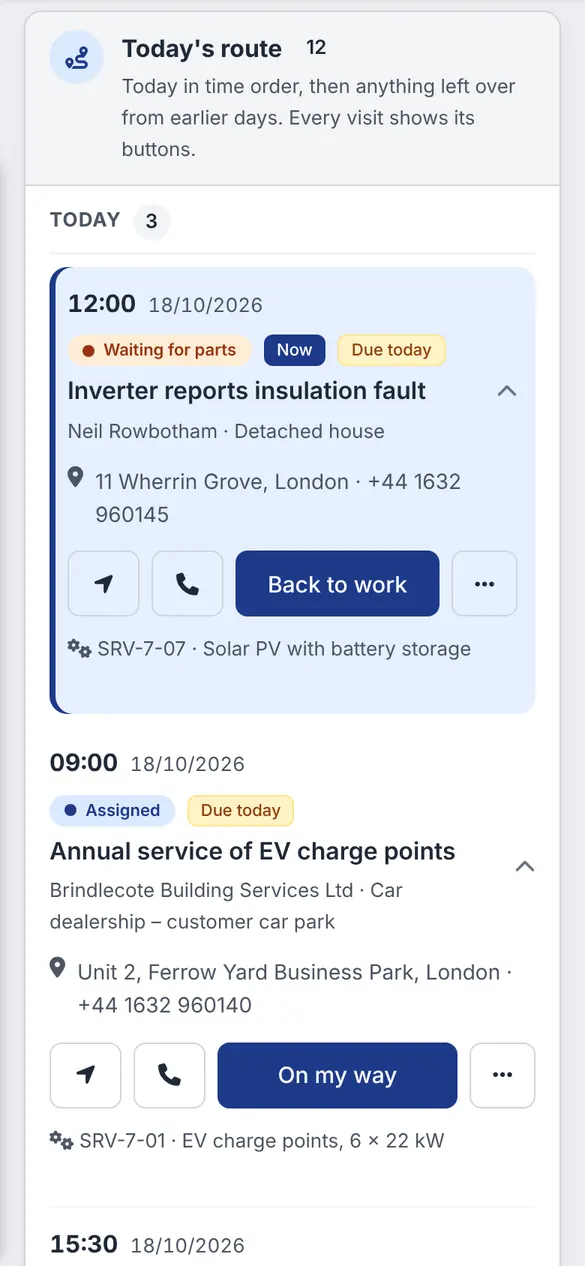
Each electrician sees today's visits in time order: the address, the customer's number, the status and the next step. Navigation and a call button sit next to every address, and a visit waiting for parts says so before anyone drives across town for nothing.
Today's route for each electrician
Tasks and chat on the job itself
Staff get their own Workzone screen
SoloProfessional
A real Bidmio screen with demo data.
5
15:00, board in and tested · Hours by voice
Log hours and notes by voice, for you and the apprentice
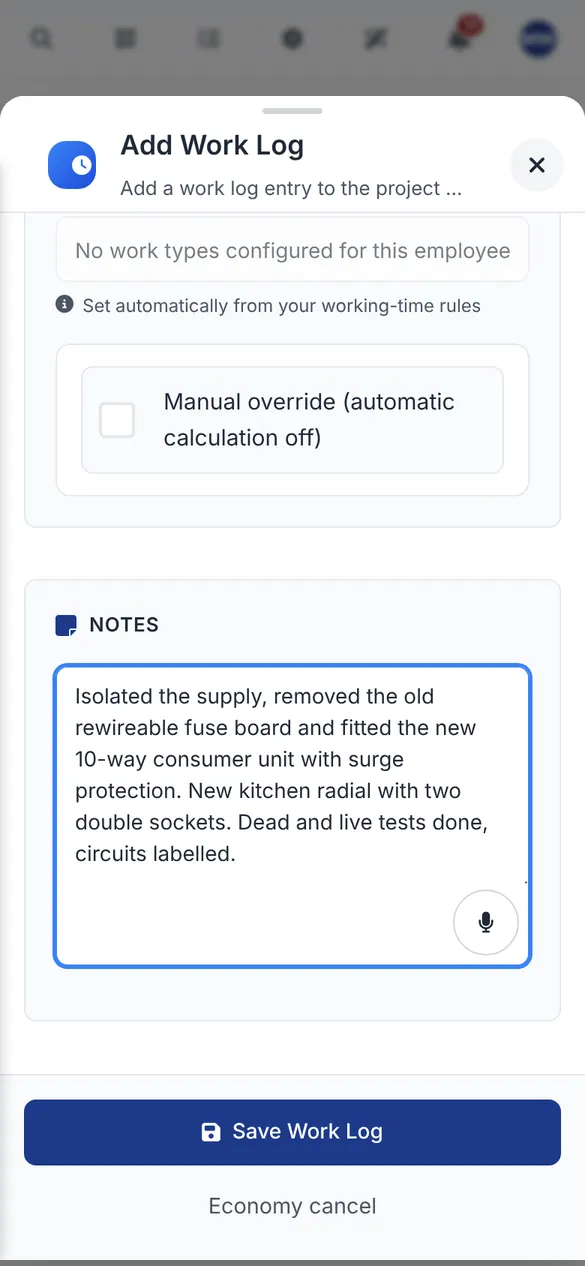
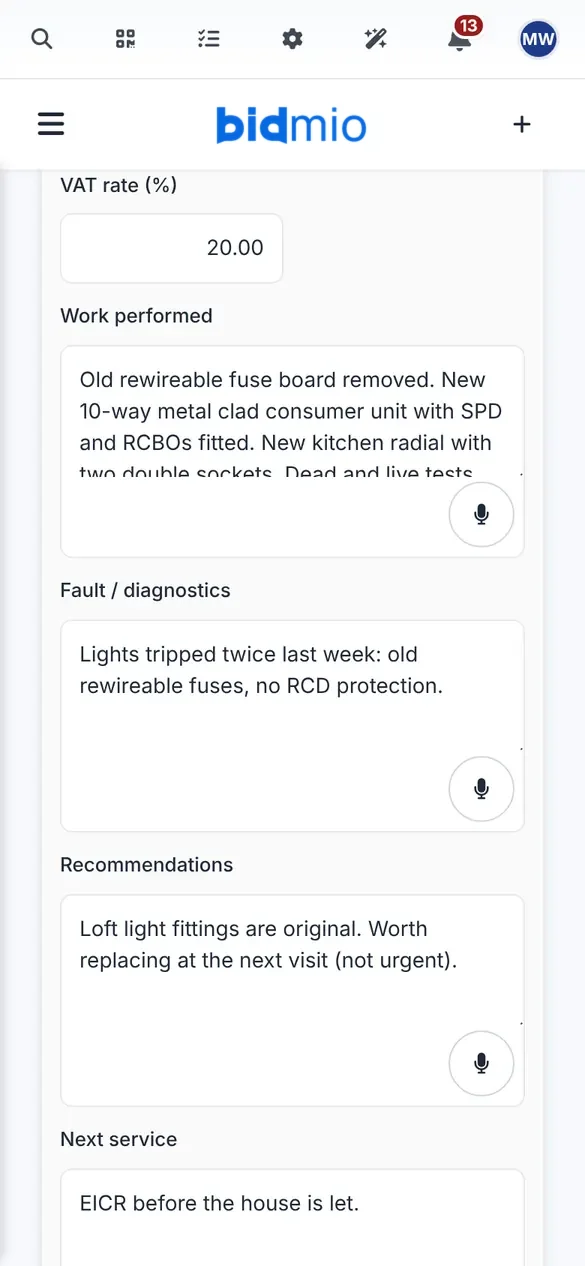
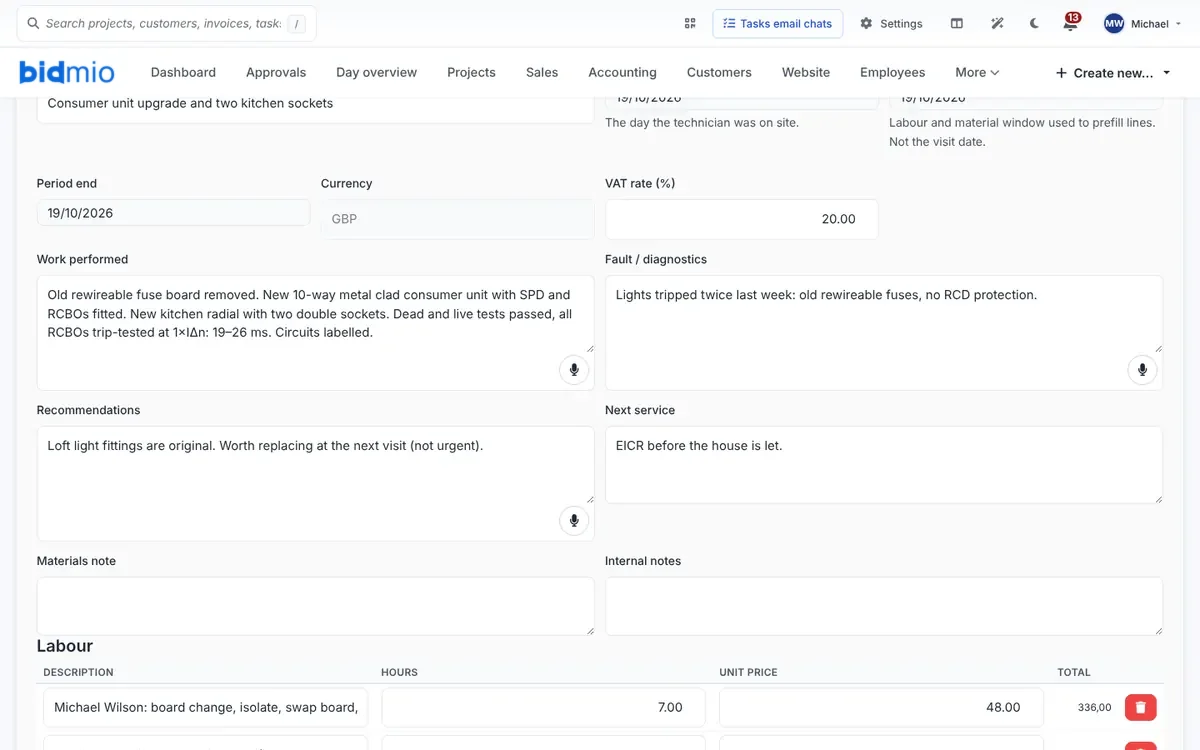
Michael taps the microphone and says what was done: supply isolated, old fuse board out, new 10-way consumer unit in, kitchen radial run, dead and live tests passed, circuits labelled. Bidmio writes it out, he checks the text and saves seven hours to Sarah's job. The before and after photos of the board go on the job too, not into his camera roll.
Start and finish time turn into hours by themselves
The apprentice logs hours on the same job
Hours can be saved without signal and sent later
SoloProfessional
A real Bidmio screen with demo data.
6
7:20 that morning, the wholesaler · Materials
Wholesaler receipts on the job, not in the van door
The RCBO board, the twin and earth and the back boxes were picked up at the counter. Michael photographs the receipt in the Workzone and puts it against Sarah's job. If the wholesaler emails its invoices, they arrive in Bidmio, the details are read out of the document and they wait for his approval.
Cost price and selling price kept apart
Van stock and booking parts to a job on the Professional plan
Staff outlays submitted from the phone for repayment
SoloProfessional
A real Bidmio screen with demo data.
7
15:20 · Job sheet
A job sheet with the test notes, ready to sign on site
Before he packs up, Michael fills in the job sheet on his phone: what was done, the RCBO trip times, what Sarah reported, a note on the loft lights, and the labour and parts at the quoted prices. Then Sarah signs on his phone and so does he, or she gets a link to sign by email, and the signed PDF goes to her. Your Electrical Installation Certificate still comes from your scheme's certificate software; you attach its PDF to the same job.
Customer and electrician signatures with date and time
A job sheet turns into an invoice with one button
Photos and the certificate PDF stay with the job
SoloProfessional
A real Bidmio screen with demo data.
8
16:30 · Invoice
An electrician's invoice built from the accepted quote
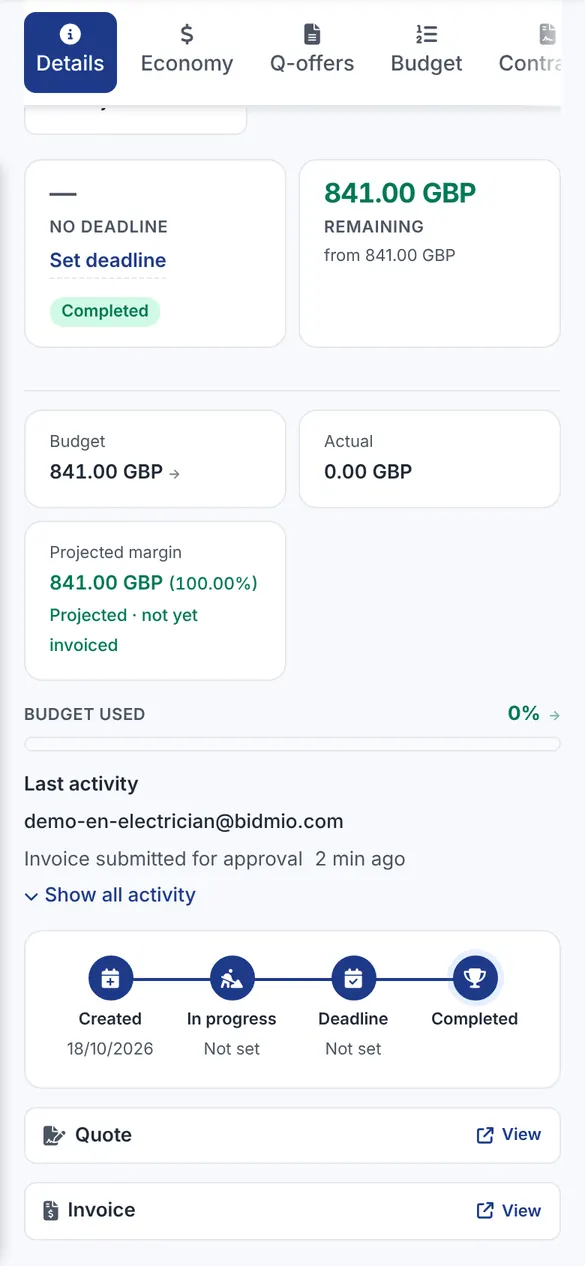
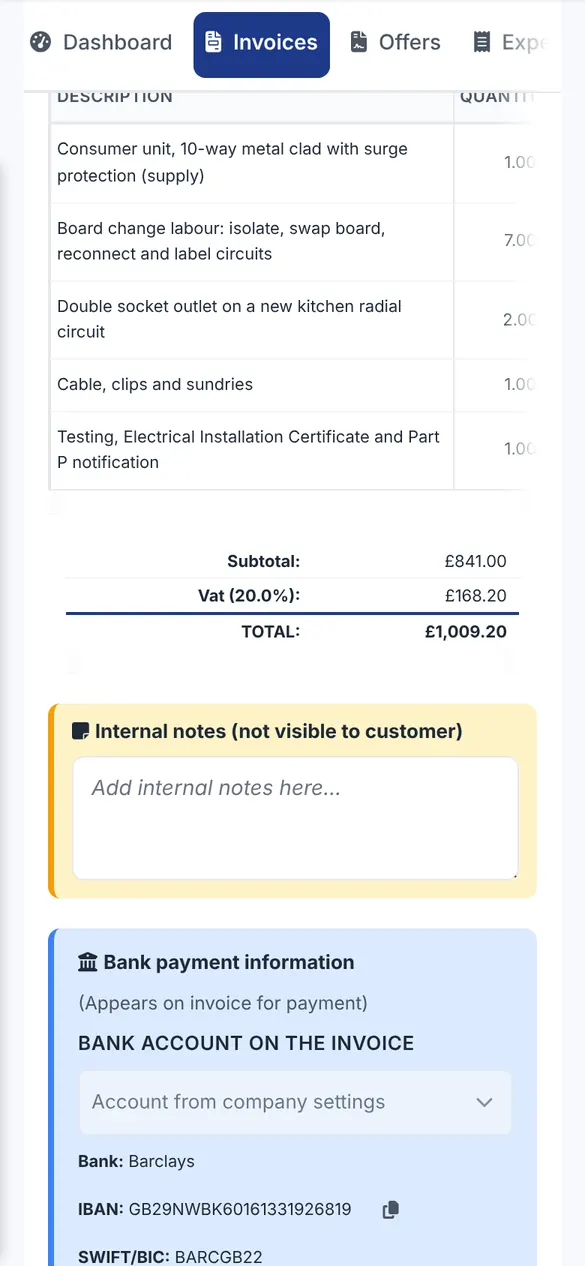
The lines from the quote are already there, so the invoice is ready in a couple of minutes: same five lines, same £1,009.20. Your bank name, IBAN and payment terms print on it, and it goes to Sarah by email as a PDF. A bigger job can be billed in stages, with a deposit for materials first.
Deposit, stage and final invoices on the same job
Credit notes instead of editing an issued invoice
Repeat invoices for maintenance contracts
SoloProfessional
A real Bidmio screen with demo data.
9
Thursday · Payment
The bank payment is matched to the invoice
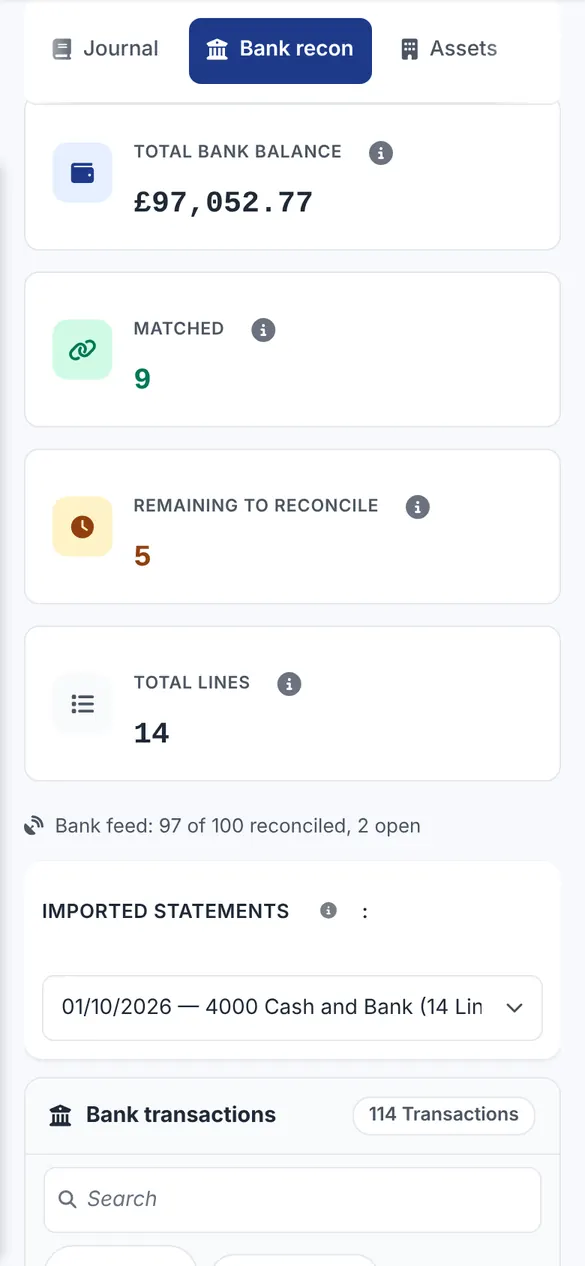
Sarah pays by bank transfer. Michael imports the bank statement, and Bidmio suggests which incoming payment belongs to which invoice by number and amount; nothing is matched until he confirms it. A cash payment or a part payment can still be recorded by hand on the invoice, and receivables show what is still open and what is overdue, so chasing is a list, not a guess.
Bank statement import with suggested matches
Payments can still be recorded by hand on the invoice
Open and overdue invoices on one screen
SoloProfessional
A real Bidmio screen with demo data.
10
Years later · Next date
Inspection due dates you don't have to remember
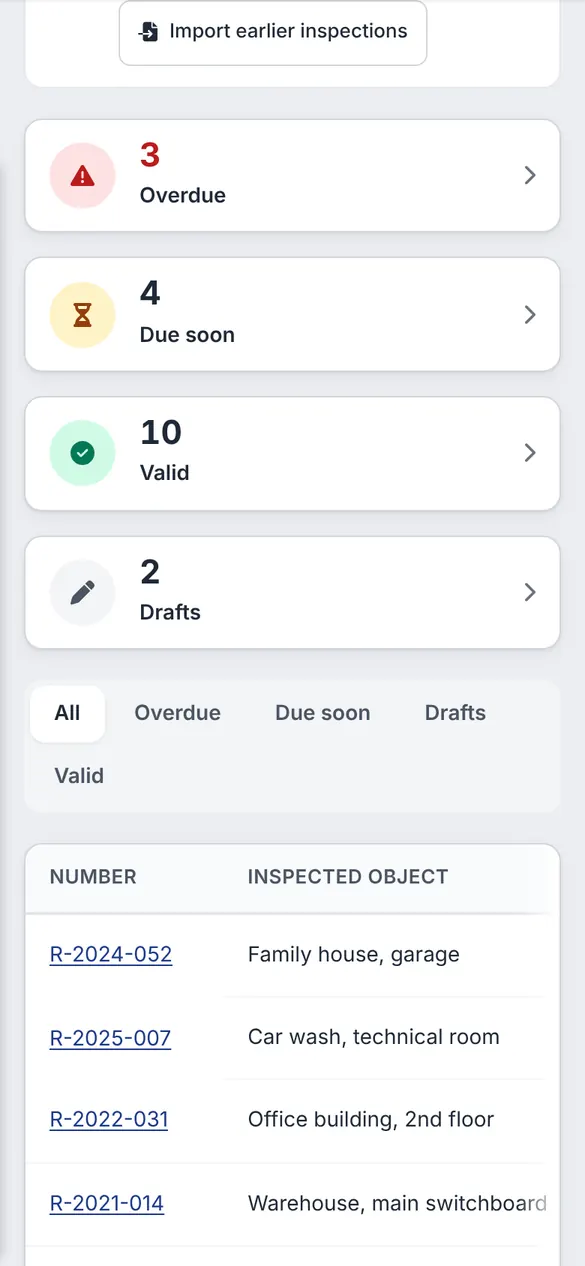
Sarah lets the house out a few years later and needs an EICR. The inspection register shows every installation you look after, which ones are overdue and which fall due in the next 60 days, and Bidmio can email the customer before the date. When she rings, the old job is still there with the photos of the board, so you know exactly what was fitted.
Import your existing list of due dates from a spreadsheet
A comeback is a new short job; the old invoice stays as it was
Professional
A real Bidmio screen with demo data.
Why bother
The board's in. The money isn't.
Most sparks don't lose money on the job itself. They lose it at the kitchen table at nine at night: the apprentice's hours nobody wrote down, the RCBOs left on a wholesaler receipt, the extra socket the customer asked for on the day.
Today
A price sent by text as one round number
Photos of boards mixed in with family photos
Hours in a notebook, receipts in the van door
EICR dates in your head or a paper diary
Invoices typed again in a separate program
With Bidmio
An itemised quote the customer accepts with one tap
Photos, hours and materials kept on the job
Hours spoken into the phone, yours and the apprentice's
A register that shows which inspections fall due
The invoice built from lines you already have
Free checks · 2 minutes
Check your business as an electrician
Run your own numbers: what to charge per hour, whether your quote makes money, what an employee costs and what your van costs per hour.
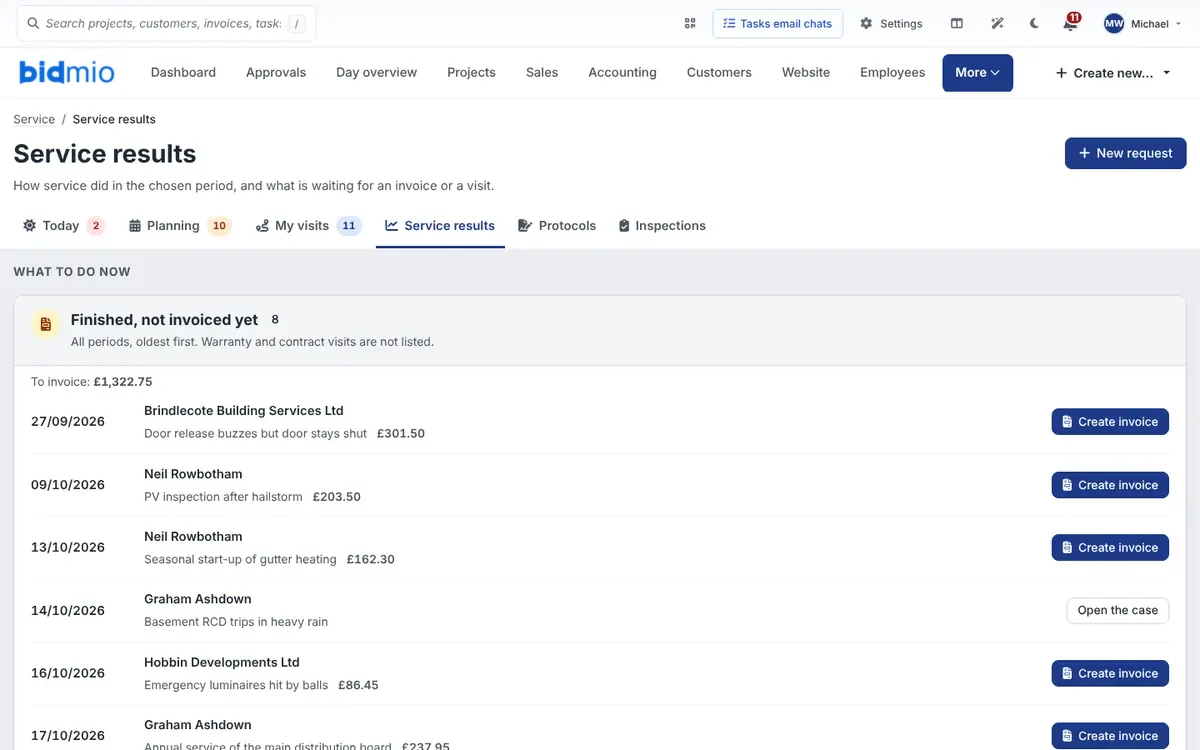
A list of completed visits that still have no invoice, with the amount waiting to be billed. You create the invoice straight from the list, so finished work doesn't sit there unpaid because the paperwork never happened.
app.bidmio.com
In detail
What else Bidmio does for electricians
The ten steps above are one board change. Bidmio doesn't stop at the invoice: the same app keeps your van stock, your apprentice's hours, your landlord customers and your subcontract work in order. And when two people become ten, you change your plan, not your software.
Part P, BS 7671 certificates and where Bidmio fits
A new circuit, a consumer unit replacement, or adding to or altering a circuit in a special location such as the zone around a bath or shower is notifiable under Part P of the Building Regulations in England and Wales. If you are registered with a competent person scheme such as NICEIC, NAPIT or ELECSA, you self-certify and the scheme tells building control; the homeowner then gets a compliance certificate. Your Electrical Installation Certificate, Minor Works certificate or EICR is written to BS 7671 in the certificate software your scheme gives you.
Bidmio does not replace that software and does not notify anyone for you. What it does is keep everything around the certificate in one place: the quote that priced the testing, the hours, the photos of the board before and after, the signed job sheet and the certificate PDF you attach to the job. When a customer, a letting agent or your assessor asks for something, it is on the job, not in an email from two years ago.
Price testing and certification as its own quote line
Attach the EIC, Minor Works or EICR PDF to the job
Photos of the board kept with the date they were taken
Board schedules, circuit charts and labels
For every board at a customer's address you keep a schedule under Switchboards: the rating plate, the supply (earthing arrangement, U0, Ze and fault current), RCDs, RCBOs, the main switch, surge protection and every final circuit with its breaker, cable, length and installation method. The board belongs to the customer's site, not to one job, so the schedule stays with it after the next alteration. You can also start one straight from a job.
For each circuit Bidmio works out the voltage drop against its limit (3 % for lighting, 5 % for the rest), the earth fault loop impedance against the breaker's maximum, the smallest fault current, whether the breaker can break the fault current at the board, the cable's current-carrying capacity and the load on each phase. The formulas follow HD 60364, the European standard that BS 7671 is built on. A warning never blocks issuing: you write a reason, and it is locked with the results. These are checks on your design, not a BS 7671 certificate.
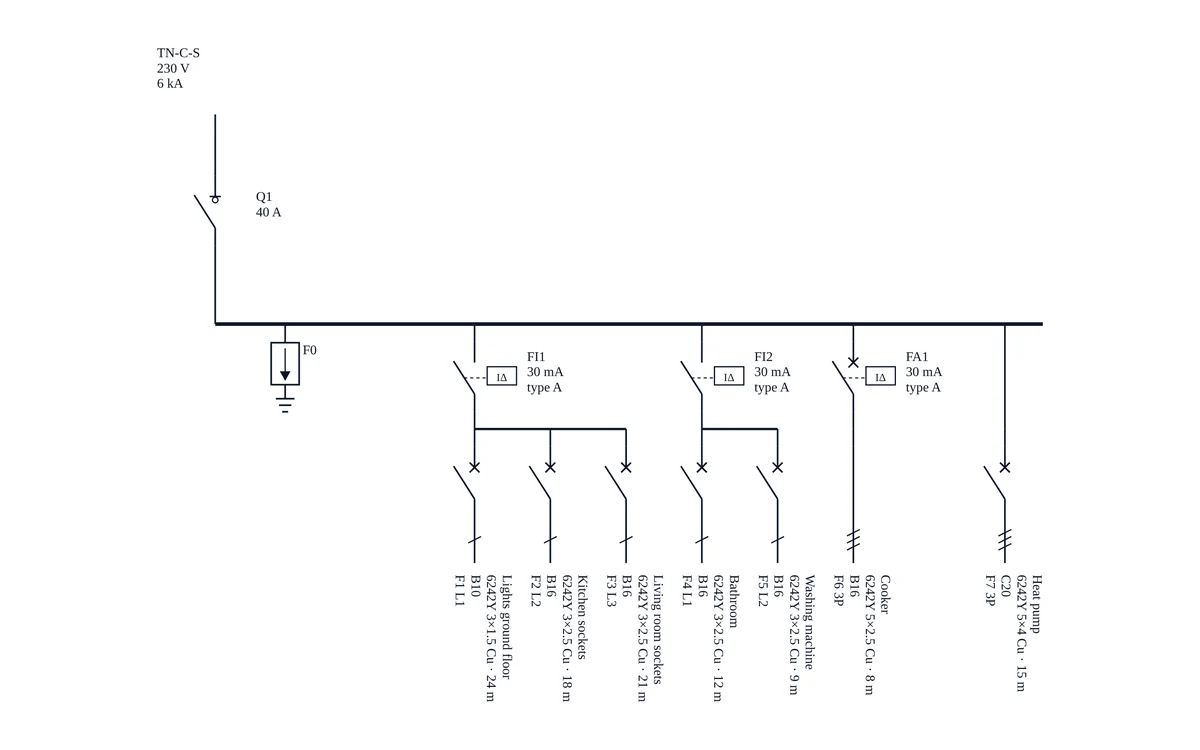
You don't have to retype circuits. A list from Excel or another program uploads as CSV or Excel, and Bidmio checks every line before it adds anything. A paper chart from the board door or the labels on the breakers you simply photograph: AI reads it, highlights the cells it is unsure of and adds only the lines you confirm to the draft (the read uses AI credits). On site you edit circuits on your phone on the On site page, even without signal, and the changes are sent when the signal is back. From the issued version Bidmio draws a single-line diagram with IEC 60617 symbols and prints it on landscape A3. You set the order of devices and circuits in the diagram with arrows in the draft. A sub-board is linked to the circuit that feeds it, and the main board's page lists every sub-board fed from it.
An electrician whose licence is recorded on their HR card issues the schedule. It gets a number such as RZ-2026-0001, the issuer's name and a fingerprint of its content, so nobody can quietly change it. A change is a new version that you can compare with the last one: added, removed and changed circuits. The issued version prints on landscape A4 for the inside of the board door, signed with your company certificate if you have uploaded one, with a QR code that tells whether the paper is still current. A label sheet gives the board label, whose QR code always opens the current version, and DIN rail strips in 17.5 mm modules. Switchboards are on the Professional plan.
Circuit schedule for each board, with versions and a comparison
Voltage drop, loop impedance, fault current and phase load
Landscape A4 for the board door with a QR code
Board label and DIN rail strips
Import circuits from Excel or CSV, every line checked
Circuit chart read from a photo with AI
Edit circuits on your phone, even without signal
Single-line diagram with IEC 60617 symbols on A3
Sub-boards linked to the circuit that feeds them
app.bidmio.com
Landlords, letting agents and EICR due dates
Private landlords in England need an EICR at least every five years. Where the report calls for remedial or further investigative work, it has to be done within 28 days or the shorter period the report gives; C3 recommendations are not mandatory. For an electrician that means a steady list of dates, if somebody keeps it. The inspection register in Bidmio shows each installation you look after with its last and next inspection date, split into overdue, due within 60 days and valid.
Moving from a spreadsheet or a paper diary is one upload: enter one installation per line with its last inspection and next due date, and Bidmio checks every line before it records anything. From then on the customer can get an email before the next date comes round, and the visit can be planned straight from the register. A letting agent with twenty properties is one customer with a job for each address.
Overdue and due soon at a glance (Professional)
Reminder emails to the customer before the date
Earlier inspections imported from CSV or Excel
Repeat invoices for agents on a maintenance contract
Deposits, stage payments and getting paid
Most domestic customers pay on completion by bank transfer, but a rewire or an EV charger with a new supply often needs a deposit for materials first. In Bidmio a deposit, a stage invoice and the final invoice all sit on the same job, so you always see how much of the quote has been billed and how much has been paid.
If you agree a job in the customer's home, the Consumer Contracts Regulations usually give them 14 days to cancel, and you should only start inside that time if they expressly ask you to, on a durable medium such as an email or a signed request. Keep the customer's own email, or the message they send through the quote link, on the job; a note you type yourself is not enough. Once the invoice is out, receivables show what is open and what is overdue, and you can set up rules that email a polite follow-up when a quote gets no answer after a number of days, and a thank-you once an invoice is marked paid.
Deposit, stage and final invoices on one job
Your bank details and payment terms on every invoice
Follow-up and thank-you email rules you switch on, with your own templates
Credit notes instead of changing an issued invoice
Working for builders and main contractors
Plenty of electricians spend half the year on someone else's site. If a builder or main contractor who uses Bidmio invites you to their job, you log your hours and materials there free of charge, without a subscription of your own. Their site manager sees your progress without phoning you, and you see their drawings and tasks.
Before the plasterboard goes up, photograph the first fix and send a numbered photo report as a PDF with your logo. If the site chat is busy with people who write in other languages, each message can be read in English while the original is kept. Your JIB or ECS card, RAMS and CIS paperwork still sit with you and the contractor, outside Bidmio.
Free access as an invited subcontractor
Photo report PDF of first fix and handover
Job chat with translation of each message
Van stock, wholesaler invoices and purchase orders
An electrician's van is a small shop: RCBOs, glands, back boxes, reels of cable. With the Professional plan each van is a stock location, parts are booked out to the job they went into, and you set a minimum for the things you always run out of. When a van drops below it, Bidmio suggests what to reorder, and a purchase order can go to the wholesaler after approval.
Supplier invoices can be emailed straight to your Bidmio inbox. The supplier, number, amount and VAT are read out of the document, the job is suggested and you approve it; nothing is booked without your say. A stock count once a quarter shows what really is in the vans.
Each van as a stock location with minimums (Professional)
Supplier invoices by email, approved before booking
Purchase orders and stock counts (Professional)
Apprentices, vans, tools and the office
Your apprentice and electricians get the Workzone on their phones: today's jobs, hours, photos, receipts and holiday requests. When someone is near a site the phone can suggest a work log for them to confirm, and hours logged in a basement with no signal are sent when the signal comes back. Overtime and holidays are on one screen for you.
With the Professional plan you keep a log of journeys and vehicles, with mileage worked out from the addresses and a monthly summary for whoever does your books. With Developer, test instruments and power tools get a QR label, so you know which multifunction tester the apprentice has and when it is due for calibration. Every plan also gives you a website template for electricians and an enquiry form that drops new leads into Bidmio.
A spoken work report records the whole day in one go. In the Work zone, or from the job's options menu, you record up to three minutes: which job, who worked how long, what was done and what material went in. If you would rather not talk, type it. Bidmio turns it into hours, material from the van, from the price list or as a one-off item, and a site diary note. You check every line, and nothing reaches the job until you tap Save to project. Whoever may create invoices then taps Create invoice draft on the saved report and gets a draft partial invoice with exactly those hours and that material; nothing is issued or sent. Reports still without a draft wait for the office on the invoice list under Spoken reports. It needs AI switched on and uses AI credits.
Workzone for staff, including holiday requests
Work logs suggested by location and saved offline
Vehicles and mileage log (Professional)
Tools and test instruments with QR labels (Developer)
Website and enquiry forms on every plan
Several companies under one login (Professional up to 5, Developer up to 10)
Spoken work report: hours, material and a diary note from one recording, then an invoice draft
What Bidmio does not do for electricians
We would rather tell you now than after you have moved your customers over. Bidmio does not write BS 7671 certificates: your EIC, Minor Works and EICR forms still come from your scheme's software, and Part P notifications still go through your scheme. It does not file anything with HMRC. There is no Making Tax Digital submission, no CIS deductions or monthly CIS returns and no UK VAT return.
Bidmio does not connect to Xero, QuickBooks or Sage. If your accountant works in one of those, keep it: export your invoices and expenses lists to Excel and send them over. Invoices in pounds carry your bank details but no payment QR code and no card payment link, and UK bank accounts come in through a statement import rather than a live bank feed. UK e-invoicing through Peppol is not offered.
No EIC, Minor Works or EICR forms and no Part P notifications
No Making Tax Digital, CIS returns or UK VAT return
No link to Xero, QuickBooks or Sage, only Excel export
No card payments or payment QR on invoices in pounds
Typical work
Electrical software for the work you actually do
From a single fault call-out to a block of flats with a dozen boards.
Fault finding and call-outs
Call-out charge, hours and parts as three lines. Invoice the same afternoon, while the customer still remembers why they rang.
Rewires
First fix this week, second fix after the plasterer. Bill the first fix as a stage and the rest when the house is finished.
Flats and landlords
One landlord or letting agent, a job for every flat. You can see which address is paid and which is still open.
EV chargers and solar PV
A fixed price for the install, hours on the roof or the drive, and the parts from the receipt. Photos of the isolator and inverter for the next service.
EICRs and periodic work
Due dates in one register, reminders to the customer and repeat invoices for maintenance contracts.
Comebacks
The old job with its photos shows whether it was your work. The fix is a new short job, so the original invoice stays untouched.
Switching over
What you can stop using
One app instead of a handful. Bring your customers and your price list across, and we'll help you on a call when you switch.
Plans in euros, your invoices in poundsBidmio plans are priced and billed in euros, so your card or bank converts the monthly amount to pounds. Everything your electrical business sends to customers, quotes and invoices included, is in pounds with UK VAT.
Your accountant keeps the booksInvite your accountant as an external user for the companies you choose and remove the access in one click. They see the invoices, receipts and bank matches, or you send a CSV export. Bidmio does not file with HMRC and does not replace Xero, QuickBooks or Sage.
Can Bidmio produce my EIC, Minor Works certificate or EICR?+
No. Those BS 7671 forms still come from the certificate software of your competent person scheme, and Part P notifications still go through the scheme. In Bidmio you price the testing, attach the certificate PDF to the job and keep the next inspection date in the register.
How do I quote for a board change or a rewire?+
Line by line from your own price list: call-out, hours, the consumer unit, sockets, cable and sundries, testing and certification. You can dictate the text or let the AI assistant draft a quote from a photo, and you check it before anything is sent. When the customer accepts, the quote becomes the job.
Does Bidmio handle VAT, Making Tax Digital and CIS?+
If you are VAT-registered, quotes and invoices carry VAT on each line, at 20 %, 5 % or 0 % as you set it, in pounds. If you are not registered, you leave VAT off. Which rate applies to a job, and when you have to register, is a question for your accountant. Bidmio does not submit anything to HMRC: there is no Making Tax Digital filing, no CIS deductions or returns and no UK VAT return.
Do I have to type everything? I don't have time on site.+
No. Hours, notes and quote text can be spoken into the phone. Bidmio turns the recording into text and you check it before saving. Staff can log hours without signal and they are sent when the phone is back online.
Can I keep using Xero, QuickBooks or my accountant?+
Yes. Bidmio has no direct link to Xero, QuickBooks or Sage, so your bookkeeping stays where it is. Export your invoices and expenses lists to Excel for your accountant.
Will the customer see my trade prices?+
No. The customer sees the quote, the job sheet and the invoice. What you paid at the wholesaler, your margin and your internal notes stay with you.
Can I look around before I sign up?+
Yes. The demo of an electrical firm opens without signing up, with quotes, visits and invoices in pounds. When you want to try it on your own jobs, you get First month 90% off.
Can I keep a circuit chart for each board?+
Yes, on Professional. Under Switchboards you enter the supply, protective devices and circuits, Bidmio checks voltage drop, loop impedance and phase load, and the issued version prints with a QR code and DIN rail strips. It is a schedule for the board door, not an EIC or EICR.