
Bidmio on your phone: iOS, Android or PWA
Download Bidmio from the App Store or Google Play, or install it straight from the browser as a PWA. All three use the same account and data. Android adds native background GPS. Offline is a narrow queue for timesheets and expenses — not a complete offline ERP.
iOS app in the App Store
Android app on Google Play
PWA: browser → home screen
Offline queue for timesheets and expenses
Mobile app in Bidmio
Bidmio in your pocket, right on site.
Workzone, hours, site notes, expenses and QR check-in on your phone.
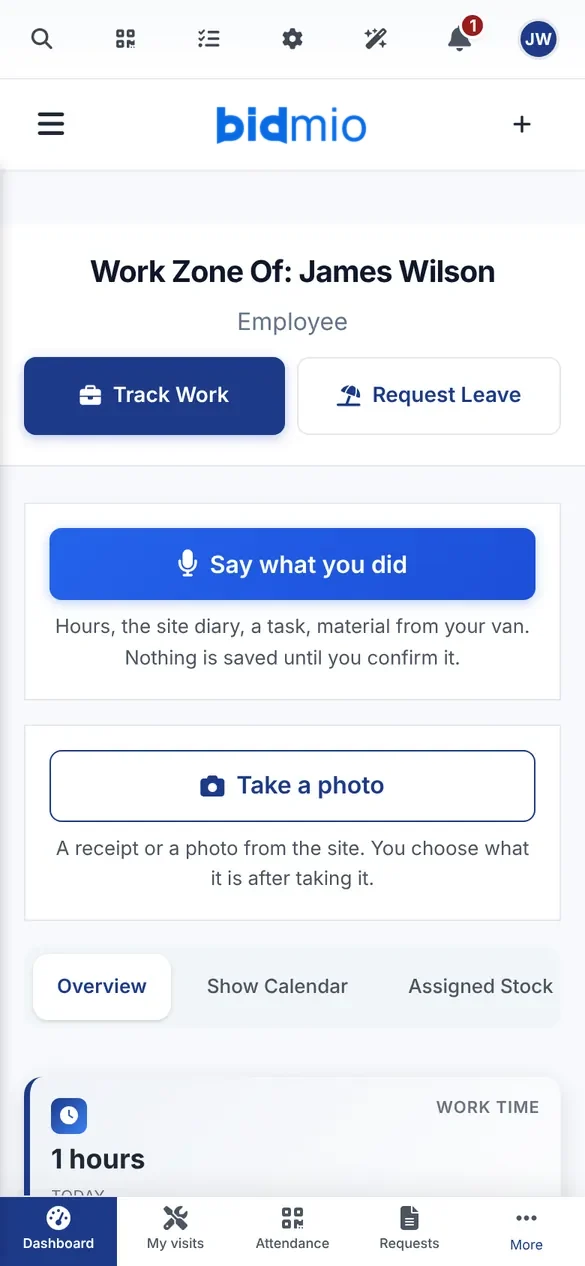
Workzone
An employee's hours, flex time, leave and expenses in one place.
How it works
Simple process from setup to results
Choose your platform
iPhone, Android or any browser.
Get the app
App Store or Google Play — or install the PWA from the browser.
Sign in
The same Bidmio account on every device.
Work on site
Hours, photos and expenses; offline they wait in the queue.
Comprehensive features
Everything you need for successful management
Installable PWA
Browser → home-screen icon.
Hours and photos in mobile web
Daily site work in the PWA.
Android app on Google Play
Native background GPS; the APK is also available for direct download.
Frequently Asked Questions about Bidmio
Get answers to common questions about Bidmio
Everything about the project management solution
Complete guide to features, benefits and best practices for construction companies. Discover how a revolutionary solution can transform your projects.
iPhone and iPad: download Bidmio from the App Store.
Android: download Bidmio from Google Play, with native background GPS for attendance. Phones without Google Play can install the APK directly.
Any device: open Bidmio in the browser and add it to the home screen as a PWA — no app store needed.
Learn More
Explore our in-depth articles to learn more about this topic
AI Agent for Contractors and Tradespeople 2026
What an AI agent, a chatbot and AI automation mean in construction. 8 jobs an AI agent handles today, what it doesn't do yet and how to start in 30 days.
Read articleA quoting app is not enough. How to spot a company system | 2026
New AI apps for tradespeople appear every month. The test: which tools do you turn off after go-live? The difference between a single-task app and a company system.
Read articleHow to Digitalize Your Construction Company in 90 Days | Complete Guide 2026
How to digitalise a construction firm in 90 days. McKinsey, Eurostat and the EC on productivity and ERP. A practical plan for firms with 5–50 people.
Read articleRelated modules
Expand the functionality of your construction company with these complementary modules
Start digitalizing your construction business today
Start with the first month at 90% off or book a call.