
Machine desk: hours, utilisation, profit and service
The card shows how much the machine worked this month, whether it needs attention, and the profit. You plan it on a calendar, and renting it out creates a draft invoice. The module is on Developer — not Solo and not Professional.
Hours, days and utilisation
Profit for managers
Plan and service intervals
Hire and a machine-day on the invoice
Equipment management in Bidmio
Machines: hours, utilisation, profit and service.
Machine overview, machine card, planning, maintenance and tool catalogue.
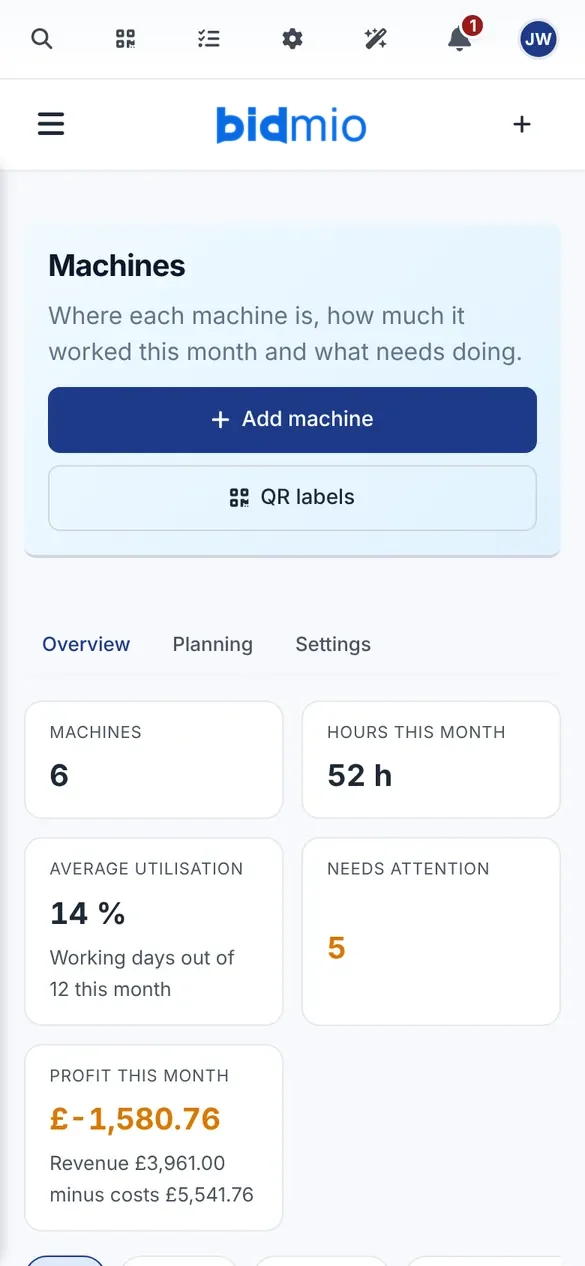
Machine overview
Hours, utilisation and profit per machine this month.
How it works
Simple process from setup to results
Open the overview
Hours, days, utilisation and what is due for service.
Plan the day
A booking calendar. The real cost stays on the machine-day.
Service and hire
An interval by hours or month. Rent in and rent out.
Put the day on the invoice
The machine-day goes on the job and into a draft invoice.
Comprehensive features
Everything you need for successful management
Month overview
Hours, days and state on one card.
Utilisation
How many working days the machine actually ran.
Profit
For managers: the month's cost against what the machine earned.
Frequently Asked Questions about Bidmio
Get answers to common questions about Bidmio
Everything about the project management solution
Complete guide to features, benefits and best practices for construction companies. Discover how a revolutionary solution can transform your projects.
Each machine has a card for the month: hours, days, utilisation and what needs attention. Managers see profit.
Hand tools stay in the catalogue: checkout, QR and a service record.
Learn More
Explore our in-depth articles to learn more about this topic
How to Digitalize Your Construction Company in 90 Days | Complete Guide 2026
How to digitalise a construction firm in 90 days. McKinsey, Eurostat and the EC on productivity and ERP. A practical plan for firms with 5–50 people.
Read articleMaterial Registration for Craftsmen | Get Everything on the Invoice
Forgotten materials cost money. With Bidmio you register materials directly on the project – digitally, easily and automatically. Save time and get control of finances.
Read articleOne camera opens a tool, clocks people in, fills a bank payment and opens a form. A map of QR codes in Bidmio, without RFID, NFC or card payment.
Read articleRelated modules
Expand the functionality of your construction company with these complementary modules
Start digitalizing your construction business today
Start with the first month at 90% off or book a call.